


Asus NUC 16 Pro Review: A Copilot+ Mini PC Built for Dual-Network Desks
The Asus NUC 16 Pro in this configuration pairs an Intel Core Ultra 7 356H with 16 GB of dual-channel DDR5-5600 and a 512 GB PCIe 4.0 NVMe drive, so it arrives ready to run Windows 11 Pro out of the box while leaving room to grow to 128 GB of memory. Its real differentiator is connectivity: two 2.5G Ethernet ports for network redundancy, Wi-Fi 7, Bluetooth 6.0, two Thunderbolt 4 ports with DisplayPort 2.1 and two HDMI 2.1 outputs. The trade-off is audio, since this chassis offers no headphone jack, no speakers and no microphone, so any sound has to travel over HDMI, DisplayPort or USB. For a compact business or edge-AI desktop that needs wired network reliability and multi-display output, it is a strong fit, and the three-year warranty backs it up.
- Business and office desktops
- Multi-display workstations
- Edge AI and local inference
- Wired-network reliability
Pros
- Dual 2.5G Ethernet ports for network redundancy
- Two Thunderbolt 4 ports with DisplayPort 2.1 output
- Two HDMI 2.1 outputs for multi-display setups
- Wi-Fi 7 and Bluetooth 6.0 wireless
- Memory upgradeable to 128 GB via dual-channel SODIMM
- On-device NPU acceleration for local AI workloads
- Three-year warranty
- VESA mount included, plus a Kensington lock slot
Cons
- No 3.5 mm stereo jack, no speakers and no microphone
- No SD card slot
- No fingerprint sensor
- External 150W power adapter instead of a built-in supply
- Integrated Intel Graphics rather than the Arc tier of the higher SKUs
Who is the Asus NUC 16 Pro for?
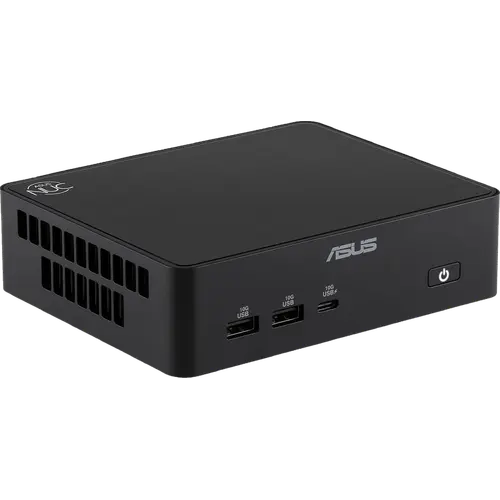
This is a compact desktop aimed at people who want full-size productivity in a 144 x 117 x 42 mm box. The Core Ultra 7 356H handles everyday office work, development and content tasks, while the integrated NPU adds on-device AI acceleration for Windows 11 Pro features that run locally instead of in the cloud. Because it ships as a full system with 16 GB of memory and a 512 GB SSD already installed, it suits buyers who would rather deploy a machine than build one, and the VESA mount in the box means it can disappear behind a monitor or under a desk.
What stands out on paper
Connectivity is where this NUC separates itself from typical mini PCs. Two 2.5G Ethernet ports allow network redundancy or segmentation, which matters for edge deployments and small-office servers, and Wi-Fi 7 with Bluetooth 6.0 covers the wireless side. Video output is unusually generous: two HDMI 2.1 ports plus two Thunderbolt 4 ports carrying DisplayPort 2.1, so a multi-monitor setup does not need adapters, and Thunderbolt also doubles as fast external storage and docking. Memory is upgradeable to 128 GB across dual-channel SODIMM slots, and storage uses a standard M.2 2280 PCIe 4.0 drive, so both are serviceable rather than soldered. A Kensington lock slot addresses physical security for machines left on open desks.
What to know before you buy
There is no analog audio on this chassis: no 3.5 mm stereo jack, no built-in speakers and no microphone, so headphones or desktop speakers need an HDMI or DisplayPort display, a USB audio device, or Bluetooth. There is also no SD card slot, which rules out direct camera offloads, and no fingerprint sensor for biometric sign-in. Power comes from an external 150W adapter rather than an internal supply, so the desk gains a power brick and the machine is less tidy to move than a mini PC with a built-in PSU. Finally, the integrated graphics here are the four Xe-core Intel Graphics tier rather than the Arc configuration found on the higher Core Ultra X-series versions of this same chassis, so demanding GPU work is not this SKU's strength.
Is the Asus NUC 16 Pro worth it?
As a business-class mini PC it earns its place through I/O and serviceability rather than raw graphics. The dual 2.5G LAN, dual Thunderbolt 4 and dual HDMI 2.1 combination is rare at this size, the DDR5 and M.2 slots keep the machine useful past its first upgrade cycle, and Windows 11 Pro plus a three-year warranty make it straightforward to deploy in a fleet. Buyers who need stronger integrated graphics should look at the Core Ultra X variants of the same chassis, and anyone who wants analog audio or an internal power supply should shop elsewhere in the category.
Frequently asked questions
Does the Asus NUC 16 Pro come with Windows installed?
Yes. This is the full-system configuration, so it ships with Windows 11 Pro preinstalled along with 16 GB of DDR5 memory and a 512 GB M.2 NVMe SSD, unlike the barebone kit versions of the same chassis.
How much RAM can the Asus NUC 16 Pro take?
It supports up to 128 GB of DDR5 memory across its dual-channel SODIMM slots. It arrives with 16 GB running at 5600 MT/s, so there is substantial upgrade headroom.
How many monitors can it drive?
It has two HDMI 2.1 ports and two Thunderbolt 4 ports that carry DisplayPort 2.1, so multiple displays can be connected directly without adapters or docks.
Does it have a headphone jack?
No. This chassis has no 3.5 mm stereo jack, no internal speakers and no microphone. Audio has to go out over HDMI, DisplayPort, USB or Bluetooth.
Does the Asus NUC 16 Pro have an NPU for AI?
Yes. The Intel Core Ultra 7 356H includes an integrated NPU for AI acceleration, which is what qualifies the system for Copilot+ features that run on the device rather than in the cloud.
What networking does it include?
Two 2.5G Ethernet ports plus Wi-Fi 7 and Bluetooth 6.0. The dual wired ports allow redundant or segmented network connections, which is useful for edge and small-server roles.