

Asus NUC 16 Pro (Ultra X7 32GB + 1TB) Review: The Arc Configuration That Trades Memory Slots for Speed
This is the graphics-forward configuration of the NUC 16 Pro: an Intel Core Ultra X7 358H paired with Intel Arc B390 graphics across 12 Xe-cores and an Intel NPU 5, rather than the four-core integrated graphics of the Core Ultra 7 versions of the same chassis. The memory is the defining trade-off. You get 32 GB of LPDDR5x running at 9600 MT/s, which is considerably faster than the SODIMM configurations, but it is soldered to the board, so the only upgrade path is buying a higher-capacity SKU up to the 96 GB this processor tier supports. Everything else is the business specification the chassis is known for: dual 2.5G Ethernet, Wi-Fi 7, Bluetooth 6.0, two Thunderbolt 4 ports with DisplayPort 2.1, two HDMI 2.1 outputs, a 1 TB PCIe 4.0 NVMe drive and Windows 11 Pro, backed by a three-year warranty. It is a premium buy that makes sense when the workload leans on the GPU and memory bandwidth, and a poor one if you were counting on adding RAM later.
- Edge AI and local inference
- GPU-accelerated creative work
- Multi-display workstations
- Wired-network reliability
- Space-constrained business desks
Pros
- Intel Arc B390 graphics across 12 Xe-cores
- 32 GB of LPDDR5x running at 9600 MT/s
- Dual 2.5G Ethernet ports for network redundancy
- Two Thunderbolt 4 ports with DisplayPort 2.1 output
- Two HDMI 2.1 outputs for multi-display setups
- Wi-Fi 7 and Bluetooth 6.0 wireless
- 1 TB M.2 2280 PCIe 4.0 NVMe drive, and the slot stays serviceable
- On-device NPU acceleration for local AI workloads
- Three-year warranty, with a VESA mount and Kensington lock slot
Cons
- Memory is soldered and cannot be upgraded after purchase
- No 3.5 mm stereo jack, no speakers and no microphone
- No SD card slot
- No fingerprint sensor
- External 150W power adapter instead of a built-in supply
- No HDMI cable in the box
Who is the Asus NUC 16 Pro (Ultra X7 32GB + 1TB) for?
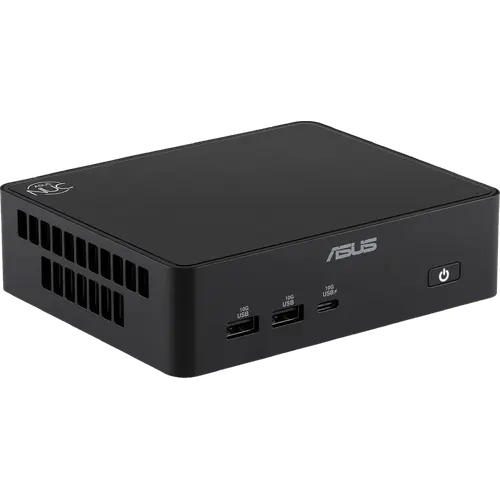
This configuration targets the desk that needs more graphics and memory bandwidth than a typical office mini PC provides, without growing beyond a 144 x 117 x 42 mm box that weighs 750g. The Core Ultra X7 358H drives Intel Arc B390 graphics across 12 Xe-cores, and an Intel NPU 5 handles on-device AI acceleration for the Windows 11 Pro features that run locally rather than in the cloud. Because it ships as a complete system with 32 GB of memory and a 1 TB drive already installed, it suits an organization deploying machines rather than assembling them, and the VESA bracket in the box lets it live behind a monitor or under a desk.
What stands out on paper
Graphics and memory are what separate this SKU from the rest of the family. Intel Arc B390 with 12 Xe-cores is a substantially wider GPU than the integrated graphics on the Core Ultra 7 configurations, and the 32 GB of LPDDR5x runs at 9600 MT/s, a bandwidth advantage that soldered memory buys over socketed modules. Connectivity is unusually generous for the size: two 2.5G Ethernet ports allow redundant or segmented network links, Wi-Fi 7 and Bluetooth 6.0 cover wireless, and video output spans two HDMI 2.1 ports plus two Thunderbolt 4 ports carrying DisplayPort 2.1, so a multi-monitor desk needs no adapters and Thunderbolt doubles as fast external storage and docking. Five USB 3.2 Gen 2 ports, one Type-C and four Type-A, handle peripherals. Storage is a standard M.2 2280 PCIe 4.0 NVMe drive, so that half of the machine stays serviceable, and a Kensington lock slot covers physical security on an open desk. Dual-fan air cooling keeps the thermals in hand under sustained load.
What to know before you buy
The memory is soldered and non-upgradeable. Reaching the 96 GB ceiling this processor tier supports means ordering a different SKU, not opening the case, which is the opposite of how the CSO-DIMM versions of this chassis work. There is also no analog audio anywhere on the unit: no 3.5 mm stereo jack, no built-in speakers and no microphone, so sound has to travel over HDMI, DisplayPort, USB or Bluetooth. There is no SD card slot, ruling out direct camera offloads, and no fingerprint sensor for biometric sign-in. Power comes from an external 150W adapter rather than an internal supply, so the desk gains a power brick and the machine is less tidy to relocate. No HDMI cable is included, so budget for one alongside the VESA bracket that is in the box.
Is the Asus NUC 16 Pro (Ultra X7 32GB + 1TB) worth it?
It earns its premium placement through the GPU, the memory bandwidth and the I/O rather than through flexibility. If the workload is edge inference, GPU-accelerated creative work or anything that benefits from feeding a wide integrated GPU quickly, the Arc B390 and the 9600 MT/s LPDDR5x are exactly what the money buys, and the dual 2.5G LAN plus dual Thunderbolt 4 combination is rare at this size. If the plan was to start modest and add memory in two years, the socketed Core Ultra 5 and 7 configurations of the same chassis are the better purchase, since they reach 128 GB through CSO-DIMM slots. Anyone who needs an analog headphone jack or an internal power supply should look elsewhere in the category entirely.
Frequently asked questions
Can you upgrade the RAM in the Asus NUC 16 Pro Ultra X7?
No. This configuration uses 32 GB of LPDDR5x soldered to the board, so there are no memory slots to open. The Core Ultra X7 tier supports up to 96 GB, but reaching it means buying a higher-capacity SKU rather than adding modules. The Core Ultra 5 and 7 versions of the same chassis use CSO-DIMM slots instead and go to 128 GB.
What graphics does this configuration have?
Intel Arc B390 graphics with 12 Xe-cores, integrated into the Core Ultra X7 358H. That is a wider GPU than the integrated Intel Graphics found on the Core Ultra 7 configurations of the same NUC 16 Pro chassis.
How many monitors can it drive?
It has two HDMI 2.1 ports and two Thunderbolt 4 ports that carry DisplayPort 2.1, so multiple displays connect directly without adapters or a dock.
Does it have a headphone jack?
No. This chassis has no 3.5 mm stereo jack, no internal speakers and no microphone. Audio has to go out over HDMI, DisplayPort, USB or Bluetooth.
Does the Asus NUC 16 Pro have an NPU for AI?
Yes. The Core Ultra X7 358H includes an Intel NPU 5 for AI acceleration, which is what qualifies the system for Copilot+ features that run on the device rather than in the cloud.
What networking does it include?
Two 2.5G Ethernet ports plus Wi-Fi 7 and Bluetooth 6.0. The dual wired ports allow redundant or segmented network connections, which is useful for edge and small-server roles.
Does it come with Windows installed?
Yes. This is the full-system configuration, so it ships with Windows 11 Pro preinstalled alongside the 32 GB of memory and the 1 TB M.2 NVMe SSD, unlike the barebone kit versions of the same chassis.