



Asus ROG NUC 16 RTX 5060 Review: The Entry Configuration of a Three-Litre Gaming Desktop
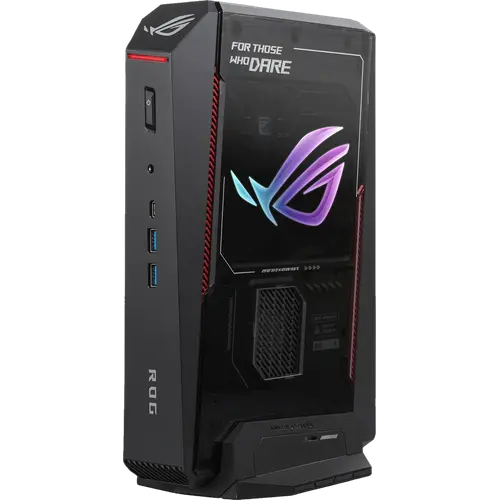
This is the least expensive way into the ROG NUC 16 chassis, and almost nothing structural was removed to get there. It pairs a 20-core Intel Core Ultra 7 270HX Plus with a discrete NVIDIA GeForce RTX 5060 Laptop GPU carrying 8GB of GDDR7, 32GB of dual-channel DDR5-6400 and a 1TB PCIe 4.0 NVMe drive, inside a three-litre body measuring 282 x 190 x 57 mm that can stand upright or lie flat. The cooling, the port array and both upgrade paths are identical to the top configurations of the line: three fans over a dual vapor chamber, two HDMI 2.1 FRL outputs, two DisplayPort 2.1, Thunderbolt 4, Wi-Fi 7, and memory that goes to 128 GB. What separates it from its siblings is the frame buffer and the power envelope, so it is the configuration to pick for high-refresh play at 1080p and 1440p rather than for maximum settings at 4K.
- 1080p and 1440p gaming
- Small-form-factor desk builds
- Multi-display setups
- Living-room gaming
Pros
- Discrete NVIDIA GeForce RTX 5060 Laptop GPU with 8GB of GDDR7
- 20-core Intel Core Ultra 7 270HX Plus with a dedicated Intel AI Boost NPU
- Triple-fan cooling over a dual vapor chamber
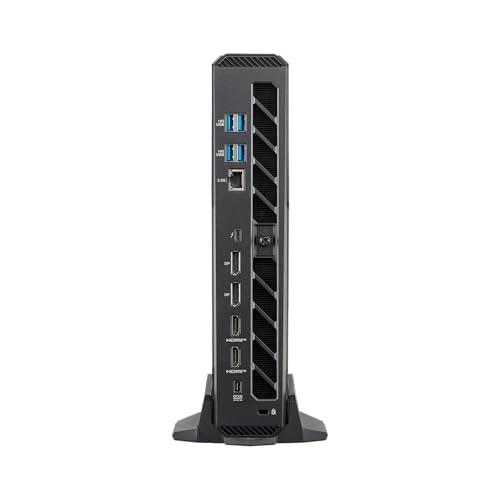
- Five video outputs: two HDMI 2.1 FRL, two DisplayPort 2.1 and Thunderbolt 4
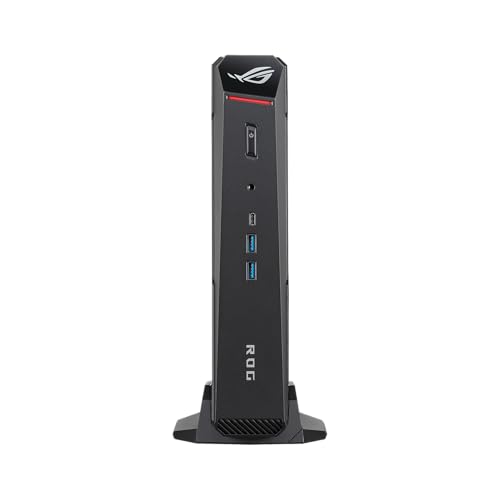
- Seven USB 3.2 Gen 2 ports plus a 3.5 mm combo audio jack
- Dual-channel DDR5-6400 memory upgradeable to 128 GB
- Standard M.2 2280 NVMe PCIe 4.0 storage slot with tool-free access
- Wi-Fi 7, Bluetooth 5.4 and 2.5G Ethernet
- Three-litre chassis that stands upright or lies flat
- Kensington lock slot and a three-year warranty
Cons
- Runs from a 280W external adapter instead of an internal power supply
- 8GB of graphics memory is the smallest frame buffer in the line
- Heavy for a mini PC at over three kilograms
- Only one 2.5G Ethernet port, so no wired redundancy
- No VESA mount and no HDMI cable included
- No SD card slot and no fingerprint sensor
- No built-in speakers or microphone
- Ships with Windows 11 Home rather than Pro
Who is the ROG NUC 16 RTX 5060 for?
This is a gaming machine that happens to be small, not a small PC that happens to game, and it is aimed at the buyer who wants the chassis without paying for the largest GPU in the range. The discrete RTX 5060 Laptop GPU carries 8GB of GDDR7, which is a comfortable budget for high-refresh play at 1080p and 1440p, for GPU-accelerated encoding and for lighter creative work, while the Intel Core Ultra 7 270HX Plus supplies 20 cores on the processor side and brings a dedicated Intel AI Boost NPU alongside it for on-device AI tasks. At three litres it suits a desk, a media cabinet or a rig that travels, and it assumes the owner will trade an internal power supply for the volume that saves. A built-in G-sensor detects whether the machine is standing on its removable stand or lying flat, so it adapts to whatever space it lands in.
What stands out on paper
Thermals are the reason a discrete GPU fits in this volume at all: three cooling fans work over a dual vapor chamber, which is what lets the processor and the graphics hold their clocks in a body under six centimetres thick. Display connectivity is unusually generous for the size, with two HDMI 2.1 FRL ports, two DisplayPort 2.1 outputs and a Thunderbolt 4 Type-C port that also carries DisplayPort 2.1, so several high-refresh monitors connect directly without a dock. There are seven USB 3.2 Gen 2 ports in total, six Type-A and one Type-C, plus a 3.5 mm combo jack for a headset. Networking pairs an Intel Killer Wi-Fi 7 BE1750x card and Bluetooth 5.4 with a Realtek 2.5G Ethernet port. Both upgrade paths stay open and are designed for tool-free access: the dual-channel DDR5-6400 CSO-DIMM memory can be taken to 128 GB, and storage is a standard M.2 2280 NVMe PCIe 4.0 slot rather than a soldered drive. A Kensington lock slot and a three-year warranty round it out.
What to know before you buy
Power and portability are the trade-offs. There is no internal power supply, so the system runs from a 20V, 14A, 280W external adapter and the desk gains a brick beside the chassis. At 3.12 kg this is heavy for a mini PC, and it ships without a VESA mount, so hanging it behind a display is not an option out of the box. The 8GB frame buffer is the smallest in the line, which is what sets the ceiling on texture settings and resolution compared with the 12GB and 16GB configurations of the same chassis. Networking is a single 2.5G Ethernet port, leaving no wired redundancy and no second subnet. There is no SD card slot and no fingerprint sensor, and the chassis carries no internal speakers or microphone, so audio has to come from headphones, powered speakers or the display. No HDMI cable is in the box. The licence is Windows 11 Home rather than Pro, which matters if you need domain join or the management features only the Pro edition carries.
Is the ROG NUC 16 RTX 5060 worth it?
The question at this size is always whether the volume saved is worth the premium, because the same class of GPU inside a tower costs less and upgrades further. What is actually being bought here is density: a discrete RTX 5060 and a 20-core Intel mobile processor that stay cool in roughly three litres, with five video outputs, Thunderbolt 4, Wi-Fi 7 and a three-year warranty behind them. Against the other configurations of this chassis it gives up graphics memory and headroom while keeping the cooling, the ports, the 128 GB memory ceiling and the standard M.2 storage slot intact, and it drops the power envelope from 380W to 280W in the process. For a compact desk rig, a living-room machine or a small workstation where a tower will not fit, it is the configuration that asks the least while giving up the least that matters.
Frequently asked questions
What graphics card does this ROG NUC 16 configuration use?
A discrete NVIDIA GeForce RTX 5060 Laptop GPU with 8GB of GDDR7 memory. The same chassis is also sold with larger GPU tiers, so check the model number to confirm which one a listing is offering.
Which model number is this configuration?
RNUC16JNK7X589AU. That code identifies the Core Ultra 7 270HX Plus build with the RTX 5060, 32 GB of memory and a 1 TB drive, and it is what separates this unit from the other ROG NUC 16 configurations.
How many monitors can it drive?
There are five video outputs: two HDMI 2.1 FRL ports, two DisplayPort 2.1 ports and one Thunderbolt 4 Type-C port that also carries DisplayPort 2.1, so several high-refresh displays can connect directly without a dock.
Can the memory and storage be upgraded?
Yes, and both are designed for tool-free access. It ships with 32 GB of dual-channel DDR5-6400 CSO-DIMM memory and supports up to 128 GB, and storage is a standard M.2 2280 NVMe PCIe 4.0 slot holding a 1 TB drive.
Does it have an internal power supply?
No. Power comes from an external 20V, 14A, 280W adapter, so plan desk or shelf space for the brick in addition to the chassis itself.
What networking and ports does it include?
An Intel Killer Wi-Fi 7 BE1750x card and Bluetooth 5.4 wirelessly, a Realtek 2.5G Ethernet port for wired connections, seven USB 3.2 Gen 2 ports (six Type-A and one Type-C), a Thunderbolt 4 port and a 3.5 mm combo audio jack.