

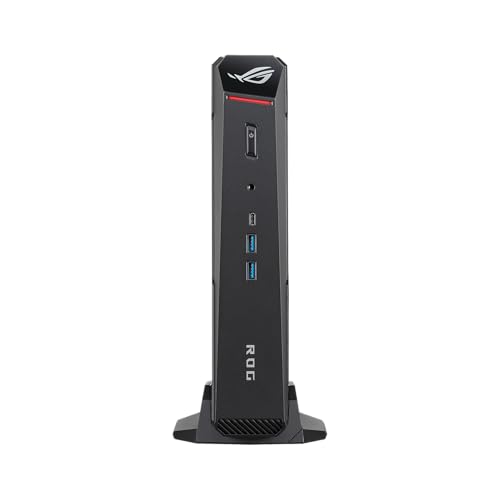



Asus ROG NUC 16 Review: Desktop-Class RTX 5080 Gaming in a 3 Kilogram Box
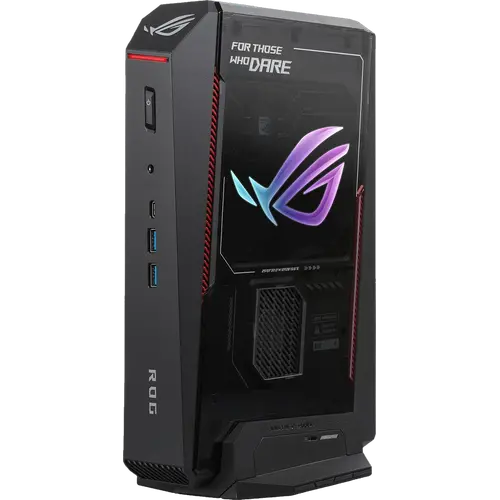
The ROG NUC 16 is the most powerful configuration Asus puts in a small chassis: a 24-core Intel Core Ultra 9 290HX Plus, an NVIDIA GeForce RTX 5080 Laptop GPU with 16GB of GDDR7, 32GB of DDR5-6400 and a 1TB PCIe 4.0 NVMe drive, all in a 282 x 190 x 57 mm body that can stand upright or lie flat. Cooling is the engineering story here, with three fans, a dual vapor chamber covering most of the board and a dedicated SSD heatsink, which is what makes this class of GPU viable at this size. The costs are real: it needs a 380W external power adapter, it weighs over three kilograms, it ships with a single Ethernet port and there is no VESA mount in the box. If you want desktop gaming or GPU-accelerated creative work without a full tower, this is the top of the category, and the price reflects it.
- High-end gaming in small spaces
- GPU-accelerated creative work
- Local AI and rendering workloads
- Multi-display battle stations
Pros
- NVIDIA GeForce RTX 5080 Laptop GPU with 16GB of GDDR7
- 24-core Intel Core Ultra 9 290HX Plus with an integrated NPU
- Triple-fan cooling with a dual vapor chamber and dedicated SSD heatsink
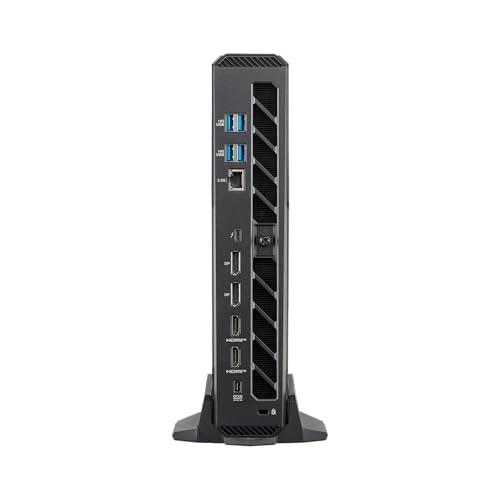
- Five video outputs: two HDMI 2.1 FRL, two DisplayPort 2.1 and Thunderbolt 4
- Seven USB ports plus a 3.5 mm combo audio jack
- Memory upgradeable to 128 GB at DDR5-6400
- Wi-Fi 7 wireless and a Kensington lock slot
- Three-year warranty
Cons
- Requires a 380W external power adapter
- Heavy for a mini PC at over three kilograms
- Only one 2.5G Ethernet port, so no wired redundancy
- No VESA mount included
- No SD card slot and no fingerprint sensor
- No built-in speakers or microphone
- Ships with Windows 11 Home rather than Pro
Who is the Asus ROG NUC 16 for?
This is a gaming and creator machine first, and a mini PC second. The RTX 5080 Laptop GPU with 16GB of GDDR7 handles ray-traced titles and GPU-heavy production work such as 3D rendering, video encoding and local model inference, while the 24-core Core Ultra 9 290HX Plus supplies the CPU side with eight performance cores and sixteen efficient cores. It suits someone who wants that capability on a desk, in a media cabinet or as a LAN-party machine rather than in a full tower, and who is willing to accept a large power adapter as the price of admission. The chassis can be oriented upright or horizontally, so it adapts to the space it lands in.
What stands out on paper
Thermals get more attention than anything else: three cooling fans, a dual vapor chamber with 72% thermal coverage and a dedicated SSD heatsink, which is what allows a laptop-class RTX 5080 to run at its higher power targets in a box this small. Display connectivity is unusually broad for a mini PC, with two HDMI 2.1 FRL ports, two DisplayPort 2.1 outputs and a Thunderbolt 4 Type-C port that also carries DisplayPort 2.1, so multi-monitor and high-refresh setups do not need a dock. There are seven USB ports in total across the front and rear, plus a 3.5 mm combo audio jack for headsets, which not every mini PC in this category includes. Memory runs at DDR5-6400 and can be taken to 128 GB, and the M.2 2280 slot accepts drives up to 4 TB with PCIe 5.0 support, so both are upgrade paths rather than dead ends.
What to know before you buy
Power and portability are the trade-offs. The system runs from a 380W external adapter instead of an internal supply, so the desk gains a substantial brick, and at 3.12 kg this is heavy for a mini PC. Networking is a single 2.5G Ethernet port, so there is no wired redundancy or second subnet, and the wireless card pairs Wi-Fi 7 with Bluetooth 5.4 rather than the newer 6.0 found on some current models. There is no VESA mount included, no SD card slot and no fingerprint sensor, and the chassis has no internal speakers or microphone, so audio needs headphones, powered speakers or a display. It also ships with Windows 11 Home rather than Pro, which matters if you need domain join or BitLocker management.
Is the Asus ROG NUC 16 worth it?
At this tier the question is whether small size is worth the premium, because the same GPU class in a tower costs less and upgrades further. What you are buying is engineering density: an RTX 5080 with 16GB of GDDR7 and a 24-core CPU that stay cool in under six liters of volume, with five video outputs, Thunderbolt 4 and a three-year warranty behind it. For a living-room gaming rig, a compact rendering workstation or a desk where a tower simply will not fit, it justifies itself. Buyers who do not need the top GPU should look at the RTX 5070 Ti and RTX 5060 configurations of the same chassis, which cut a substantial amount from the price.
Frequently asked questions
What graphics card is in the Asus ROG NUC 16?
This configuration uses a discrete NVIDIA GeForce RTX 5080 Laptop GPU with 16GB of GDDR7 memory. The same chassis is also sold with RTX 5070 Ti and RTX 5060 options at lower prices.
How many monitors can the ROG NUC 16 drive?
It has five video outputs: two HDMI 2.1 FRL ports, two DisplayPort 2.1 ports and one Thunderbolt 4 Type-C port that also carries DisplayPort 2.1, so multiple high-refresh displays can connect directly.
Can I upgrade the memory and storage?
Yes. It ships with 32 GB of DDR5-6400 across two modules and supports up to 128 GB, and the M.2 2280 slot holds a 1 TB PCIe 4.0 drive with support for drives up to 4 TB, including PCIe 5.0 models.
Does the ROG NUC 16 have an internal power supply?
No. Power comes from an external 20V, 19A, 380W adapter, so you should plan desk space for the power brick in addition to the chassis itself.
Does it come with Windows?
Yes, Windows 11 Home is preinstalled. Note this is the Home edition, not Pro, so business features such as domain join are not included.
How is such a powerful GPU cooled in a mini PC?
The thermal design uses three cooling fans, a dual vapor chamber that covers 72% of the internal area and a separate heatsink for the SSD, which is what lets the RTX 5080 and the 24-core processor sustain load in this form factor.