

Asus ROG NUC 16 (RTX 5080 64GB + 2TB) Review: The Fully Loaded White Edition
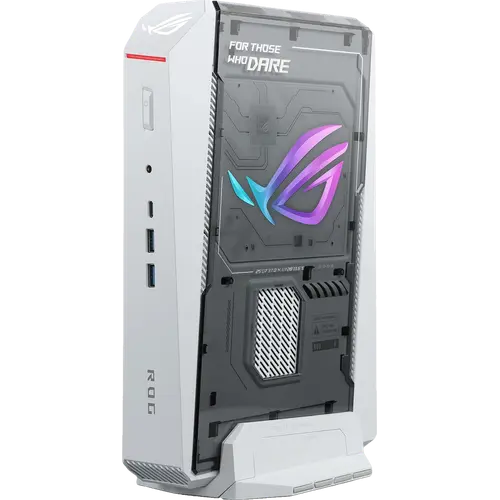
This is the ROG NUC 16 with nothing held back: a 24-core Intel Core Ultra 9 290HX Plus, an NVIDIA GeForce RTX 5080 Laptop GPU with 16GB of GDDR7, 64GB of DDR5 across two SO-DIMMs and a 2TB M.2 PCIe 4.0 drive, in the white version of the same 282 x 190 x 57 mm body. Doubling the memory and the storage over the 32GB configuration is what makes it a workstation rather than only a gaming box: large scenes, big timelines and local models fit in RAM, and the projects fit on the internal drive. The trade-offs are unchanged and real, a 380W external adapter, 3.12 kg of chassis, one Ethernet port and no VESA mount, plus one specific to this build, since the bundled 64GB kit runs at DDR5-5600 rather than the 6400 the CSO-DIMM option reaches. If you want the most capable small-form-factor machine Asus builds and do not want to open it on day one, this is that machine.
- GPU-accelerated creative work
- Local AI and rendering workloads
- High-end gaming in small spaces
- Multi-display battle stations
Pros
- NVIDIA GeForce RTX 5080 Laptop GPU with 16GB of GDDR7
- 64GB of DDR5 memory and a 2TB PCIe 4.0 NVMe drive as standard
- 24-core Intel Core Ultra 9 290HX Plus with a 13 TOPS Intel AI Boost NPU
- Triple-fan cooling with a dual vapor chamber and dedicated SSD heatsink
- Five video outputs: two HDMI 2.1 FRL, two DisplayPort 2.1 and Thunderbolt 4
- Seven USB ports plus a 3.5 mm combo audio jack
- Wi-Fi 7, 2.5G Ethernet and a Kensington lock slot
- Tool-free thumb screws with memory upgradeable to 128 GB and 4TB drive support
- Three-year warranty
Cons
- Requires a 380W external power adapter
- Heavy for a mini PC at over three kilograms
- Only one 2.5G Ethernet port, so no wired redundancy
- The bundled 64GB kit runs at DDR5-5600, below the 6400 the chassis supports
- No VESA mount included
- No SD card slot and no fingerprint sensor
- No built-in speakers or microphone
- Ships with Windows 11 Home rather than Pro
Who is the Asus ROG NUC 16 (RTX 5080 64GB + 2TB) for?
This configuration is aimed at the person who would otherwise have bought the 32GB model and immediately ordered memory and a second drive. The RTX 5080 Laptop GPU with 16GB of GDDR7 does the heavy lifting on ray-traced games, 3D rendering, video encoding and local model inference, and the 24-core Core Ultra 9 290HX Plus, with eight performance cores and sixteen efficient cores, feeds it. What the 64GB of DDR5 and the 2TB PCIe 4.0 drive add is headroom: multi-application creative sessions, virtual machines, large datasets and long timelines that a 32GB, 1TB machine would start swapping through. It suits a desk, a media cabinet or a studio corner where a full tower does not fit, and this build is the white one, so it also suits a setup that is not all black.
What stands out on paper
Thermals are the reason a GPU this size fits here at all. Asus uses three QuietFlow fans, a dual vapor chamber covering 72% of the internal area with full contact over both the CPU and the GPU, and a dedicated SSD heatsink, and rates the result below 38 dBA under sustained load. Display connectivity is unusually wide for a mini PC: two HDMI 2.1 FRL ports, two DisplayPort 2.1 outputs and a Thunderbolt 4 Type-C port that also carries DisplayPort 2.1, so a multi-monitor high-refresh setup needs no dock. There are seven USB ports across the front and rear plus a 3.5 mm combo audio jack, networking is 2.5G wired with Intel Killer Wi-Fi 7 and Bluetooth 5.4 alongside it, and the processor carries an Intel AI Boost NPU rated at 13 TOPS for on-device AI features. Both upgrade paths stay open even at this tier: memory can go to 128 GB and the M.2 2280 slot accepts drives from 1TB to 4TB, including PCIe 5.0 models.
What to know before you buy
Power and portability are the price of the performance. The system runs from an external 20V, 19A, 380W adapter rather than an internal supply, so a substantial brick joins the chassis on the desk, and at 3.12 kg this is heavy for a mini PC. There is a single 2.5G Ethernet port, so no wired redundancy and no second subnet, and no VESA mount in the box, which limits where it can be hidden. The chassis has no SD card slot, no fingerprint sensor and no internal speakers or microphone, so audio needs headphones, powered speakers or a display. It ships with Windows 11 Home rather than Pro, which matters for domain join and managed BitLocker. And one detail specific to this build: the factory 64GB kit is DDR5-5600 SO-DIMM, a step below the DDR5-6400 CSO-DIMM modules the smaller-capacity configurations use.
Is the Asus ROG NUC 16 (RTX 5080 64GB + 2TB) worth it?
The question at this tier is not whether a tower would be cheaper, because it would, but whether the memory and storage jump is worth paying Asus for instead of doing it yourself. Buying it this way means one warranty covering the whole machine, three years of it, no opening a brand-new chassis and no leftover 32GB kit and 1TB drive, and the machine is ready for large workloads out of the box. Against that, the same chassis with 32GB and 1TB costs meaningfully less and both parts are user-serviceable behind thumb screws. Choose this build if the workload genuinely needs the RAM and the space now, or if the white finish is what you were after; if the GPU is the only part that matters, the RTX 5070 Ti and RTX 5060 configurations of the same chassis save a great deal.
Frequently asked questions
How is this configuration different from the other ROG NUC 16 models?
It is the top build, model RNUC16JNK9X2AAAU. It shares the Core Ultra 9 290HX Plus and the RTX 5080 Laptop GPU with the 32GB model, but doubles the memory to 64 GB and the storage to 2 TB, and it is finished in white rather than black.
Can I still upgrade the memory and storage?
Yes. Thumb screws give tool-free access, memory can be taken to 128 GB, and the M.2 2280 slot accepts drives from 1 TB to 4 TB, including PCIe 5.0 models.
How many monitors can it drive?
It has five video outputs: two HDMI 2.1 FRL ports, two DisplayPort 2.1 ports and one Thunderbolt 4 Type-C port that also carries DisplayPort 2.1, so several high-refresh displays can connect directly without a dock.
Does it have an internal power supply?
No. Power comes from an external 20V, 19A, 380W adapter, so plan desk or shelf space for the brick alongside the 282 x 190 x 57 mm chassis.
How loud does it get under load?
Asus rates the thermal design below 38 dBA even under sustained high load, using three QuietFlow fans, a dual vapor chamber with 72% internal coverage and a separate SSD heatsink.
Which operating system does it come with?
Windows 11 Home is preinstalled. It is the Home edition rather than Pro, so business features such as domain join are not included.