


Asus ROG NUC 2025 with RTX 5070 Review: The Mini PC Built to Replace a Gaming Tower
This configuration of the Asus ROG NUC 2025 pairs an Intel Core Ultra 9 275HX with an NVIDIA GeForce RTX 5070 Laptop GPU, 32GB of DDR5-6400 and a 1TB PCIe 4.0 drive in a chassis of roughly three liters. Owners consistently describe it as genuinely plug and play, well built, and small enough to live in places a tower cannot go, while running current games comfortably at 1440p on high settings. The recurring complaints are just as consistent: the cooling fan ramps up and whines on light tasks, the DC power plug works loose easily, and 1TB fills fast with modern game installs. It is a premium purchase that buys engineering and size rather than raw value, and it makes sense when the space, not the budget, is the constraint.
- 1440p high-refresh gaming
- Desks and cabinets with no room for a tower
- Thunderbolt dock setups
- Multi-monitor gaming rigs
- Vehicles, LAN parties and living rooms
Pros
- NVIDIA GeForce RTX 5070 Laptop GPU and Intel Core Ultra 9 275HX in a three-liter chassis
- Genuinely plug and play, arriving assembled with Windows 11 Home
- Five video outputs: two HDMI 2.1 FRL, two DisplayPort 2.1 and Thunderbolt 4
- Seven USB ports, six of them USB 3.2 Gen 2 Type-A
- Wi-Fi 7 with Bluetooth 5.4 alongside 2.5G Ethernet
- Triple-fan QuietFlow cooling with a dual vapor chamber
- Tool-free upgrades, with memory to 96GB and PCIe 5.0 storage support to 4TB
- Build quality owners single out as excellent
- Three-year limited warranty on Asus NUC products
- Kensington lock slot and a front 3.5mm combo audio jack
Cons
- Fan noise ramps up and whines during ordinary desktop work, not just under load
- The DC power connector works loose with minimal cable movement
- The ARGB lighting and the Armoury Crate software drew complaints
- 1TB of storage fills quickly with modern game installs
- Requires a 330W external power adapter, with no internal power supply
- Only one 2.5G Ethernet port
- No HDMI cable and no VESA mount included
- No SD card reader, fingerprint sensor, speakers or microphone
- Ships with Windows 11 Home rather than Pro
- Heavy for a mini PC at over three kilograms
Who is the Asus ROG NUC 2025 with RTX 5070 for?
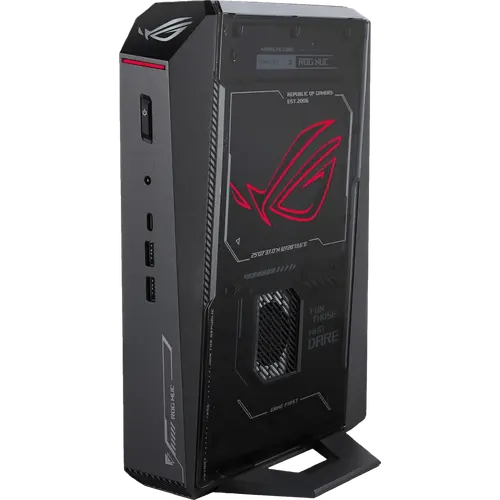
This is the configuration for someone who wants a real gaming machine without a real gaming case. The Core Ultra 9 275HX handles the processor side, an integrated Intel AI Boost NPU covers on-device AI work, and the RTX 5070 Laptop GPU does the rendering, all inside a chassis measuring 282.4 by 187.7 by 56.5 mm. Owners describe using it exactly that way: one runs it in the cab of a semi-truck, where a tower and its large power supply were never an option, and reports that the machine is happy on the vehicle's auxiliary power unit. Another docks it over Thunderbolt into an existing desk setup and drives dual 1440p 144Hz monitors from it, treating it as a gaming laptop with the screen removed. Anyone who has already built a tower once and does not want to do it again is the other clear audience, since this arrives assembled with Windows 11 Home installed.
What buyers love
Three themes come up again and again. The first is the size: owners keep comparing it to a games console and pointing out it is smaller, which is what makes it viable on a desk, in a cabinet or mounted out of sight. The second is that it simply works out of the box, with no parts list, no assembly and no first-boot drama. The third is gaming performance that matches the price bracket, with current titles running at high settings and 1440p high refresh rates, and only the most demanding cinematic presets causing frame drops. Build quality gets specific praise too. On paper the reason it holds up is the QuietFlow cooling design, three fans over a dual vapor chamber, and a port array that is unusually generous for the format: two HDMI 2.1 FRL outputs, two DisplayPort 2.1 outputs and a Thunderbolt 4 Type-C port that also carries DisplayPort 2.1, so five displays can be attached, plus six USB 3.2 Gen 2 Type-A ports, a front USB 3.2 Gen 2 Type-C port, 2.5G Ethernet, Wi-Fi 7 and Bluetooth 5.4.
What to know before you buy
The complaints are mechanical and specific. Fan noise is the loudest one: the cooling ramps up and settles back down constantly, producing an uneven whine during ordinary desktop work rather than only under gaming load. The DC power connector is the other, described as loose enough to fall out when cables at the front are moved around. The ARGB lighting and the Armoury Crate utility that controls it also drew a sharp complaint, as did a Windows image that arrived with Microsoft 365 and OneNote installed in a long list of languages that had to be uninstalled one by one. Storage is the spec-level caveat: 1TB of PCIe 4.0 NVMe is not much once a handful of modern games are installed, and one owner said so directly. The good news is that the machine is designed to be opened, with thumb screws for tool-free access, memory that goes to 96GB and an M.2 2280 slot that accepts PCIe 4.0 or PCIe 5.0 drives up to 4TB, though one owner did have to fight to get a second SSD detected. Also budget desk space for the 330W external adapter, since there is no internal power supply, and expect no HDMI cable and no VESA mount in the box. There is no SD card reader, no fingerprint sensor and no built-in speakers or microphone, and it ships with Windows 11 Home rather than Pro.
Is the Asus ROG NUC 2025 with RTX 5070 worth it?
A tower with an equivalent desktop GPU costs less and upgrades further, and owners say so themselves without regretting the purchase, because the point is what fits in three liters. What the premium buys is a 24-core class processor and an RTX 5070 Laptop GPU that stay cool in a box the size of a thin console, five video outputs, seven USB ports and a chassis that opens with thumb screws. Asus backs NUC products with a three-year limited warranty, which is longer than most gaming desktops carry. If a tower would fit and nobody would mind it, this is the wrong machine. If the space is the whole problem, and 1440p high refresh is the target rather than maxed-out 4K, it answers the question well, with fan noise and a fussy power plug as the price of admission.
Frequently asked questions
Which graphics card does this Asus ROG NUC 2025 configuration use?
This one has a discrete NVIDIA GeForce RTX 5070 Laptop GPU alongside the processor's integrated Intel graphics. Asus sells the same chassis with RTX 5060, RTX 5070 Ti and RTX 5080 Laptop GPUs at other price points.
How many monitors can the ROG NUC 2025 drive?
Up to five. There are two HDMI 2.1 FRL ports, two DisplayPort 2.1 ports and one Thunderbolt 4 Type-C port that also carries DisplayPort 2.1.
Can the memory and storage be upgraded?
Yes, and the chassis is built for it: thumb screws give tool-free access. Memory goes up to 96GB and the M.2 2280 slot takes PCIe 4.0 or PCIe 5.0 drives up to 4TB. This configuration ships with 32GB of DDR5-6400 in CSO-DIMM modules and a 1TB PCIe 4.0 drive.
Is the ROG NUC 2025 quiet?
Not always. Asus uses a QuietFlow design with three fans and a dual vapor chamber, but owners report the fan spinning up and down during light desktop use, producing an uneven whine rather than a steady hum.
Does it have an internal power supply?
No. It uses an external 19.5V, 16.9A, 330W adapter, so plan for the power brick next to the machine. Some owners also find the DC plug works loose when front cables are moved.
What comes in the box?
The AC adapter and power cord plus the safety and warranty paperwork. There is no HDMI cable and no VESA mount, so both are separate purchases.
How long is the warranty?
Asus offers a three-year limited warranty on NUC products bought from authorized distributors, covering the hardware included in the box.