


Beelink Mini S12 Review: The Cheap Little Box That Became a Home Server Favourite
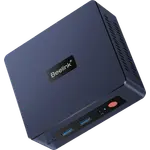
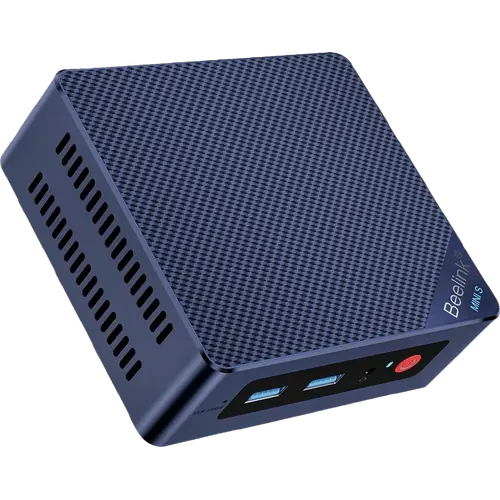
The Beelink Mini S12 pairs the four-core Intel N95 with Intel UHD graphics, 8GB of DDR4-3200 and a 480GB SATA SSD in a chassis of roughly 115 x 102 x 39 mm. What owners actually do with it is telling: Proxmox hosts running half a dozen containers, Home Assistant, security camera recorders, Minecraft servers, ham radio logging and RV or backup desktops. The reasons are consistent, namely very low power draw, near silence, a second internal M.2 slot for more storage, a VESA bracket in the box and a licensed copy of Windows 11 Pro. The honest limit is the processor: buyers describe it as a lower class chip that handles a handful of containers or everyday browsing well and nothing heavier. Linux users should also know the onboard Wi-Fi needed a recent kernel before it worked.
- Home servers and virtualization hosts
- Always-on low-power tasks
- Web, email and streaming desktops
- RV, backup and second machines
Pros
- Very low power draw, which is why owners leave it running permanently
- Near silent, with owners struggling to hear the fan at idle
- Second M.2 2280 slot, and drives reachable with a few screws
- VESA bracket included and compatible with VESA 100 mounting
- Licensed Windows 11 Pro preinstalled
- 2.5G Ethernet and dual HDMI for two displays
- Four USB Type-A ports plus a front headphone jack
- One of the cheapest ways into a complete desktop
Cons
- Entry-level processor, with owners noting it is not a powerhouse
- Single-channel memory capped at 16GB
- Onboard Wi-Fi needed a recent Linux kernel to work
- Wi-Fi 5 and Bluetooth 4.2 rather than current standards
- One owner reports the chassis running warm
- Buyers report the listing description not matching the configuration sold
- No DisplayPort, Thunderbolt, SD reader or Kensington lock slot
Who is the Beelink Mini S12 for?
This is the entry point of the mini PC market and buyers use it accordingly. The Intel N95 offers four cores and four threads up to 3.4 GHz with 16 execution units of UHD graphics, which covers browsing, email, word processing, online streaming and 4K video playback, and it does that at a power draw low enough that owners leave it running permanently. A striking share of reviewers are not using it as a desktop at all: one runs Proxmox with four to six containers and clusters two units over their second network interfaces, another runs a Bedrock Minecraft server, another monitors home security cameras around the clock, and another installed Home Assistant OS in a Proxmox VM. It also shows up as a portable backup PC and an RV computer paired with a television.
What buyers love
Silence and power draw dominate. Owners describe it as basically silent, with one saying you have to put your ear close to hear the fan at idle, and low power consumption comes up repeatedly as the reason it was chosen over a full desktop. Value is the second theme: one buyer itemised a complete portable setup, machine plus television plus wireless keyboard and mouse, for less than the price of a mid-range laptop. Serviceability gets specific praise, with owners noting that adding a second SSD takes four screws and that RAM and drives are easy to reach. Setup is described as no-brainer, plug and play, booting to Windows 11 Pro in minutes, and the included mounting bracket fits VESA 100 in a side-offset arrangement so it can hang between a monitor and its arm.
What to know before you buy
The processor is the ceiling, and reviewers say it plainly: it is a lower class model that works well for a handful of containers or everyday chores but is not a powerhouse, and gaming is explicitly out of scope. Memory is single-channel and tops out at 16GB. Linux users hit a specific snag, since the onboard Intel AX101 Wi-Fi was unsupported until the 6.4 kernel and one owner had to use a USB dongle in the meantime, though Wi-Fi worked immediately under Windows. Wireless is Wi-Fi 5 with Bluetooth 4.2, both a generation or more behind current machines. One owner reports the unit running somewhat hot, and another replaced the supplied drive with a Samsung SSD after reading about the original. Several international buyers also complain that the listing's headline specification does not match the configuration actually sold, so check the variant you are adding to the cart.
Is the Beelink Mini S12 worth it?
For a low-power always-on box, it is one of the easiest recommendations in the category, and owners who bought it for that job are the most positive of all. It costs a fraction of the Ryzen and Core Ultra machines here, includes a Windows 11 Pro licence, takes a second M.2 drive and mounts behind a monitor. Anyone expecting desktop-class speed, dual-channel memory, Thunderbolt or modern wireless should spend more and look further up this category. Anyone who wants a quiet, cheap, tiny computer to run containers, cameras or a browser will find it does exactly that.
Frequently asked questions
Is the Beelink Mini S12 good as a home server?
It is the use case owners mention most. Reviewers run Proxmox with several containers, Home Assistant in a VM, security camera software and game servers on it, choosing it specifically for low power draw and near-silent operation.
Can I add more storage?
Yes. There are two M.2 2280 slots, one PCIe 3.0 x4 that also takes SATA drives and one PCIe 3.0 x1, and owners describe fitting a second drive with four screws.
How much memory does it support?
Up to 16GB of DDR4-3200 in a single SO-DIMM slot, so it runs single-channel. This configuration ships with 8GB.
Does it work with Linux?
Yes, but with one caveat that owners flag. The onboard Intel AX101 wireless card was not supported until the 6.4 kernel, so earlier distributions needed a USB Wi-Fi adapter. Wired Ethernet and everything else worked normally.
Is it noisy?
Owners consistently say no. It uses a cooling fan with a large air duct, and reviewers describe it as effectively silent, needing to put an ear next to the case to hear it at idle.
Can it be mounted behind a monitor?
Yes. A mounting bracket is included and owners report it fits VESA 100 without modification, in a side-offset position that works between a monitor and a monitor arm.