



Geekom A5 Review: A Quiet Ryzen 5 Office Desktop With Room to Grow
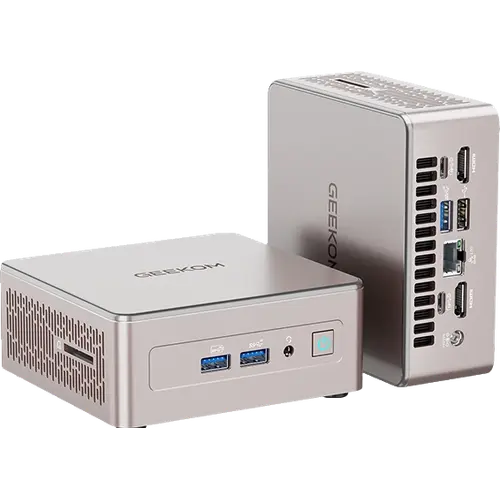
The Geekom A5 is a budget office desktop built around the AMD Ryzen 5 7430U with Radeon graphics, 16GB of DDR4 in two SODIMM slots and a 512GB PCIe 3.0 NVMe drive. It suits documents, browsing, video calls and home server duty, and it is easy to grow, with memory expandable to 64GB. The trade-offs are older platform choices (DDR4, PCIe 3.0, no USB4 or Thunderbolt), but a three-year warranty and a generous port list make it a sensible value pick.
- Office and business desks
- Budget buyers
- Home servers
- Multi-monitor setups
Pros
- Two DDR4 SODIMM slots, expandable to 64GB
- 512GB M.2 NVMe SSD included
- 2.5G Ethernet, Wi-Fi 6 and Bluetooth 5.2
- Five USB 3.2 Gen 2 ports plus USB 2.0 and an SD card reader
- Two HDMI 2.0 outputs and DisplayPort over USB-C
- Windows 11 Pro, VESA mount and HDMI cable included
- Three-year warranty
Cons
- DDR4 memory rather than DDR5
- SSD limited to PCIe 3.0 speeds
- No USB4 or Thunderbolt port
- Integrated graphics are not meant for demanding games
- No built-in speakers or microphone
Who is the Geekom A5 for?
It is a machine for desks where steady everyday performance and plenty of ports matter more than gaming. The Ryzen 5 7430U handles office suites, browsers with many tabs, video conferencing and light photo work, and the compact 117 x 112 x 49 mm chassis weighs 652g, so the included VESA mount can hang it behind a monitor. Windows 11 Pro comes installed, which suits small offices that need domain and management features, and the Kensington lock slot helps on shared or public desks.
What the Geekom A5 offers
Memory is not soldered: two DDR4 SODIMM slots hold the 16GB it ships with and accept up to 64GB. The boot drive is a 512GB M.2 2280 PCIe 3.0 x4 NVMe SSD. Connectivity is generous for the tier, with 2.5G Ethernet, Wi-Fi 6 and Bluetooth 5.2, three USB 3.2 Gen 2 Type-A and two USB 3.2 Gen 2 Type-C ports plus a USB 2.0 port, two HDMI 2.0 outputs and DisplayPort over USB-C, an SD card reader and a headphone jack. Cooling uses Geekom's IceBlast 2.0 system, power comes from an external 65W adapter, and an HDMI cable is included.
What to know before you buy
The platform is a step behind newer mini PCs. Memory is DDR4 rather than DDR5, the SSD runs at PCIe 3.0 speeds, and there is no USB4 or Thunderbolt port, so high-speed docks and external graphics enclosures are out. The integrated Radeon graphics are meant for display output and video playback rather than demanding games, and there is no neural processing unit for local AI features. There are no built-in speakers or microphone, so audio goes through the headphone jack, a monitor or a USB or Bluetooth device, and there is no fingerprint sensor.
Is the Geekom A5 worth it?
As a budget business or home desktop, it makes a clear case: upgradeable memory, a fast 2.5G network port, Wi-Fi 6, six USB ports and support for several displays, backed by a three-year warranty that is longer than most rivals offer. Anyone who needs faster storage, DDR5 or USB4 should look at a newer Ryzen model, but for quiet everyday work at a low cost the A5 covers the essentials.
Frequently asked questions
Can the Geekom A5 memory be upgraded?
Yes. It uses two DDR4 SODIMM slots and supports up to 64GB, so the 16GB it ships with can be replaced or expanded.
What storage does the Geekom A5 come with?
A 512GB M.2 2280 NVMe SSD on a PCIe 3.0 x4 link.
Does the Geekom A5 have Thunderbolt or USB4?
No. Its fastest ports are USB 3.2 Gen 2, including two Type-C ports that also carry DisplayPort video.
What networking does the Geekom A5 have?
A 2.5G Ethernet port, Wi-Fi 6 and Bluetooth 5.2.
Is the Geekom A5 good for gaming?
Not for demanding titles. Its integrated AMD Radeon graphics are aimed at office work, video playback and light games.




































