Geekom A5 Review: The Quiet Eight-Core Mini PC With Room to Grow
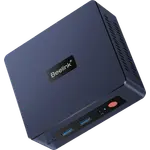
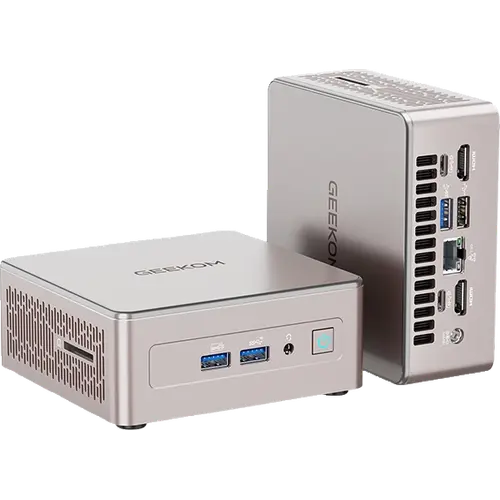
The Geekom A5 2027 Edition is a compact eight-core mini PC that buyers describe as quiet, quick to boot and easy to live with, and its triple drive bays and two memory slots give it more expansion room than most desktops this size. The Ryzen 7 7730U, 16GB of upgradeable DDR4 and a 15W quiet mode suit office work, media and always-on home-lab use. The honest trade-offs are PCIe 3.0 storage, no USB4 or Thunderbolt, DDR4 rather than DDR5, and integrated Radeon graphics that are not meant for gaming.
- Office and business desks
- Home servers and light NAS use
- Multi-monitor productivity
- Buyers who want to add their own drives
Pros
- Owners consistently describe it as quiet, even under load
- Fast boot and responsive everyday office and multimedia performance
- Windows 11 Pro preinstalled and ready out of the box
- Three storage bays with up to 7TB total capacity
- Two DDR4 SODIMM slots upgradeable to 64GB
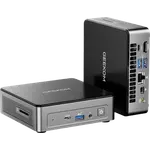
- Six USB ports, an SD 4.0 reader and a headphone jack
- 2.5G Ethernet, Wi-Fi 6 and Bluetooth 5.4
- Two HDMI 2.0 and two USB-C outputs for up to four 4K displays
- Compact metal-reinforced chassis with a VESA mount and a three-year warranty
Cons
- Some owners report it runs warm under long continuous heavy load
- The second M.2 slot is 2242 only, limiting drive choices
- A few units arrived with a faulty audio jack or a poorly shielded HDMI cable
- Storage is limited to PCIe 3.0 speeds
- No USB4 or Thunderbolt port
- DDR4 memory rather than the faster DDR5 used by newer models
- No built-in speakers or microphone
Who is the Geekom A5 for?
This is a machine for documents, browsers, video calls and light creative work rather than gaming. Buyers use it for everyday office tasks, photo editing and multimedia, and several praise how little space it takes, with the VESA mount letting it sit behind a monitor. The Ryzen 7 7730U pairs eight cores and sixteen threads with a 2.0 to 4.5GHz range, and a 15W quiet mode keeps it composed through long workdays. Windows 11 Pro comes preinstalled, and the maker also lists Linux compatibility, so it fits both offices and home-lab users running Home Assistant, media servers or other always-on services.
What buyers love
The recurring theme in owner reviews is silence: buyers repeatedly describe the mini PC as quiet or practically inaudible, even under load, which pairs with the IceBlast 3.0 cooling and the 15W quiet mode on the spec sheet. Speed also comes up often, with owners calling it fast, responsive and quick to boot for office suites, browsing and photo work. Setup is another common point, with Windows 11 ready out of the box and no bloatware to remove. Expansion wins praise too: buyers add a second M.2 SSD and a 2.5 inch drive, and note that the two memory sticks run in dual channel. Many sum it up as a lot of computer for the size and the price.
What to know before you buy
A few caveats show up in reviews and on the spec sheet. Some owners report the chassis runs warm during long continuous heavy use, so it benefits from a little airflow. The second M.2 slot is 2242 rather than 2280, which limits which drives fit there, and the main slot is PCIe 3.0 rather than 4.0. There is no USB4 or Thunderbolt, memory is DDR4 rather than the faster DDR5 newer models use, and there are no built-in speakers or microphone, so audio needs the headphone jack or a monitor. A small number of buyers received a unit with a faulty 3.5mm audio jack or a poorly shielded HDMI cable, both handled through the three-year warranty and a return.
Is the Geekom A5 worth it?
For an office or always-on desktop, the case is strong: eight cores, six USB ports, three drive bays, dual-channel memory up to 64GB, 2.5G Ethernet, quad 4K display support and a three-year warranty are a lot at this tier, and the quiet operation is what owners mention first. Anyone who needs PCIe 4.0 storage, USB4 or faster gaming graphics should step up the range, but for routine productivity and home-lab work the A5 covers the requirements without a premium.
Frequently asked questions
Is the Geekom A5 quiet?
Yes. It pairs a 15W quiet mode with the IceBlast 3.0 cooling system, and reviewers consistently describe it as quiet or practically silent in everyday use, though it can run warm under long continuous heavy load.
Can the Geekom A5 memory be upgraded?
Yes. It has two DDR4 SODIMM slots and supports up to 64GB, so the 16GB it ships with can be replaced or expanded, and the two slots run in dual channel.
How much storage can the Geekom A5 hold?
Up to 7TB across three bays: an M.2 2280 PCIe 3.0 x4 NVMe slot up to 4TB, an M.2 2242 SATA slot up to 1TB and a 2.5 inch 7mm SATA bay up to 2TB.
How many monitors can the Geekom A5 drive?
Up to four, using two HDMI 2.0 ports and two USB-C ports with DisplayPort output, at up to 4K resolution per display.
Does the Geekom A5 have Thunderbolt or USB4?
No. Its fastest ports are USB 3.2 Gen2 at 10Gbps, including two Type-C ports. Thunderbolt docks and external GPU enclosures are not supported.
Does the Geekom A5 run Linux?
It ships with Windows 11 Pro and the maker lists Linux and Ubuntu compatibility, so it can be reloaded for a home server or other always-on use.