




Geekom A5 Pro Review: A Half-Liter Office Desktop That Gets Out of the Way
The Geekom A5 Pro is a quiet, competent desktop for people whose work is documents, browsers, streaming and the occasional Photoshop session. Owners consistently describe it as fast enough, easy to set up, free of bloatware and small enough to sit on the desk instead of under it, and the all-aluminium body plus a 28W processor keeps noise and power draw low. Expandability is where it draws a line: memory uses two DDR4 SODIMM slots up to 64GB, but storage is limited to M.2 drives with no 2.5 inch bay, which caught at least one buyer out. As an office and home machine at a low price it delivers, provided you are not expecting gaming performance.
- Home and office desktops
- Small business workstations
- Living room and TV connected use
- Space-constrained desks
Pros
- Quick, bloat-free setup with Windows 11 Pro out of the box
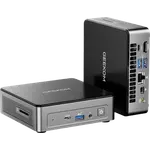
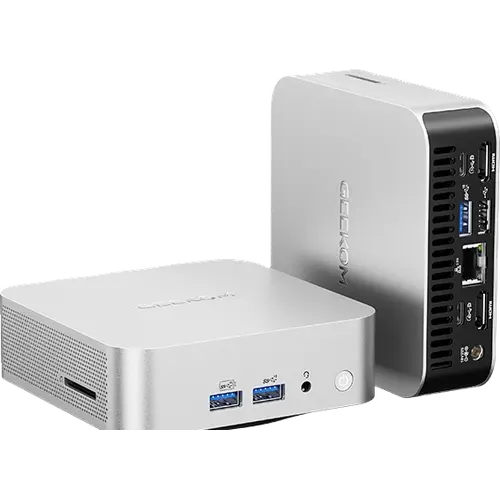
- All-aluminium 0.47 liter chassis that stays quiet under everyday load
- Dual DDR4 SODIMM slots supporting up to 64GB
- Six USB ports plus an SD card reader and Kensington lock slot
- Dual HDMI 2.0 and two USB-C outputs for up to four displays
- 2.5G Ethernet, Wi-Fi 6 and Bluetooth 5.2
- Three-year warranty with VESA mount and HDMI cable included
Cons
- No 2.5 inch SATA bay, unlike the standard A5
- Integrated Radeon Vega 7 graphics are not for gaming
- PCIe 3.0 storage rather than the faster 4.0
- No USB4 or Thunderbolt port
- DDR4 memory instead of DDR5
- No built-in speakers or microphone
Who is the Geekom A5 Pro for?
It is aimed at the everyday desktop role, and owners use it exactly that way: streaming and web browsing, running Adobe Photoshop daily in a small business, email and office work, even 2D and 3D CAD alongside 3D printing. The appeal is repeatedly framed in terms of space, with several people describing the relief of replacing a tower under the desk with a box that fits anywhere on it. Because it weighs 652 grams and includes a VESA mount, it also works behind a monitor or connected to a television, which one owner does when travelling.
What buyers love
Setup keeps coming up as painless: quick, with no bugs and no bloatware, running Windows 11 Pro cleanly out of the box. The combination of small size and adequate speed is the other constant, with owners calling it compact, cheap and functional, and one buying a second unit for the office after the first worked out. Support experiences skew positive here too, including an owner who was escalated to senior technical staff within a day and got a Linux boot problem solved by email. The all-aluminium shell, rated to withstand heavy crushing force, backs up the impression of solid construction.
What to know before you buy
The storage layout is the trap. Unlike the standard A5, the A5 Pro has no 2.5 inch SATA bay, only M.2 slots, and an owner who planned to reuse an existing drive had to fall back on an external enclosure. Graphics are integrated Radeon Vega 7, fine for display output and video but not for gaming, as owners themselves point out. The processor is a Zen 3 class 7430U with a 28W envelope, so heavy multi-threaded work belongs on a faster machine, storage runs at PCIe 3.0 rather than 4.0, and there is no USB4 or Thunderbolt. Note also that the manufacturer specification caps memory at 64GB even though the listing headline mentions a higher figure.
Is the Geekom A5 Pro worth it?
For its intended job, yes. Ratings are strongly positive and the recurring words are quiet, small and fast enough, which is the correct expectation for a 28W six-core chip. You get six USB ports, dual HDMI plus two USB-C display outputs for up to four screens, 2.5G Ethernet, an SD card reader, a Kensington lock slot and a three-year warranty, with the VESA mount and HDMI cable included. Buyers who need a 2.5 inch drive bay should look at the standard A5, and anyone chasing gaming or heavy rendering should move up the range.
Frequently asked questions
Does the Geekom A5 Pro have a 2.5 inch drive bay?
No. Storage is M.2 only, with an M.2 2280 PCIe 3.0 x4 slot and an M.2 2242 SATA slot. An existing 2.5 inch SSD or hard drive needs an external enclosure.
How much memory does the Geekom A5 Pro support?
Up to 64GB across two DDR4 SODIMM slots, according to the manufacturer specification. It ships with 16GB installed.
How many monitors can the Geekom A5 Pro drive?
Up to four, using two HDMI 2.0 ports and two USB-C ports with DisplayPort output, at up to 8K-class resolution.
Is the Geekom A5 Pro quiet?
Yes. It pairs a 28W processor with the IceBlast 2.0 cooling system, and owners consistently describe it as quiet in everyday use.
Can you run Linux on the Geekom A5 Pro?
Yes. It ships with Windows 11 Pro, and at least one owner installed Linux successfully after disabling secure boot, with support assistance from the manufacturer.