
Updated November 2026
Data from the official Geekom site.
2026 verdict
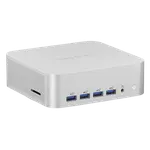
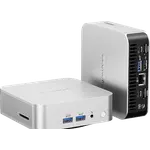
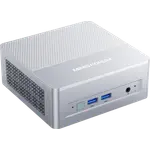
One of these is an office desktop and the other a small workstation, and the Geekom A8 Max (Ryzen 9) is the one to choose for the heavier work.
It brings a Ryzen 9 8945HS and Radeon 780M against the Ryzen 5 7430U and Vega 7 of the other, 32 GB of DDR5 against 16 GB of DDR4, and a 2 TB PCIe Gen4 SSD against 512 GB at Gen3, with Wi-Fi 6E, dual 2.5G Ethernet and two USB4 ports on top. The Geekom A5 Pro (Ryzen 5 16GB + 512GB) is the more affordable and lighter of the pair, a 0.47 liter box that owners describe as quiet and more than adequate for documents, browsing and the occasional editing session. Pick the Geekom A8 Max (Ryzen 9) for development, photo or video work and anyone who wants room to grow, and the Geekom A5 Pro (Ryzen 5 16GB + 512GB) for a simple, quiet everyday desktop.
News by email
Still comparing? Get what's new by email
New releases and the smart home news worth knowing, in your inbox.
No spam. Unsubscribe in one click.
The biggest differences
Where these two are furthest apart, and by how much.
- Storage Capacity4×Geekom A8 Max (Ryzen 9)2 TB vs 512 GB
- Memory Capacity2×Geekom A8 Max (Ryzen 9)32 GB vs 16 GB
| Feature | Geekom A5 Pro (Ryzen 5 16GB + 512GB) | Geekom A8 Max (Ryzen 9) | Winner |
|---|---|---|---|
| Rating | 4.3 | 3.8 | Geekom A5 Pro (Ryzen 5 16GB + 512GB) |
| Memory Type | DDR4 | DDR5 | Geekom A8 Max (Ryzen 9) |
| Memory Capacity | 16 GB | 32 GB | Geekom A8 Max (Ryzen 9) |
| Storage Capacity | 512 GB | 2 TB | Geekom A8 Max (Ryzen 9) |
| CPU Model | AMD Ryzen 5 7430U | AMD Ryzen 9 8945HS | Different strengths |
| GPU Model | AMD Radeon Vega 7 | AMD Radeon Graphics 780M | Different strengths |
| Warranty | 3 years | 3 years | Tie |
| Memory Configuration | Dual-channel | Dual-channel | Tie |
What the differences mean
Memory
The Geekom A8 Max (Ryzen 9) ships 32 GB of DDR5 at 5600 MT/s, while the Geekom A5 Pro (Ryzen 5 16GB + 512GB) starts at 16 GB of DDR4. Both take up to 64 GB across two SODIMM slots, but the higher-speed DDR5 and the doubled starting capacity are a real difference for multitasking and large applications.
Storage
The Geekom A8 Max (Ryzen 9) carries a 2 TB PCIe Gen4 SSD; the Geekom A5 Pro (Ryzen 5 16GB + 512GB) has a 512 GB PCIe Gen3 drive. That is four times the space at a faster generation, which matters for large media, project files and virtual machines.
Processor and graphics
The Geekom A8 Max (Ryzen 9) runs a Ryzen 9 8945HS with Radeon 780M graphics and an AMD XDNA AI engine, a clear tier above the Ryzen 5 7430U and Radeon Vega 7 of the Geekom A5 Pro (Ryzen 5 16GB + 512GB), which lists no NPU and a 28 W envelope aimed at quiet office work rather than heavy multi-threaded jobs.
Networking and ports
The Geekom A8 Max (Ryzen 9) adds Wi-Fi 6E, a second 2.5G Ethernet port and two USB4 (40Gbps) ports that can also drive displays. The Geekom A5 Pro (Ryzen 5 16GB + 512GB) settles for Wi-Fi 6, a single 2.5G Ethernet port and USB-C ports without USB4.
Size, power and noise
The Geekom A5 Pro (Ryzen 5 16GB + 512GB) is the smaller and lighter machine at about 0.47 liters and 652 g, with a 28 W processor that keeps it quiet and cool. The Geekom A8 Max (Ryzen 9) is a larger 135 mm chassis with a 120 W adapter that runs warmer, a trade for the extra performance.
Which one to buy if
- you edit photos or video, run virtual machines or write code all day
The Geekom A8 Max (Ryzen 9) pairs the Ryzen 9 8945HS with 32 GB of DDR5 and a 2 TB Gen4 SSD, the headroom those workloads need.
- your day is documents, browsers, email and streaming
The Geekom A5 Pro (Ryzen 5 16GB + 512GB) is quiet, compact and fast enough for that at a much lower spend.
- you want storage and memory room to grow over several years
The Geekom A8 Max (Ryzen 9) starts at 2 TB and 32 GB and uses the faster DDR5 and PCIe Gen4, so it stays useful longer.
- you want the quietest, smallest box on the desk
The Geekom A5 Pro (Ryzen 5 16GB + 512GB) runs a 28 W chip in an all-aluminum 0.47 liter chassis that owners describe as quiet in everyday use.
- you are building a homelab and want dual wired networking
The Geekom A8 Max (Ryzen 9) has two 2.5G Ethernet ports plus Wi-Fi 6E, where the Geekom A5 Pro (Ryzen 5 16GB + 512GB) has one.
$569.00
- + Rating: 4.3
- - Memory Type: DDR4 vs DDR5
- - Memory Capacity: 16 GB vs 32 GB
Winner
Price unavailable right now
- + Memory Type: DDR5
- + Memory Capacity: 32 GB
- + Storage Capacity: 2 TB
- - Rating: 3.8 vs 4.3
What owners say
Owners of both Geekom mini PCs reach for the same words first: quiet in everyday use, quick to set up with a clean Windows 11 Pro and no bloatware, and solid in an all-aluminum body with a VESA mount and three years of coverage. Geekom A8 Max (Ryzen 9) owners stretch that further, calling it near-silent even under load and comfortably up to Photoshop, Lightroom, development and music work, though they warn the Radeon 780M is no gaming GPU, that it runs warm and a few hit boot or stability quirks, and that counterfeits exist so it should be bought from a trusted seller. Geekom A5 Pro (Ryzen 5 16GB + 512GB) owners frame it as cheap, compact and fast enough, with one caught out by the missing 2.5 inch drive bay and others noting the Vega 7 graphics are for display and video rather than games.
Frequently Asked Questions
Which is better overall: Geekom A5 Pro (Ryzen 5 16GB + 512GB) or Geekom A8 Max (Ryzen 9)?
The Geekom A8 Max (Ryzen 9) is the more capable machine, with a faster processor, DDR5 memory, four times the storage and USB4. The Geekom A5 Pro (Ryzen 5 16GB + 512GB) is the better value for light office work, since it is more affordable and still quiet and quick for everyday tasks.
What is the biggest difference between the Geekom A5 Pro (Ryzen 5 16GB + 512GB) and the Geekom A8 Max (Ryzen 9)?
The performance class. The Geekom A8 Max (Ryzen 9) uses a Ryzen 9 8945HS, 32 GB of DDR5 and a 2 TB PCIe Gen4 SSD, while the Geekom A5 Pro (Ryzen 5 16GB + 512GB) uses a Ryzen 5 7430U, 16 GB of DDR4 and a 512 GB Gen3 drive.
What are the Geekom A8 Max (Ryzen 9) specs?
It runs an AMD Ryzen 9 8945HS with Radeon 780M graphics and an XDNA AI engine, 32 GB of dual-channel DDR5 (up to 64 GB), a 2 TB PCIe Gen4 SSD, dual 2.5G Ethernet, Wi-Fi 6E, Bluetooth 5.4, two USB4 ports and dual HDMI 2.0, with Windows 11 Pro and a three-year warranty.
Can either of these run games?
Both rely on integrated graphics, so neither is a gaming machine. The Geekom A8 Max (Ryzen 9) has the stronger Radeon 780M, but owners still pair it with a console for games, and the Radeon Vega 7 in the Geekom A5 Pro (Ryzen 5 16GB + 512GB) is aimed at display output and video rather than games.
Who should buy the Geekom A8 Max (Ryzen 9)?
Developers, photo and video editors, and anyone juggling many apps who wants a quiet small-form-factor machine with room for storage and memory. Its dual Ethernet and USB4 ports also suit homelab and multi-display setups.
Who should buy the Geekom A5 Pro (Ryzen 5 16GB + 512GB)?
Buyers who need a small, quiet, low-cost desktop for documents, browsing, email and streaming, or a box to mount behind a monitor or attach to a TV. It is not built for gaming or heavy multi-threaded work.
Spotted something wrong on this page? Tell us and we will fix it.
 Our store on AmazonShop our ideas on AmazonLists of the smart home setups we would put together ourselves, ready to add to your Amazon cart.Shop on Amazon
Full comparison table
Compare all 113 Mini PCs side by side
You are looking at two of them. The full table lines up all Mini PCs in the catalog with the same specs, so you can filter by what you need and sort by price or rating.
- 113 Mini PCs
- 41 specs compared
- 38 filters
- Mini PCs

NUC 15 Pro+ (Ultra 9 32GB + 1TB)
- Mini PCs
ROG GR70 (RTX 5070 32GB + 2TB)
- Mini PCs
NUC 13 Pro Slim (i7 16GB + 512GB)
- Mini PCs
NUC 15 Pro Slim (Core 5 16GB + 512GB)
- Mini PCs
ROG NUC 16 (RTX 5060 32GB + 1TB)
- Mini PCs

SEi14 (32GB + 1TB)
- Mini PCs

MS-03 (Ultra 9 64GB + 1TB)
- Mini PCs

GT1 Mega Ultra 5
- Mini PCs
SER9 Pro (24GB + 1TB)
- Mini PCs

Mac Mini (M4 16GB + 512GB)
- Mini PCs
Mac Mini (M4 Pro 24GB + 512GB)
- Mini PCs

K17 Plus (32GB + 1TB)
- Mini PCs
M1-1390 (32GB + 1TB)
- Mini PCs
MS-S1 Max (128GB + 2TB)
- Mini PCs
MS-S1 Max (64GB + 2TB)
- Mini PCs
Mac Mini (M2 Pro 16GB + 512GB)
- Mini PCs
GT1 Mega Ultra 9
- Mini PCs

Mac Mini (M6 16GB + 256GB)
- Mini PCs
K16 (32GB + 1TB)
- Mini PCs
G1 Pro (32GB + 1TB)
- Mini PCs
A5 (Ryzen 5 16GB + 512GB)
- Mini PCs
A5 2027 Edition (Ryzen 7 16GB + 512GB)
- Mini PCs
A5 Pro 2026 Edition (16GB + 1TB)
- Mini PCs
A6 (Ryzen 7 16GB + 1TB)
- Mini PCs
A7 2026 Edition (Ryzen 5 7535HS 16GB + 1TB)
- Mini PCs
A7 Max (Ryzen 9)
- Mini PCs
A8 (Ryzen 7 16GB + 1TB)
- Mini PCs
A8 Max (Ryzen 7)
- Mini PCs
A9 Max (HX 370)
- Mini PCs
A9 Max (HX 470)
- Mini PCs
A9 Mega (128GB + 2TB)
- Mini PCs
A9 Mega (64GB + 1TB)
- Mini PCs
AX8 Max (16GB + 1TB)
- Mini PCs
GT1 Mega Ultra 5
- Mini PCs
GT1 Mega Ultra 9
- Mini PCs
GT13 Max
- Mini PCs
IT13 2026 Edition (Ultra 7 32GB + 1TB)
- Mini PCs
IT13 (2TB)
- Mini PCs
IT13 Max (Ultra 9 24GB + 500GB)
- Mini PCs
IT15 (32GB + 1TB)