






Geekom A5 Pro 2026 Edition Review: A Quiet Aluminum Office Box With Four Display Outputs
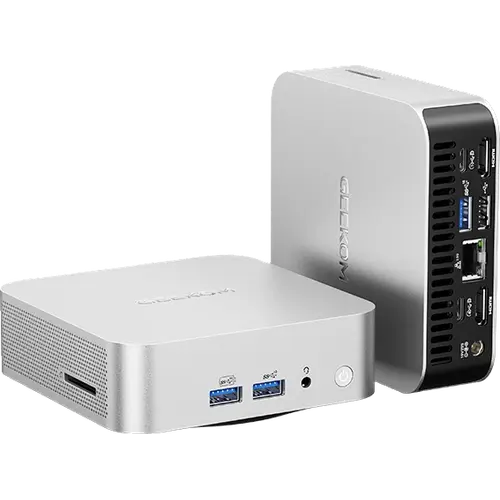
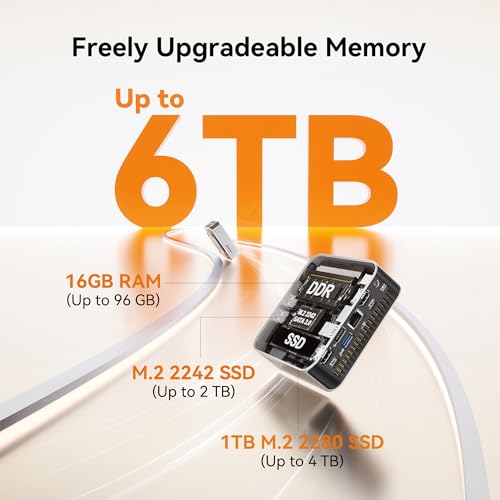
The Geekom A5 Pro 2026 Edition is an office-focused mini PC built around the six-core, twelve-thread AMD Ryzen 5 7530U with Radeon Vega 7 graphics, shipping with 16 GB of DDR4 and a 1 TB NVMe drive. Its appeal is completeness rather than raw speed: an all-aluminum chassis measuring 112 x 112 x 37 mm, two HDMI 2.0 ports and two USB-C ports for a four-display workstation, six USB ports in total, a 2.5G Ethernet port, an SD card reader and a Kensington lock slot. Both memory and storage are user-serviceable, with room for 64 GB of RAM and a second M.2 drive, and the box includes the VESA mount and HDMI cable rather than selling them separately. This is not a machine for gaming or heavy rendering, but for desks that need many screens, many ports and quiet operation, it covers the essentials with a three-year warranty behind it.
- Office and business desktops
- Four-display workstations
- Behind-the-monitor VESA installs
- Budget buyers who want serviceability
Pros
- Drives four displays via two HDMI 2.0 and two USB-C ports
- Six USB ports including two USB-C
- 2.5G Ethernet rather than gigabit
- SD card reader built in
- All-aluminum chassis with IceBlast 3.0 cooling
- Upgradeable DDR4 SO-DIMM memory to 64 GB and two M.2 storage slots
- Kensington lock slot for physical security
- VESA mount and HDMI cable included, Windows 11 Pro, three-year warranty
Cons
- DDR4 memory rather than DDR5
- Storage runs at PCIe 3.0 rather than PCIe 4.0
- No NPU, so no on-device AI acceleration
- No Thunderbolt port
- Wi-Fi 6 and Bluetooth 5.2 rather than Wi-Fi 7
- External 65W adapter instead of a built-in power supply
- Integrated Vega graphics limit gaming to lighter titles
- No built-in speakers, microphone or fingerprint sensor
Who is the Geekom A5 Pro 2026 Edition for?
This is a productivity machine for offices, home offices, classrooms and reception desks. The Ryzen 5 7530U provides six cores and twelve threads at up to 4.5 GHz, which is comfortable territory for spreadsheets, browser-heavy work, video calls and light photo editing, and the Radeon Vega 7 graphics handle 4K video playback without strain. It also suits IT teams deploying several units, since it arrives with Windows 11 Pro activated and supports Linux distributions for development, container and virtualization work. At 0.47 liters with the VESA mount included, it can be bolted behind a monitor and forgotten about.
What stands out on paper
Display support is the strongest feature for the money: two HDMI 2.0 ports plus two USB-C ports with DisplayPort output drive up to four screens directly, which is unusual on a machine at this tier and removes the need for a docking station. Port coverage is broad too, with six USB ports in total (three USB 3.2 Gen 2 Type-A, two Type-C and one USB 2.0), a 2.5G Ethernet port for faster wired networking than the usual gigabit, a 3.5 mm headphone jack and an SD card reader that photographers and anyone handling camera media will appreciate. The all-aluminum unibody helps dissipate heat and the IceBlast 3.0 cooling system keeps noise down. Both storage slots are accessible, one M.2 2280 NVMe and one M.2 2242 SATA, and the DDR4 SO-DIMM memory takes up to 64 GB, so nothing important here is soldered in place. A Kensington lock slot covers physical security, and the box includes the VESA mount, HDMI cable and power adapter.
What to know before you buy
The platform is deliberately modest. Memory is DDR4 rather than the faster DDR5 found on newer mini PCs, storage runs on PCIe 3.0 instead of PCIe 4.0, and the processor has no NPU, so on-device AI features that need a neural engine are out of reach. Wireless is Wi-Fi 6 with Bluetooth 5.2 rather than Wi-Fi 7, there is no Thunderbolt port, and power comes from an external 65W adapter rather than an internal supply. The chassis has no built-in speakers or microphone and no fingerprint sensor, so headsets and passwords do the work. Gaming is limited to lighter and older titles given the integrated Vega graphics.
Is the Geekom A5 Pro 2026 Edition worth it?
For office duty it is a sensible buy, because the specification is balanced rather than compromised in the places that hurt: four display outputs, 2.5G networking, an SD reader, a Kensington slot, upgradeable RAM and dual storage slots, all in an aluminum body with a three-year warranty. Buyers who want DDR5, PCIe 4.0 storage, Thunderbolt or an NPU should spend more on a current-generation Core Ultra or Ryzen AI machine. Buyers who mainly need a quiet, reliable desktop that drives several monitors and can be serviced years from now will find little missing here.
Frequently asked questions
How many monitors can the Geekom A5 Pro 2026 Edition support?
Four. Two HDMI 2.0 ports plus two USB-C ports with DisplayPort output let it drive four screens directly, with no docking station required.
Can the memory and storage be upgraded?
Yes. Memory uses standard DDR4 SO-DIMM modules and supports up to 64 GB. Storage has two slots: an M.2 2280 NVMe slot holding the included 1 TB drive and a second M.2 2242 SATA slot for expansion.
Does it have an SD card reader?
Yes, there is a built-in SD card reader, which is useful for offloading camera media without a separate adapter.
Which operating system does it come with?
Windows 11 Pro is preinstalled and activated. Geekom also states support for major Linux distributions such as Ubuntu and Fedora, including dual-boot setups.
Is the A5 Pro 2026 Edition good for gaming?
Only for lighter workloads. The Radeon Vega 7 integrated graphics handle older and less demanding titles plus 4K video playback, but there is no discrete GPU for modern high-end games.
Does it include a VESA mount?
Yes. The box contains the mini PC, a VESA mount, the power adapter, an HDMI cable and the user guide, so mounting it behind a monitor needs no extra purchase.

































