Mini PCs · Head to head

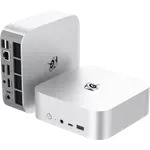
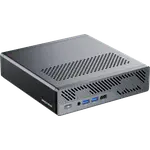
Geekom A6 (Ryzen 7 16GB + 1TB) vs GMKtec NucBox M5 Ultra (32GB + 512GB)

Full Mini PCs comparison in 2026

Updated October 2026
Data from the official Geekom and GMKtec sites.
2026 verdict
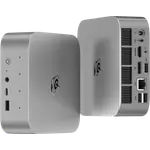
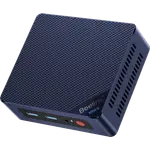
For a quiet home or office desktop, the Geekom A6 (Ryzen 7 16GB + 1TB) edges out the GMKtec NucBox M5 Ultra (32GB + 512GB) on newer memory, more storage and a longer warranty.
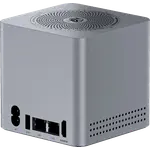
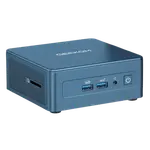
It pairs an eight-core Ryzen 7 6800H with Radeon 680M graphics, DDR5 memory, a 1 TB PCIe 4.0 drive and a USB4 port, and it comes with a three-year warranty. The GMKtec NucBox M5 Ultra (32GB + 512GB) has more memory out of the box, at 32 GB, and two 2.5G Ethernet ports, but it runs DDR4 and PCIe 3.0 and carries a one-year warranty. Pick the Geekom A6 (Ryzen 7 16GB + 1TB) for a well-rounded, upgradeable desktop with newer storage, and the GMKtec NucBox M5 Ultra (32GB + 512GB) if you are running a Proxmox or pfSense box that needs dual 2.5G links and 32 GB from day one.
vs
News by email

Still comparing? Get what's new by email

New releases and the smart home news worth knowing, in your inbox.

Smart home news and new releases, straight to your inbox

New releases, comparisons and the smart home news worth knowing.

No spam. Unsubscribe in one click.

Your subscription could not be saved. Please try again.
Please enter a valid email address.
Tick the box above to finish signing up.
We couldn't verify you're human. Please try again.
Too many attempts. Please try again in an hour.
Your subscription has been successful.
FeatureGeekom A6 (Ryzen 7 16GB + 1TB)GMKtec NucBox M5 Ultra (32GB + 512GB)Winner
Price$599.00$419.99GMKtec NucBox M5 Ultra (32GB + 512GB)
Rating4.44.3Geekom A6 (Ryzen 7 16GB + 1TB)
Warranty3 years1 yearGeekom A6 (Ryzen 7 16GB + 1TB)
Memory TypeDDR5DDR4Geekom A6 (Ryzen 7 16GB + 1TB)
Memory Capacity16 GB32 GBGMKtec NucBox M5 Ultra (32GB + 512GB)
Storage Capacity1 TB512 GBGeekom A6 (Ryzen 7 16GB + 1TB)
CPU ModelAMD Ryzen 7 6800HAMD Ryzen 7 7730UDifferent strengths
GPU ModelAMD Radeon 680MAMD Radeon Graphics (8 cores, up to 2000 MHz)Different strengths

What the differences mean

Memory generation and size

The GMKtec NucBox M5 Ultra (32GB + 512GB) ships 32 GB of DDR4-3200 and takes 64 GB. The Geekom A6 (Ryzen 7 16GB + 1TB) starts at 16 GB but uses DDR5. So the GMKtec gives you more memory on day one, while the Geekom gives you faster memory and slots to add more later, up to 64 GB.

Storage

The Geekom A6 (Ryzen 7 16GB + 1TB) arrives with a 1 TB PCIe 4.0 drive. The GMKtec NucBox M5 Ultra (32GB + 512GB) starts at half the capacity, 512 GB, on a PCIe 3.0 slot. Both have a second M.2 bay, but the Geekom begins with twice the fast storage.

USB4 and external devices

The Geekom A6 (Ryzen 7 16GB + 1TB) has a USB4 Type-C port, so a fast dock or external drive runs at full speed. The GMKtec NucBox M5 Ultra (32GB + 512GB) stops at USB 3.2 Gen 2, with no USB4 or Thunderbolt, which limits single-cable docks and external storage.

Networking

The GMKtec NucBox M5 Ultra (32GB + 512GB) has two 2.5G Ethernet ports, which suits a firewall or virtualisation host that needs a second link. The Geekom A6 (Ryzen 7 16GB + 1TB) has one 2.5G port. On wireless, both offer Wi-Fi 6E and Bluetooth 5.2.

Warranty

The Geekom A6 (Ryzen 7 16GB + 1TB) is covered for three years. The GMKtec NucBox M5 Ultra (32GB + 512GB) carries a one-year warranty. For two machines in the same class, that is a clear difference in how long the purchase is protected.

Which one to buy if

What owners say

Owners of both mini PCs describe a fast boot, low noise and a lot of computer for the money, and both groups move easily between ordinary desk work and always-on duty. Geekom A6 (Ryzen 7 16GB + 1TB) owners focus on the build and the setup: a painless first run, a machine that is smaller than expected yet stays quiet under load, and an aluminium body that feels solid. Their complaints concentrate on after-sales support, which several describe as slow and non-technical despite the warranty, and on the fact that the integrated graphics are not for demanding games. GMKtec NucBox M5 Ultra (32GB + 512GB) owners talk more about performance per watt and Linux, reporting clean installs of Fedora and Mint and a machine that runs virtualisation and containers without trouble, and they rate GMKtec support unusually well. Their warnings are the older DDR4 and PCIe 3.0 platform, graphics that get hot under sustained gaming, and an occasional sleep-wake fault.

Frequently Asked Questions

Which is better overall: Geekom A6 (Ryzen 7 16GB + 1TB) or GMKtec NucBox M5 Ultra (32GB + 512GB)?

The Geekom A6 (Ryzen 7 16GB + 1TB) is the better all-rounder, with DDR5 memory, a 1 TB Gen4 drive, USB4 and a three-year warranty. The GMKtec NucBox M5 Ultra (32GB + 512GB) wins on shipped memory and dual 2.5G networking, so it suits a home-lab server best.

What is the biggest difference between the Geekom A6 (Ryzen 7 16GB + 1TB) and the GMKtec NucBox M5 Ultra (32GB + 512GB)?

Memory and networking priorities. The Geekom A6 (Ryzen 7 16GB + 1TB) uses newer DDR5 with a USB4 port and a 1 TB PCIe 4.0 drive, while the GMKtec NucBox M5 Ultra (32GB + 512GB) gives you 32 GB and two 2.5G Ethernet ports on an older DDR4 and PCIe 3.0 platform.

Do both mini PCs have USB4?

No. The Geekom A6 (Ryzen 7 16GB + 1TB) has a USB4 Type-C port. The GMKtec NucBox M5 Ultra (32GB + 512GB) does not, topping out at USB 3.2 Gen 2, so fast docks and external GPUs are out of reach on it.

Which one is better for a home server, the Geekom A6 (Ryzen 7 16GB + 1TB) or the GMKtec NucBox M5 Ultra (32GB + 512GB)?

The GMKtec NucBox M5 Ultra (32GB + 512GB), because its two 2.5G Ethernet ports, 32 GB of memory and dual M.2 slots fit firewall, Proxmox and NAS roles, and owners report running virtualisation and Linux on it without problems.

Who should buy the Geekom A6 (Ryzen 7 16GB + 1TB)?

Anyone who wants a compact, quiet desktop for office work, media and light creative tasks, with newer DDR5 memory, a 1 TB Gen4 drive, USB4 and a three-year warranty, and who does not need dual Ethernet ports.

AmazonOur store on AmazonShop our ideas on AmazonLists of the smart home setups we would put together ourselves, ready to add to your Amazon cart.Shop on Amazon
Full comparison table

Compare all 105 Mini PCs side by side

You are looking at two of them. The full table lines up all Mini PCs in the catalog with the same specs, so you can filter by what you need and sort by price or rating.

  • 105 Mini PCs
  • 41 specs compared
  • 38 filters
Open the full comparison
More Mini PCs

Top Mini PCs to compare next

105 mini PCs from 7 brands compared: Geekom, Beelink, GMKtec, Asus and more. CPU, RAM, storage, ports, GPU and NPU specs, side by side.

All Mini PCs
Geekom

More Geekom products

A sharper look at other Geekom products worth comparing.

Explore Geekom
GMKtec

More GMKtec products

A sharper look at other GMKtec products worth comparing.

Explore GMKtec