





Geekom A7 Max Review: Ryzen 9 Power in a Four-Inch Box, With One Memory Caveat
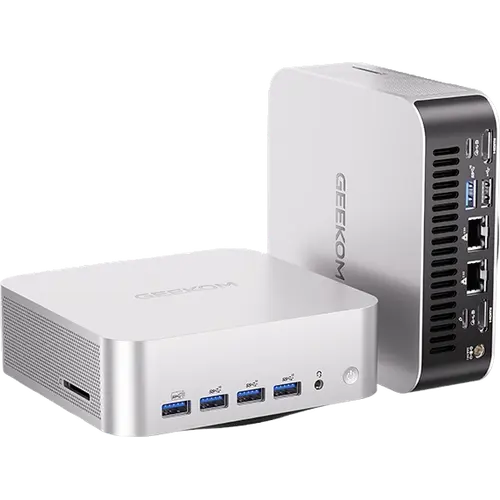
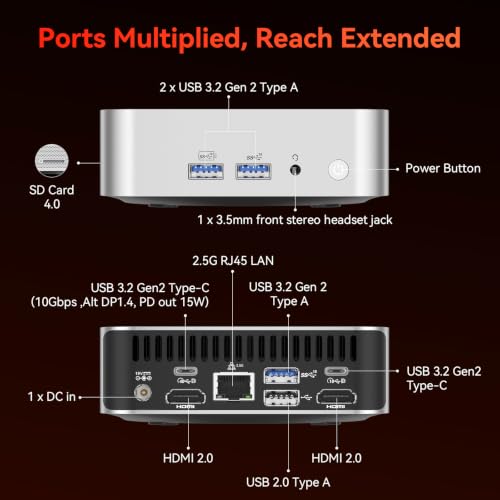
The Geekom A7 Max is a desktop replacement for people who want tower-class CPU performance without the tower. The Ryzen 9 7940HS gives eight Zen 4 cores up to 5.2GHz with Radeon 780M graphics, and the port selection is unusually complete for the size: two 40Gbps USB4 ports, two HDMI 2.0 outputs for up to four displays, dual 2.5G Ethernet, an SD card reader and a Kensington lock. The trade-off is the memory it ships with, a single 16GB SODIMM in a two-slot machine, so the configuration most buyers actually want costs extra. Backed by a three-year warranty, it is a strong value if you plan on that upgrade and buy where returns are easy.
- Home and office desktops
- Multi-monitor workstations
- Dual-network and firewall setups
- Light 1080p gaming
Pros
- Eight-core Ryzen 9 7940HS up to 5.2GHz with Radeon 780M graphics
- Two 40Gbps USB4 Type-C ports plus dual HDMI 2.0 for up to four displays
- Dual 2.5G Ethernet for separated or redundant networks
- Socketed DDR5 SODIMM memory expandable to 64GB
- 1TB M.2 2280 PCIe 4.0 x4 SSD with room for 2TB
- SD card reader and Kensington lock on a chassis about 135 mm per side
- Runs cool and quiet under the IceBlast 2.0 cooling system
- Three-year warranty, with HDMI cable and VESA mount in the box
Cons
- Ships with a single 16GB stick, so it runs single-channel until you add a second
- The bundled memory module can be slower than the quoted specification
- Opening the case disturbs the internal Wi-Fi antenna cables
- The USB4 ports supply power but cannot power the unit itself
- After-sales and replacement handling draw repeated criticism
- Integrated graphics are not a substitute for a discrete GPU
- No built-in speakers or microphone, and an external power brick rather than an internal supply
Who is the Geekom A7 Max for?
It suits anyone retiring a full tower or an ageing desktop and wanting the replacement to disappear behind a monitor. Owners describe it doing exactly that, freeing up desk space while handling office work, browsing and media without effort, and several bought it specifically because they did not need discrete graphics or RGB lighting. The Radeon 780M is enough for 1080p AAA titles, and buyers who game on it report no complaints in that department. The dual 2.5G Ethernet ports are the detail that sets it apart from most mini PCs in this class, since they allow physically separate internal and external networks for firewall, NAS or load-balancing duty. It runs Windows 11 Pro out of the box, and at least one owner confirms Linux works just as well.
What buyers love
Setup and thermals come up constantly. Owners describe the first boot as quick and straightforward, and repeatedly note the machine stays cool to the touch on both top and bottom with a very low noise level, which matches the IceBlast 2.0 dual-heat-pipe cooling on the spec sheet. Build quality draws specific praise, including from buyers cross-shopping it against cheaper alternatives who picked it for the metal chassis, the dual network interfaces and the three-year warranty rather than the price. The 40Gbps USB4 ports get used in practice, not just listed: one owner runs a gaming monitor off one of them. And the fact that memory and storage are socketed rather than soldered is treated as a feature, with several owners upgrading to 32GB themselves.
What to know before you buy
The consistent complaint is the memory it arrives with. The A7 Max has two SODIMM slots but ships with a single 16GB stick, so it runs single-channel out of the box, and more than one owner found the installed module was an unbranded part clocked at 4800 rather than the 5600 the specification quotes, which makes buying a matched second stick a guessing game. Opening the case is the other recurring warning: the internal Wi-Fi antenna cables come away with the cover and are awkward to reseat, and one owner returned the unit unopened rather than risk it. Two smaller notes: the USB4 ports deliver power but cannot power the machine itself, despite what the Power Delivery labelling suggests, and one owner had Bluetooth peripherals dropping out until support helped resolve it. The most serious reports concern after-sales rather than the hardware, with two owners describing defective units and a slow, difficult replacement process despite the warranty on paper.
Is the Geekom A7 Max worth it?
For a desk or office machine, yes, provided you budget for a second memory stick. You get eight Ryzen cores, expandable DDR5 up to 64GB, a 1TB PCIe 4.0 drive with room for 2TB, four-display output at up to 8K, dual 2.5G networking and an SD card reader, in a body roughly 135 mm on a side that includes an HDMI cable and a VESA mount. Against cheaper mini PCs it wins on build, networking and warranty length; against its own siblings the differences are the processor generation and how much memory the box actually contains. The risk sits in the support experience rather than the machine, so buy it somewhere returns are simple and treat the three-year warranty as paperwork rather than a fast repair path.
Frequently asked questions
How much memory does the Geekom A7 Max come with, and can you upgrade it?
It ships with 16GB of DDR5 in a single SODIMM, leaving the second of its two slots free. Memory is socketed rather than soldered and supports up to 64GB, so adding a second module is straightforward, and it is the upgrade most owners recommend because a single stick runs single-channel.
How many monitors can the Geekom A7 Max drive?
Up to four. It has two HDMI 2.0 outputs plus two USB4 Type-C ports at 40Gbps that also carry display output, with support for 8K resolution.
Is the Geekom A7 Max good for gaming?
For 1080p, yes. The Radeon 780M is integrated RDNA 3 graphics that handle mainstream AAA titles at 1080p and support ray tracing, but it is not a replacement for a discrete graphics card at higher resolutions.
Why does the Geekom A7 Max have two Ethernet ports?
Both are 2.5G RJ45 ports, which lets you keep two networks physically separate, for example one for internal or corporate traffic and one for internet access. It also enables firewall, NAS, load-balancing and failover setups on a single machine.
Can the Geekom A7 Max be powered over USB-C?
No. Its two USB4 Type-C ports support Power Delivery outward to peripherals, but the machine itself is powered by its 19V 120W DC adapter.
What is in the box with the Geekom A7 Max?
The mini PC, an HDMI cable, the power adapter, a VESA mount and a user guide. It is covered by a three-year warranty.



































