


Geekom A8 (Ryzen 7 16GB + 1TB) Review: A Ryzen 7 Desktop That Fits Behind Your Monitor
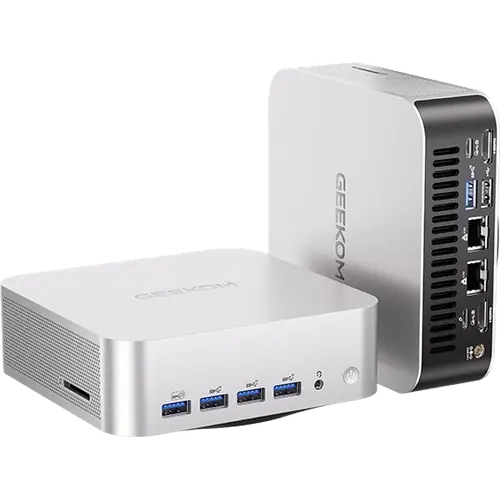
The Geekom A8 in this configuration pairs an AMD Ryzen 7 8745HS and Radeon 780M graphics with 16 GB of DDR5 and a 1 TB PCIe 4.0 SSD, in an aluminium chassis of 112 x 112 x 38 mm. It is a well-equipped mid-range mini PC: USB4, two HDMI 2.0 ports, DisplayPort over USB-C, 2.5G Ethernet, Wi-Fi 6E, Bluetooth 5.4, an SD card slot and a Kensington lock, with Windows 11 Pro, a VESA mount and a three-year warranty. The trade-offs are no Thunderbolt, an external 120 W power adapter and a 64 GB memory ceiling, which suits office, media and light creative work rather than heavy workstation loads.
- Home office and productivity
- Multi-monitor desks
- Media and light gaming
- Monitor-mounted setups
Pros
- AMD Ryzen 7 8745HS with Radeon 780M graphics
- 16 GB DDR5 SO-DIMM, upgradeable to 64 GB
- 1 TB PCIe 4.0 x4 SSD
- USB4, two HDMI 2.0 and DisplayPort over USB-C
- 2.5G Ethernet, Wi-Fi 6E and Bluetooth 5.4
- SD card slot, Kensington lock and VESA mount included
- Windows 11 Pro and a three-year warranty
Cons
- No Thunderbolt
- External 120 W power adapter
- Memory limited to 64 GB
- No speakers, microphone or fingerprint sensor
Who is the Geekom A8 (Ryzen 7 16GB + 1TB) for?
It suits anyone replacing a full-size desktop with something that takes almost no desk space. The Ryzen 7 8745HS and Radeon 780M integrated graphics give it the headroom for office work, many browser tabs, video calls, photo editing, 4K media and casual games. Because a VESA mount is included, it can sit on the back of a monitor for a clean, all-in-one style desk, and the Kensington lock slot helps in shared offices.
What the Geekom A8 offers
Connectivity is the strong suit. There is one USB4 Type-C port, a USB 3.2 Gen 2 Type-C port, three USB 3.2 Gen 2 Type-A ports and one USB 2.0 Type-A, plus two HDMI 2.0 outputs and DisplayPort over USB-C for several screens. Networking covers 2.5G Ethernet, Wi-Fi 6E and Bluetooth 5.4. Memory is 16 GB of DDR5 at 5600 MT/s on SO-DIMM modules, upgradeable to 64 GB, and storage is a 1 TB M.2 2280 PCIe 4.0 x4 SSD. An SD card slot and a 3.5 mm audio jack are on board, and cooling uses Geekom's IceBlast 1.5 system with dual copper heat pipes. Windows 11 Pro comes installed, and an HDMI cable and VESA mount are in the box.
What to know before you buy
There is no Thunderbolt port, so Thunderbolt-only docks and drives will not get full support, although USB4 covers most fast external devices. Power comes from an external 120 W adapter rather than an internal supply. Memory tops out at 64 GB, which matters if you plan to run large virtual machines or local AI models. There are no built-in speakers, microphone or fingerprint sensor, so video calls need a headset, webcam or monitor with audio.
Is the Geekom A8 (Ryzen 7 16GB + 1TB) worth it?
For everyday computing it is a lot of machine in a small box: a current Ryzen 7 with capable integrated graphics, a fast 1 TB SSD, USB4, 2.5G Ethernet and Wi-Fi 6E, backed by a three-year warranty. If you need Thunderbolt, more than 64 GB of memory or a stronger processor for heavy rendering, a higher-tier mini PC is the better fit; for a quiet, compact office and media desktop it covers almost everything.
Frequently asked questions
What processor and graphics does the Geekom A8 (Ryzen 7 16GB + 1TB) use?
An AMD Ryzen 7 8745HS with AMD Radeon 780M integrated graphics, alongside an AMD Ryzen AI NPU.
Can I upgrade the memory?
Yes. It ships with 16 GB of DDR5 at 5600 MT/s on standard SO-DIMM modules, and it supports up to 64 GB.
How many monitors can it connect to?
It has two HDMI 2.0 ports and DisplayPort output over USB-C, so it can drive several displays at once.
Does the Geekom A8 have Thunderbolt?
No. It has a USB4 Type-C port instead, which handles most fast storage and display docks, but it is not Thunderbolt certified.
Does it come with a VESA mount?
Yes. A VESA mount and an HDMI cable are included, so it can be attached to the back of a monitor.