

GEEKOM A8 Max (Ryzen 7, 32GB/1TB) Review: Quiet, Well-Built and Great Value for Everyday Computing
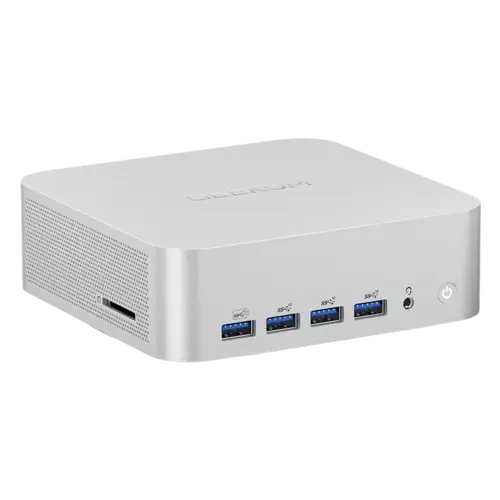
The GEEKOM A8 Max (Ryzen 7 variant, 32GB DDR5, 1TB SSD, Windows 11 Pro) is the more affordable A8 Max, and owners rate it highly. The standout praise is value: buyers repeatedly call the price-to-performance excellent. It's very quiet in normal/quiet mode (near-inaudible for office use, only audible during demanding games), fast and responsive for everyday tasks (office, web, video, photo/video editing and light gaming) and handles multitasking without slowing down. The build is solid and premium (metal chassis), it's compact and space-saving with plenty of useful ports, and it ships with a clean Windows 11 Pro (no bloatware) that sets up easily. Most owners report no overheating, and it's backed by a 3-year warranty, several call GEEKOM their favorite mini-PC brand. The caveats: the fan curve is a common gripe (it tends to stay quiet then ramp to high RPM abruptly rather than spinning up gradually, though owners agree it's not jet-engine loud). The integrated graphics aren't for heavy gaming. One owner was underwhelmed by the speed gain versus an old tower, and one buyer of two units reported real instability (mouse freezing/jerkiness, the display briefly going black, and spontaneous restarts). A couple also noted residual heat after shutdown (GEEKOM support suggested a BIOS setting to cut USB power after shutdown; support replies quickly but somewhat generically). For a quiet, well-built, great-value mini PC for everyday use, it's an easy recommendation.
- Office, web and media use
- Photo/video editing and light gaming
- Quiet, space-saving desktops
- Value seekers upgrading from an old tower
Pros
- Excellent price-to-performance value
- Quiet in normal use; solid metal build; compact and space-saving
- Clean Windows 11 Pro (no bloatware); plenty of ports; 3-year warranty
- Fast and responsive for office, media, editing and light gaming
Cons
- Aggressive fan curve (ramps to high RPM abruptly)
- Integrated graphics not for heavy gaming
- A few stability reports (freezing, black screen, spontaneous restarts)
- Residual heat after shutdown for some (needs a BIOS tweak); Ryzen 7 is the lower-tier CPU
Who is the GEEKOM A8 Max (Ryzen 7) for?
This is the more affordable A8 Max: a compact mini PC built on an AMD Ryzen 7 (8845HS in the US, 8745HS in the EU) with 32GB of DDR5 RAM, a 1TB PCIe 4.0 SSD, dual 2.5G LAN, Wi-Fi 6E, USB4 and Windows 11 Pro. It's ideal for everyday computing, office work, web, video, photo/video editing and light gaming, in a quiet, space-saving box that's a good upgrade from an aging tower. It's not aimed at heavy gaming (integrated graphics) or anyone who needs the extra headroom of the Ryzen 9 A8 Max.
What buyers love
Value leads the reviews, owners repeatedly praise the price-to-performance as excellent. It's quiet in normal/quiet mode (near-silent for office use), fast and responsive for daily tasks, and handles multiple applications at once without bogging down. The build quality impresses (a solid metal chassis), it's compact and frees up desk space, and it offers plenty of useful ports. Windows 11 Pro comes pre-installed and clean, with no bloatware or junk, and setup is straightforward. Most owners report no overheating for typical use, appreciate the 3-year warranty, and several rate GEEKOM as their top mini-PC brand, with some already eyeing a second unit or the successor model.
What to know before you buy
A few caveats. The fan behavior is the most common gripe: several owners feel the fan curve is poorly tuned, staying quiet too long then ramping to high RPM abruptly rather than spinning up gradually, though they agree it isn't jet-engine loud and is inaudible in normal office use. The integrated graphics are fine for light gaming but not demanding titles. One owner felt the real-world speed gain over an older tower was smaller than expected (improvements mainly in graphics and size). More concerning, one buyer of two units reported genuine instability, mouse freezing and jerkiness, the monitor briefly going black, and spontaneous shutdowns/restarts. A couple of owners also noticed residual heat hours after shutdown; GEEKOM support suggested a BIOS setting to stop USB power after shutdown, and while support replies quickly, some found the answers a bit generic. This is the Ryzen 7 (not Ryzen 9) A8 Max, so it's the lower-tier CPU in the lineup, still fast for most, but worth noting.
Is the GEEKOM A8 Max (Ryzen 7) worth it?
For everyday use, yes. It's quiet, well-built and a genuinely strong value, fast enough for office work, media, editing and light gaming, with a clean Windows 11 Pro and a 3-year warranty, which is why it is so well rated. Just weigh the trade-offs: an aggressive fan curve, integrated graphics that limit heavy gaming, and a small number of stability reports. If you want a compact, quiet, affordable desktop for typical tasks and light play, it's an easy pick; if you need serious gaming or maximum performance, look at a discrete-GPU system or the Ryzen 9 version.
Frequently asked questions
Is the GEEKOM A8 Max (Ryzen 7) good for gaming?
For light gaming, yes; for demanding titles, no. The integrated graphics handle casual and lighter games well, and owners enjoy it for that, but it's not a heavy-gaming machine. If serious gaming is your goal, choose a system with a discrete GPU.
Is it quiet?
Mostly, yes. In normal/quiet mode it's near-inaudible for office use. The main complaint is the fan curve: it tends to stay quiet then ramp up to high RPM abruptly under load rather than spinning up gradually. Owners agree it's not jet-engine loud, but the tuning could be smoother.
How does it compare to the Ryzen 9 A8 Max?
This is the lower-tier Ryzen 7 version (8845HS in the US, 8745HS in the EU), so it has less CPU headroom than the Ryzen 9 A8 Max. That said, owners find it plenty fast for everyday tasks, and it's the better value if you don't need the extra performance.
Are there any reliability concerns?
Most owners are happy, but one buyer of two units reported real instability, mouse freezing/jerkiness, the display briefly going black, and spontaneous restarts. A couple also noticed residual heat after shutdown, which GEEKOM support addressed via a BIOS setting to cut USB power. Support replies quickly, if somewhat generically.
Does it come with Windows and is setup easy?
Yes. It ships with Windows 11 Pro pre-installed and clean, with no bloatware or junk software, and owners describe setup as quick and straightforward. It boots fast and runs stably from the start for the large majority of buyers.