



Geekom A9 Max (HX 370) Review: A Tiny Ryzen AI Desktop With More Ports Than Most Towers
The Geekom A9 Max (HX 370) is a premium mini PC that owners rate highly for its speed, its build and how many ports it fits into a box small enough to replace a Mac mini. The Ryzen AI 9 HX 370 and Radeon 890M handle office work, virtual machines, video editing and lighter gaming with ease, and memory and storage are easy to upgrade. Running local AI models is where it disappoints at least one owner, and the warranty process can be slow outside the main markets, but as a compact, quiet, well-connected Windows desktop it is one of the most complete options at its price.
- Desktop and Mac mini replacements
- Remote work and virtual machines
- Multi-display productivity desks
- Light gaming and video editing
Pros
- Fast Ryzen AI 9 HX 370 with Radeon 890M graphics
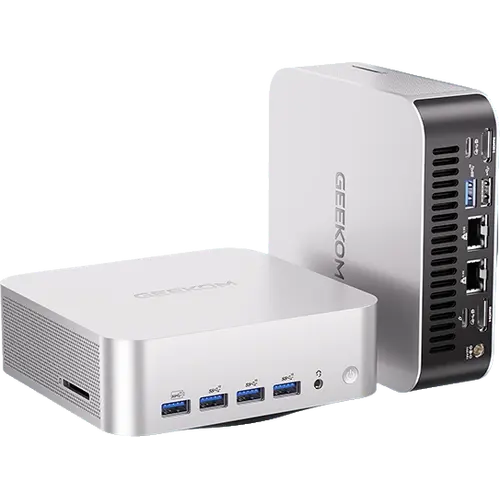
- Tiny metal chassis with more ports than many towers
- Two USB4 ports with DisplayPort plus two HDMI 2.1
- Two 2.5G Ethernet ports, Wi-Fi 7 and Bluetooth 5.4
- 32GB DDR5, easy to upgrade to 128GB
- Quiet and cool in everyday use
- Windows 11 Pro, VESA mount and HDMI cable included
Cons
- Disappointing for running local AI models
- Warranty claims can mean paid international shipping
- Only two USB-C ports
- USB4 ports are not Thunderbolt certified
- External 120W power adapter
Who is the Geekom A9 Max (HX 370) for?
Owners buy it to replace ageing laptops that cannot move to Windows 11, Mac minis when they need Windows-only software, and older machines that cannot keep up with their own code or virtual machines. It suits anyone who wants desktop-class performance on a small desk: the Ryzen AI 9 HX 370 with Radeon 890M graphics, 32GB of dual-channel DDR5 at 5600 MT/s and a 1TB PCIe Gen4 x4 SSD, in a metal chassis about 135 mm square. Two 2.5G Ethernet ports also make it a capable homelab node.
What buyers love
Size and ports come up in almost every review: owners are struck by how tiny it is and that it still has more connections than most full-size computers, with five USB 3.2 Gen 2 Type-A ports, two USB4 Type-C ports that carry DisplayPort, two HDMI 2.1 outputs, two 2.5G Ethernet ports, Wi-Fi 7 and Bluetooth 5.4. Performance gets the same praise, from smooth Office and browsing to faster video editing, virtual machines for coursework and custom apps running several times faster than on older laptops. Some find even demanding games playable, others say current games run at low to medium settings. It stays quiet and cool in normal use, feels well built, and owners like that it is easy to upgrade, with room for 128GB of memory and a second M.2 2230 slot.
What to know before you buy
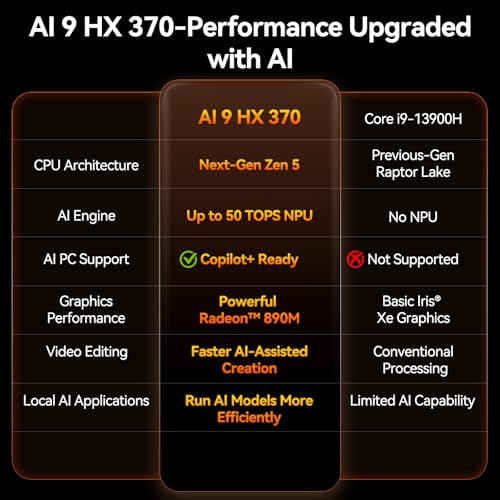
The 50 TOPS NPU does not make it a local AI workstation: one owner found that even small language models ran badly or failed to answer, even after upgrading to 128GB of memory, so buy it for its CPU and GPU rather than for running models at home. One owner had the audio port fail after five months and found the three year warranty hard to use, with the claim requiring paid international shipping. There are only two USB-C ports, the USB4 ports are not Thunderbolt certified and the 120W power supply is an external adapter. Geekom does not publish the unit's weight.
Is the Geekom A9 Max (HX 370) worth it?
For a fast, quiet and very well connected Windows desktop that fits anywhere, yes: owners find it strong value for what it includes, from Windows 11 Pro and a VESA mount to an SD 4.0 card reader and dual networking. If local AI is the main reason you are shopping, test your workload first or look at machines with far more graphics memory, and if you only need office work, a cheaper mini PC will feel just as quick.
Frequently asked questions
Can the Geekom A9 Max (HX 370) run local AI models?
Its Ryzen AI 9 HX 370 has an XDNA 2 NPU rated at 50 TOPS for Windows AI features, but one owner found local language models ran poorly even with 128GB of memory, so it is better bought as a fast general-purpose PC.
Can I upgrade the RAM and storage on the Geekom A9 Max (HX 370)?
Yes. It ships with 32GB of dual-channel DDR5-5600 on SODIMM slots and supports up to 128GB, and storage uses an M.2 2280 PCIe Gen4 x4 SSD with a second M.2 2230 Gen4 x4 slot.
How many monitors can the Geekom A9 Max (HX 370) drive?
Up to four: two through its HDMI 2.1 FRL ports and two through its USB4 Type-C ports, which carry DisplayPort.
Is the Geekom A9 Max (HX 370) good for gaming?
For lighter and older games, yes. The integrated Radeon 890M runs current titles at low to medium settings, and some owners find demanding games playable, but it is not a substitute for a dedicated graphics card.
Does the Geekom A9 Max (HX 370) support Thunderbolt?
It has two USB4 Type-C ports, but they are not Thunderbolt certified.



































