

Geekom AX8 Max Review: The Near-Silent Ryzen 7 Mini PC With Dual 2.5G LAN
The Geekom AX8 Max is a desktop replacement for people who want a quiet, port-rich machine rather than a gaming rig. Its Ryzen 7 8745HS (8 cores, 16 threads), 16 GB of DDR5 and 1 TB PCIe Gen4 SSD chew through browser-heavy office work, streaming and multitasking, while dual 2.5G Ethernet and dual 40Gbps USB4 make it a credible home server, NAS front end or four-display workstation. The trade-off is graphics: the integrated Radeon 780M is comfortable with video and light titles but buyers who tried demanding games hit its ceiling, and this chip carries no AI NPU. If silence, upgradeable memory and a three-year warranty matter more to you than frame rates, it is an easy pick.
- Quiet home offices
- Desktop replacement
- Home lab and NAS builds
- Multi-display workstations
- Living room media PCs
Pros
- Near-silent in normal use, with IceBlast 2.0 cooling keeping temperatures in check
- Ryzen 7 8745HS with 8 cores and 16 threads, paired with DDR5-5600 memory
- Dual 2.5G Ethernet ports for NAS, firewall or dual-network setups
- Two 40Gbps USB4 ports plus two HDMI 2.0 outputs, up to four displays
- Upgradeable DDR5 SODIMM memory to 64 GB and a swappable M.2 2280 Gen4 SSD
- Windows 11 Pro pre-installed, with VESA mount and HDMI cable included
- Three-year warranty and an aluminum chassis
- SD card slot and Kensington lock on board
Cons
- Integrated Radeon 780M graphics run out of headroom in demanding games
- No AI NPU on this processor, unlike the 8845HS version of the platform
- No dedicated DisplayPort connector and no Thunderbolt certification
- External 120W power adapter instead of a built-in supply
- No fingerprint reader, speakers or microphone
- The listing mixes memory configurations, so it is easy to order the wrong one
Who is the Geekom AX8 Max for?
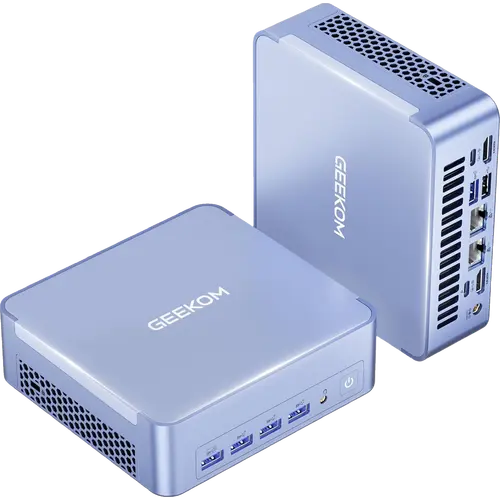
This is a mini PC aimed at the person replacing a tower that cannot move to Windows 11, or a noisy machine that sits in the same room as the television. It ships with Windows 11 Pro pre-installed on a 1 TB PCIe Gen4 SSD, mounts behind a monitor with the VESA plate in the box, and pulls its power from an external 120W adapter, so it disappears into a desk or a media cabinet. The port list is what sets it apart from cheaper mini PCs: two 2.5G Ethernet jacks that can be split between a LAN and an internet side or aggregated for bandwidth, two USB4 Type-C ports at 40Gbps that carry video and external storage, five USB 3.2 Gen 2 Type-A ports, a USB 2.0 port, two HDMI 2.0 outputs, an SD card slot and a Kensington lock. That combination suits a home lab, a small NAS front end, a trading or monitoring desk with several screens, and any office that needs a wired network path instead of Wi-Fi.
What buyers love
Two themes dominate the reviews: noise and speed. Owners describe the machine as basically silent, with the fan audible only if you put your ear next to it, and one buyer who had built a dedicated quiet desktop with sound-deadening parts said this replaced it without any of that work. Heat is not a complaint either, including from someone running it inside a closed media cabinet. On performance, buyers coming from older desktops and from Geekom's own entry-level models report instant boots, no slowdown with dozens of browser tabs open, and smooth 4K streaming. Setup gets consistent praise for being a matter of minutes thanks to the pre-activated Windows 11 Pro install, and several reviewers single out the packaging and build quality, the included VESA mount and HDMI cable, the low power draw in normal use, and the three-year warranty as reasons they chose it over a cheaper box.
What to know before you buy
Graphics are the honest limit. The Radeon 780M is a capable integrated GPU for video, office work and older or lighter games, but one buyer bought the machine specifically to play a modern MMO on a television and could not get it running smoothly after hours of tuning. If gaming is the goal, either plan on an external GPU over USB4 or buy a different class of machine. The Ryzen 7 8745HS also lacks the Ryzen AI NPU its 8845HS sibling has, so local AI acceleration is not part of the package despite the AI branding around this category. On connectivity, there is no dedicated DisplayPort connector and no Thunderbolt certification: displays hang off the two HDMI 2.0 ports and the two USB4 ports. The power supply is an external brick rather than built in, and there is no fingerprint reader, speaker or microphone on board. Two practical warnings from buyers: the same listing sells more than one memory configuration, and at least one international buyer received a different capacity than expected, so confirm which variant is in your cart; and while most units arrive working, the reviewer whose machine failed described a slow, frustrating support escalation.
Is the Geekom AX8 Max worth it?
For a quiet, wired, always-on desktop it is very good value. You get a full eight-core Zen 4 chip, DDR5 memory in two SODIMM slots that you can take to 64 GB yourself, a Gen4 SSD you can swap, dual 2.5G networking and USB4, all in an aluminum chassis with a three-year warranty. Nothing here is soldered shut, which is the main argument against the small-form-factor machines it competes with. The reasons to spend more are graphics performance and on-device AI: a Ryzen AI or discrete-GPU mini PC costs noticeably more but answers both. The reason to spend less is if you only need a browser and a couple of tabs, where an N100-class box will do. For everyone in between, this hits the sweet spot of ports, silence and upgradeability.
Frequently asked questions
Is the Geekom AX8 Max quiet enough for a living room?
Yes. Buyers consistently describe it as near-silent, with the fan only audible from a few inches away, and one owner runs it inside a closed media cabinet without heat problems. The IceBlast 2.0 cooling system and the three selectable performance modes let you keep it in a quiet profile for media and office work.
Can the Geekom AX8 Max handle gaming?
Only light gaming. The integrated AMD Radeon 780M handles older titles, emulation and 1080p casual play, but a buyer trying a modern MMO on a television could not get smooth frame rates after extensive tuning. The two USB4 ports can drive an external GPU if you want real gaming performance later.
How much memory and storage can the Geekom AX8 Max take?
This configuration ships with 16 GB of DDR5-5600 in dual-channel SODIMM slots and a 1 TB M.2 2280 PCIe Gen4x4 SSD. Geekom rates the machine for up to 64 GB of DDR5 and up to 2 TB of Gen4 storage, and both are user-replaceable rather than soldered.
How many monitors can the Geekom AX8 Max drive?
Up to four. Two HDMI 2.0 outputs and two USB4 Type-C ports each carry video, so you can run a four-screen 4K setup or a single 8K display. There is no dedicated DisplayPort jack, so DisplayPort monitors need a USB-C connection or an adapter.
Does the Geekom AX8 Max work as a home server or NAS?
It is one of the better mini PCs for that job. The two 2.5G Ethernet ports let you separate an internal network from the internet-facing side or aggregate them for bandwidth, the USB4 ports handle fast external storage, and the machine is quiet and low-power enough to leave running around the clock. It is fully compatible with Linux alongside the pre-installed Windows 11 Pro.
What comes in the box with the Geekom AX8 Max?
The mini PC, a 19V 120W power adapter, an HDMI cable, a VESA mount for attaching it behind a monitor, and the user manual. Geekom backs it with a three-year warranty.