


Geekom GT13 Max Review: Dual USB4 and Dual 2.5G Ethernet in a Core Ultra 9 Mini PC
The Geekom GT13 Max is a compact desktop built around Intel's Core Ultra 9 185H, with 16 cores and 22 threads, Intel Arc graphics and an Intel AI Boost NPU. Owners who use it as a tower replacement, a travel desktop or a general office and design machine praise its speed, tiny footprint and easy setup. The recurring complaint is fan noise, which several buyers found loud or high pitched, and a few received units that locked up or overheated, with support that went unanswered. Two USB4 ports, dual 2.5G Ethernet, Wi-Fi 7 and eight USB ports make it well connected for its size, and the 16 GB of DDR5 on SO-DIMM modules plus a second M.2 slot leave room to grow, offset by an external 120W adapter, no Thunderbolt certification and an ABS chassis.
- Replacing a desktop tower
- Travel and compact workstations
- Multi-display productivity
- Upgradeable compact desktops
Pros
- Fast Intel Core Ultra 9 185H with 16 cores and 22 threads
- Small enough to pack up for travel, with a VESA mount
- Easy setup, with Windows 11 Pro ready to go
- Two USB4, two HDMI 2.0 and a Mini DisplayPort 1.4
- Dual 2.5G Ethernet, Wi-Fi 7 and Bluetooth 5.4
- 16 GB dual-channel DDR5 SO-DIMM, upgradeable to 64 GB
- 1 TB PCIe 4.0 SSD plus a free M.2 2242 SATA slot
- Three-year warranty
Cons
- The fan is loud or high pitched for several owners
- A few units locked up or ran hot, and some owners report unresponsive support
- 16 GB of memory and a 1 TB SSD feel limited for heavy workloads
- External 120W power adapter
- USB4 ports are not Thunderbolt certified
- Second M.2 slot is SATA only
- No built-in speakers, microphone or fingerprint reader
- ABS chassis rather than metal
Who is the Geekom GT13 Max for?
It suits a desk that needs desktop-class performance in very little space. Owners describe replacing an older tower, packing it into a bag with a keyboard and mouse for a portable setup that reconnects in a minute, using it for graphic design in the Adobe suite and for general office work. The Core Ultra 9 185H runs 16 cores and 22 threads up to 5.10 GHz, with a dedicated NPU for AI features. Dual 2.5G Ethernet and Wi-Fi 7 also make it a candidate for a home server, firewall or network lab, and it is a practical upgrade platform, with SO-DIMM memory and a second M.2 slot.
What owners like about the Geekom GT13 Max
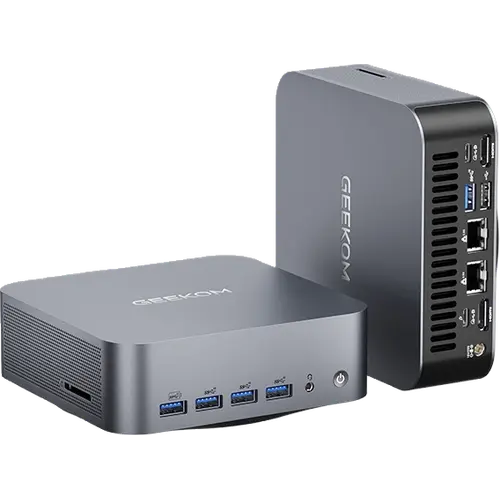
Speed and size are the main praise. Owners say processing is far quicker than the tower they replaced, that it handles design software smoothly and that it is easy to hook up, with Windows 11 ready to go. They like the number of USB ports, the VESA mount and the compact body. Connectivity leads the spec sheet: two USB4 Type-C ports, five USB 3.2 Gen 2 Type-A, one USB 2.0, two HDMI 2.0 outputs and a Mini DisplayPort 1.4, rated up to 8K along with video over both USB4 ports. Networking is two 2.5G Ethernet ports, Intel Wi-Fi 7 (BE200) and Bluetooth 5.4, and there is an SD 4.0 card reader. Some buyers call it good value for the performance.
What to know before you buy
The fan is the weak point. Several owners found it noisy, one describing a loud, high-pitched fan that is much louder than the maker's other models, one a fan that runs nonstop even at idle despite BIOS and power-plan changes, and one a grinding noise at first start. A small group had worse luck: a unit that locked up at the login screen with a lagging cursor, and support that stopped replying after promising a replacement. The base memory is 16 GB, which one buyer found slow for AI experiments until adding more, and another wished it came with more memory and a bigger SSD. Power comes from an external 19V 120W adapter, the USB4 ports are not Thunderbolt certified, the second storage slot is M.2 2242 SATA, the chassis is ABS rather than metal, and there are no built-in speakers, microphone or fingerprint reader.
Is the Geekom GT13 Max worth it?
It is worth it when you will use the ports and the upgrade path. Two USB4 ports, dual 2.5G Ethernet, three video outputs beyond USB4 and two M.2 slots are rare in a chassis this small, and the three-year warranty is longer than most mini PCs offer. Most owners are pleased with the speed, but fan noise decides whether it suits a quiet desk, so it is a gamble for anyone sensitive to it. The Core Ultra 9 185H is an earlier generation of Intel's Core Ultra line, so buyers chasing the newest silicon or a discrete GPU should look at newer or larger machines.
Frequently asked questions
Is the Geekom GT13 Max loud?
Fan noise is the most common complaint. Several owners found the fan loud or high pitched, and one says it runs constantly even at idle, while others are happy with it. Check the noise within the return window if you are sensitive to it.
How many monitors can the Geekom GT13 Max drive?
It has two HDMI 2.0 outputs, a Mini DisplayPort 1.4 and two USB4 ports that also carry video, with Geekom rating the Mini DisplayPort and USB4 outputs up to 8K.
Can the memory and storage be upgraded?
Yes. It ships with 16 GB of dual-channel DDR5 on SO-DIMM modules, expandable to 64 GB, and one owner added a second 16 GB module within a day. Storage is a 1 TB M.2 2280 PCIe Gen4 x4 SSD, with a second M.2 2242 SATA slot for another drive.
Does the Geekom GT13 Max have Thunderbolt?
No. It has two USB4 Type-C ports instead, which handle fast storage, displays and docks but are not Thunderbolt certified.
What ports does the Geekom GT13 Max have?
Two USB4 Type-C, five USB 3.2 Gen 2 Type-A, one USB 2.0, two HDMI 2.0, one Mini DisplayPort 1.4, two 2.5G Ethernet, an SD 4.0 card reader and a 3.5 mm audio jack.
Is the Geekom GT13 Max good for a home server?
Its two 2.5G Ethernet ports, Wi-Fi 7, two M.2 slots and up to 64 GB of memory suit a home server, network lab or firewall, with USB4 for fast external storage. The fan noise reported by some owners may matter in a living space.