





Geekom IT13 2026 Edition Review: Core Ultra 7 With Three Drive Bays
The IT13 2026 Edition is the Ultra 7 configuration of Geekom's Intel line, and it is aimed at people who want desktop-class performance from a machine that hides behind a monitor. The Core Ultra 7 356H runs 16 cores up to 4.70 GHz with a dedicated 50 TOPS NPU for on-device AI, memory moves to DDR5 SODIMM that takes up to 64GB, and the chassis keeps three separate storage bays, so a fast boot drive and bulk storage can live in the same 117 mm box. The trade-offs are a single 2.5G Ethernet port and no dedicated DisplayPort connector, and it sits at the premium end of the mini PC market rather than the value end.
- Home lab and NAS builds
- Local AI workloads
- Multi-display productivity
- Storage-heavy compact desks
Pros
- Intel Core Ultra 7 356H with 16 cores and a 4.70 GHz boost
- Dedicated 50 TOPS NPU for on-device AI work
- Three internal storage bays: M.2 2280 NVMe, M.2 2242 SATA and a 2.5-inch SATA slot
- 32GB of DDR5 SODIMM memory, upgradeable to 64GB
- Two USB4 Type-C ports plus dual HDMI 2.0 for up to four displays at 8K
- Wi-Fi 7 and Bluetooth 5.4 with 2.5G Ethernet
- SD card reader, Kensington lock, VESA mount and HDMI cable included
- Three-year warranty and a 652g metal chassis
Cons
- Single 2.5G Ethernet port rather than dual
- No dedicated DisplayPort connector and no Thunderbolt
- Memory ceiling of 64GB, below several Intel siblings
- Memory speed and channel configuration are not published
- External power brick, no internal power supply
- No built-in speaker, microphone or fingerprint reader
Who is the Geekom IT13 2026 Edition for?
This configuration suits a desk that has to do real work in almost no space. The Core Ultra 7 356H pairs 16 cores with a dedicated AI accelerator rated at 50 TOPS, which is the part that separates it from the older Intel mini PCs in this class: local model inference, AI photo and video tooling and background effects run on the NPU instead of stealing CPU time. It also fits the always-on role well, since it is small enough to VESA-mount behind a screen, ships with the mount in the box, and is covered by a three-year warranty. For a smart home, a mini PC in this bracket is the machine that runs the automation server, the media library and a couple of containers at once without a tower under the desk.
What stands out on paper
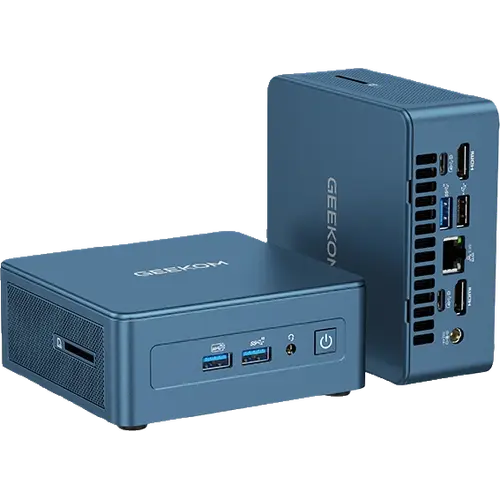
Storage flexibility is the headline. Alongside the 1TB M.2 2280 PCIe Gen4 x4 SSD there is an M.2 2242 SATA slot and a 2.5-inch SATA bay, so a boot drive, a scratch disk and a bulk volume all fit inside without an external enclosure. Memory is 32GB of DDR5 in SODIMM form, expandable to 64GB, so it is upgradeable rather than soldered. Connectivity is current: Wi-Fi 7, Bluetooth 5.4, 2.5G Ethernet, two USB4 Type-C ports at the front of the spec sheet and three USB 3.2 Gen 2 Type-A ports plus one USB 2.0 port for everything else. Two HDMI 2.0 outputs and the two USB4 ports drive up to four displays with 8K support, and the chassis still finds room for an SD card reader, a 3.5 mm headphone jack and a Kensington lock. IceBlast 2.0 cooling handles the thermals, and the machine weighs 652g in a metal chassis measuring 117 x 112 x 49.2 mm.
What to know before you buy
Networking is single 2.5G Ethernet, not the dual ports that router, firewall or NAS duty benefits from, so a second link means a USB4 adapter. There is no dedicated DisplayPort connector and no Thunderbolt branding, so a DisplayPort monitor connects through a USB4 port instead. The memory ceiling is 64GB, lower than the 128GB some Intel siblings accept, and Geekom does not publish the memory speed or whether the two slots run dual-channel. Power comes from an external 19V 6.32A adapter rather than an internal supply, which means one more brick on the floor, and there is no fingerprint reader, no built-in speaker and no microphone, so a headset or a monitor with speakers is part of the setup.
Is the Geekom IT13 2026 Edition worth it?
It is worth it when the storage bays, the NPU and the four-display output are things you will actually use, because that combination is rare at this size and the three-year warranty is longer than most of the competition offers. It is not the value pick: this configuration sits at the premium end of the range, and the cheaper 13th-generation configurations of the same chassis cost far less if AI acceleration and DDR5 are not on your list. Buyers who want dual Ethernet or 128GB of memory should look at the larger Intel and AMD models instead.
Frequently asked questions
How much storage can the IT13 2026 Edition hold?
It ships with a 1TB M.2 2280 PCIe Gen4 x4 SSD and adds two more bays: an M.2 2242 SATA slot and a 2.5-inch SATA slot, so a boot drive, a second SSD and a bulk drive fit inside the same chassis.
How many monitors can it drive?
Up to four, using the two HDMI 2.0 outputs and the two USB4 Type-C ports, with 8K output supported.
Can the memory be upgraded?
Yes. Memory is DDR5 in SODIMM form rather than soldered, ships at 32GB and can be taken up to 64GB.
Is it any good for local AI models?
It carries a dedicated NPU rated at 50 TOPS, which is enough for on-device AI features and small local models. Heavier inference still wants a machine with a discrete GPU.
Does it come with Windows preinstalled?
Yes, Windows 11 Pro is preinstalled.
Can it be mounted behind a monitor?
Yes. A VESA mount is included in the box, along with an HDMI cable, and the unit weighs 652g.