




Geekom IT13 Max Review: Sixteen Cores, 24GB of LPDDR5 and Dual 2.5G Ethernet in a 0.9L Box
The Geekom IT13 Max is a compact desktop built around Intel's 16-core Core Ultra 9 185H with a dedicated AI Boost NPU and Intel Arc graphics. Its 24GB of LPDDR5 runs fast in dual-channel, and it is unusually well connected for its size with dual 2.5G Ethernet, Wi-Fi 7, two USB4 ports and dual HDMI for up to four displays. The main catch is that the memory is soldered, so the 24GB configuration cannot be upgraded, and power comes from an external brick. Buyers who want a quiet, low-footprint machine for virtual machines, coding and light creative work get a lot of performance for the money.
- Home lab and NAS builds
- Virtual machines and coding
- Multi-monitor productivity
- Value-focused buyers
Pros
- 16-core Intel Core Ultra 9 185H with a dedicated AI Boost NPU and Intel Arc graphics
- 24GB of dual-channel LPDDR5 at 5600 MT/s for smooth multitasking and virtual machines
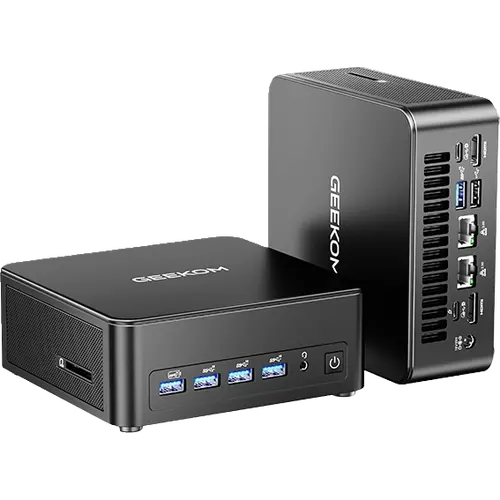
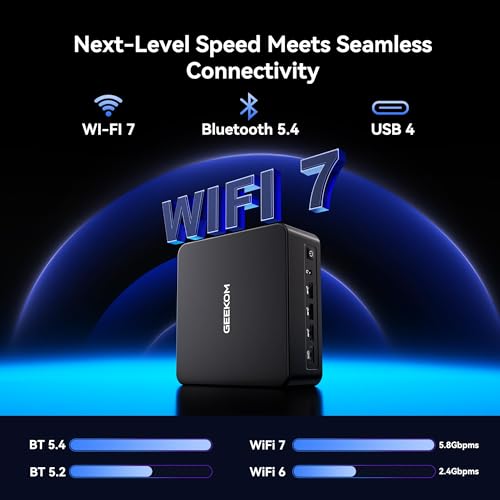
- Dual 2.5G Ethernet, Wi-Fi 7 and Bluetooth 5.4
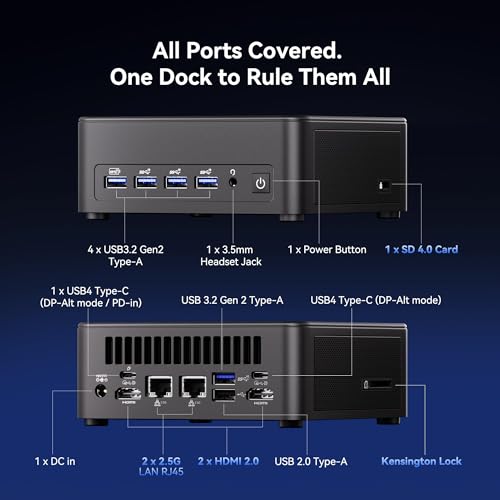
- Two USB4 Type-C ports plus dual HDMI 2.0 for up to four displays or a single 8K screen
- Five USB 3.2 Gen 2 Type-A ports, a USB 2.0 port and an SD 4.0 card reader
- 500GB PCIe Gen4 SSD with a free M.2 2242 SATA slot for a second drive
- Three-year warranty and an included VESA mount
Cons
- Memory is soldered: 24GB is the ceiling, with no upgrade path
- Only two USB-C ports
- No Thunderbolt and no dedicated DisplayPort connector
- External 120W power adapter instead of an internal supply
- No built-in speakers or microphone and no fingerprint reader
- The fan can become audible under sustained heavy load
Who is the Geekom IT13 Max for?
The IT13 Max suits a desk that needs desktop-class performance in almost no space. The 16-core Core Ultra 9 185H handles heavy multitasking, coding and virtual machines, while the AI Boost NPU and Intel Arc graphics cover on-device AI features and light creative work. Dual 2.5G Ethernet, Wi-Fi 7 and two USB4 ports make it a candidate for a home server, NAS controller or home lab, and the VESA mount lets it hide behind a monitor. It is not aimed at buyers who need a discrete GPU for demanding games or who insist on upgradeable memory.
What owners praise
Buyers consistently describe the machine as fast and quiet for everyday work, and many single out its compact size and easy setup: plug in a keyboard, mouse and monitor and it is running. Owners running several virtual machines at once report it keeps up, and Windows 11 Pro with Hyper-V support is a repeated plus for study and IT work. The port count comes up often as a strength, with dual HDMI and the front USB-A ports covering a monitor, wired peripherals and external storage without a hub. Value for the hardware is another recurring theme.
What to know before you buy
The 24GB of LPDDR5 is soldered, so this configuration has no memory upgrade path; if you expect to expand RAM later, the 16GB DDR5 SODIMM variant of the same chassis is the one to pick instead. There are only two USB-C ports, both USB4 rather than Thunderbolt, and no dedicated DisplayPort connector, so a DisplayPort monitor connects through a USB4 port. Power comes from an external 19V 120W adapter rather than an internal supply, and there are no built-in speakers, no microphone and no fingerprint reader. Under sustained heavy load the fan becomes audible, and support experiences among buyers have been mixed, from quick follow-ups to slow handling of a warranty return.
Is the Geekom IT13 Max worth it?
It is worth it when the connectivity and the CPU matter more than expandability. Dual 2.5G Ethernet, Wi-Fi 7, two USB4 ports and dual HDMI are rare together in a chassis this small, and the three-year warranty is longer than most rivals offer. The Core Ultra 9 185H is a previous-generation chip, so buyers chasing the newest silicon should look at newer models, and the soldered memory rules out later upgrades. For a quiet, compact machine for virtual machines, coding, media and always-on services, the price-to-performance is hard to beat.
Frequently asked questions
Can you upgrade the memory or storage on the Geekom IT13 Max?
The 24GB of LPDDR5 is soldered, so memory cannot be upgraded. Storage can: it ships with a 500GB M.2 2280 PCIe Gen4 SSD and adds a free M.2 2242 SATA slot for a second drive.
How many monitors can the Geekom IT13 Max drive?
Up to four, using the two HDMI 2.0 outputs and the two USB4 Type-C ports, or a single display at up to 8K.
Does the Geekom IT13 Max have Thunderbolt?
No. It has two 40Gbps USB4 Type-C ports rather than Thunderbolt, and one of them can take power input.
Is the Geekom IT13 Max good for a NAS, home server or virtual machines?
Yes. Its dual 2.5G Ethernet ports, 16-core CPU and 24GB of memory suit always-on servers, NAS duties and running several virtual machines at once.
Does the Geekom IT13 Max come with Windows?
It ships with Windows 11 Pro preinstalled and is listed as Linux compatible.
What is in the box with the Geekom IT13 Max?
The mini PC, a 120W 19V power adapter, an HDMI cable, a VESA mount and a user guide.