


Geekom Mini Air12 Review: The Budget Mini PC Owners Bolt Behind the Monitor and Forget About
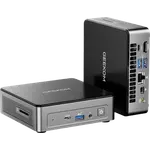
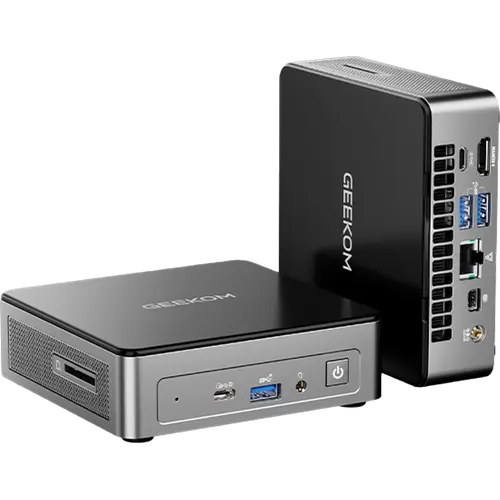
The Geekom Mini Air12 puts the Intel Pentium Gold 7505 with 48 EU UHD graphics, 8GB of dual-channel DDR4 and a 256GB NVMe drive into a chassis of 117 x 112 x 34.2 mm. Owners consistently describe it the same way: easy to set up, genuinely quiet, and so small and light that the VESA bracket behind a monitor becomes the obvious place for it. Connectivity is generous for the price, with five USB ports (three Type-A and two Type-C), HDMI 2.0, Mini DisplayPort 1.4, a full-size SD card reader, Gigabit Ethernet and Wi-Fi 6. The honest limit is the processor: several buyers say it runs out of headroom on heavier work and that they would step up a tier next time. As an office, browsing, streaming or always-on machine, it does what people bought it for.
- Home office and web browsing
- Media servers and streaming boxes
- Classrooms and retail kiosks
- Behind-the-monitor VESA installs
Pros
- Easy setup, repeatedly described as plug in and go
- Quiet operation with IceBlast 3.0 dual copper heat pipe cooling
- Very small at 34.2 mm tall, with the VESA bracket owners praise
- Five USB ports, three Type-A and two Type-C
- Full-size SD card reader and a front combo audio jack
- HDMI 2.0 plus Mini DisplayPort 1.4 for multiple displays
- Dual SO-DIMM slots, so memory can be upgraded later
- Windows 11 Pro preinstalled with a three-year warranty
Cons
- Owners report running out of processor headroom on heavier tasks
- Disk activity LED is bright enough to distract in a dark room
- Only one M.2 slot, so storage grows by replacement
- Very light chassis, with one owner reporting internal damage after a drop
- Support hours are weekdays only, not around the clock
- No Thunderbolt, discrete graphics, speakers or microphone
- Gigabit rather than 2.5G Ethernet
Who is the Geekom Mini Air12 for?
This is the budget end of the mini PC market, and buyers treat it that way. The Pentium Gold 7505 is a two-core, four-thread Tiger Lake chip with a 15W TDP and Intel UHD graphics carrying 48 execution units, which covers email, browsing, office documents, video calls, 4K streaming and light productivity. Owners describe using it exactly there: a daily driver for office tasks and online browsing, a streaming media server, a machine for classroom and remote work, and in one case a controller for CNC machines. One reviewer sums up the right expectation neatly, saying that if you realise the Air12 is basically a laptop computer in a small box you will not be disappointed in its performance.
What buyers love
Three themes repeat. Setup is the first: buyers describe screwing the provided backplate onto the monitor, hanging the machine on it, plugging in HDMI and power, and being finished, with several calling the VESA mounting a genuinely thoughtful touch that clears the desk and lets one monitor, keyboard and mouse serve two computers. Silence is the second, mentioned alongside good cooling and a solid, compact build. The third is value: multiple owners bought a second unit after the first worked out, and one describes it as a dependable, efficient machine that delivers exactly as advertised. The port count also gets specific praise, with buyers noting there are plenty of USB ports in both Type-A and Type-C form, plus the SD card reader for photo transfers.
What to know before you buy
The performance ceiling is real and owners say so plainly: one notes it runs out of performance fairly quickly on basic tasks and that they would buy the next tier up given another chance, and others explicitly rule out gaming and video editing. Memory is 8GB in this configuration, upgradeable through two SO-DIMM slots, and there is a single M.2 slot, so storage grows by replacement rather than addition. A recurring small annoyance is the disk activity LED, described as very bright and distracting in a dark room. The chassis is very light, and one buyer who dropped it had something come loose inside. Geekom support runs weekdays only rather than around the clock, though owners who reached it describe helpful responses, including repair instructions and, in one documented case from an early unit, a free replacement. There is no Thunderbolt, no built-in speakers or microphone and no discrete graphics.
Is the Geekom Mini Air12 worth it?
For its intended job, yes. It is one of the least expensive ways into a fully configured Windows 11 Pro desktop with a three-year warranty, and buyers who matched their expectations to a low-power chip report being happy enough to buy more units. Anyone doing photo or video work, virtualization or anything gaming-adjacent should skip it and look at the Ryzen and Core Ultra machines further up this category, where eight or more cores cost two to three times as much. Anyone who needs a quiet, tiny, low-power box for browsing, office work, streaming or a home server will find little to complain about beyond a bright status light.
Frequently asked questions
Is the Geekom Mini Air12 fast enough for everyday work?
For browsing, email, office documents, video calls and 4K streaming, owners say yes. Several also warn that it runs short of headroom on heavier workloads, and one specifically says they would choose a higher tier next time, so match it to light tasks.
Can I mount it behind a monitor?
Yes, and it is one of the most praised features. Owners describe screwing the supplied backplate to the monitor and hanging the machine on it, which frees the desk entirely.
How many displays can it drive?
Up to three, using the HDMI 2.0 port, the Mini DisplayPort 1.4 and the full-function USB-C port.
Can the memory and storage be upgraded?
Memory yes, through two DDR4 SO-DIMM slots up to 32GB. Storage has a single M.2 2280 slot that accepts SATA or PCIe drives up to 2TB, so increasing capacity means swapping the installed drive.
Is it noisy?
Owners consistently say no. The cooling uses dual copper heat pipes with an ultra-quiet fan, and quiet operation is one of the qualities buyers mention most often.
Does it work with Linux?
Yes. It ships with Windows 11 Pro, and Geekom lists support for Linux distributions including Ubuntu as well as FydeOS, which is why some buyers use it as a home server or soft router.