


GMKtec G10 Review: The Palm-Sized Windows 11 Pro Box That Wins on Value, Once You Flip the BIOS
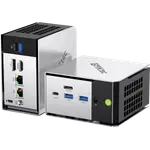
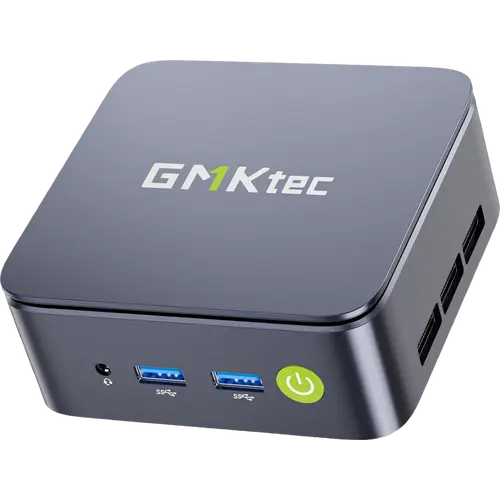
The G10 is an entry-level mini PC built for office work, browsing, media and home-lab duty rather than for speed records. It pairs an AMD Ryzen 5 3500U with Radeon Vega 8 graphics, 16 GB of dual-channel DDR4 that can grow to 64 GB, two M.2 2280 PCIe 3.0 bays and a 2.5 Gigabit Ethernet port, all in a plastic chassis of 103 x 98 x 42 mm that weighs 284 g and mounts behind a monitor with the bracket in the box. Owners consistently call it excellent value and near silent, and just as consistently point out the two catches: the machine leaves the factory in a low-power BIOS profile that has to be switched to Performance to feel quick, and once it is, it runs hot. Buy it for a light desktop, a Linux box or a always-on home server, not for gaming or heavy multitasking.
- Home office work
- Home lab and small servers
- Linux users
- Budget buyers
- Media and streaming boxes
Pros
- Outstanding value for an entry-level Windows 11 Pro machine
- Near silent in everyday use, with low power draw
- Two DDR4 SO-DIMM slots, filled in dual channel and upgradeable to 64 GB
- Two M.2 2280 PCIe 3.0 bays, so the fitted 512 GB drive leaves one free
- 2.5 Gigabit Ethernet instead of the usual gigabit port
- Triple display output over HDMI 2.1, DisplayPort 1.4 and USB-C
- Windows 11 Pro pre-installed and activated, and owners report Linux running well
- Tiny and light at 103 x 98 x 42 mm and 284 g, with VESA mount and HDMI cable included
- Kensington lock slot and a 3.5 mm audio jack on the chassis
- Powered over USB-C, so a compatible PD charger or power bank can run it
Cons
- Ships in a low-power BIOS profile and feels slow until Performance mode is enabled
- Runs hot under sustained load in Performance mode, with reports of SSD throttling
- Older Ryzen 5 3500U, so Windows updates and heavy multitasking drag
- Driver gaps reported after clean installs, including video playback stuck below 1080p
- Setup quirk: the manual warns against connecting to a network during first-run Windows setup
- Wi-Fi 5 and Bluetooth 5.0 rather than Wi-Fi 6
- No USB4, no Thunderbolt and no NPU
- No SD card reader, no built-in speaker and no microphone
- Plastic chassis and a one-year warranty, with mixed reports on after-sales support
Who is the GMKtec G10 for?
This is a machine for the jobs that fill a normal day: email, documents and spreadsheets, a browser with a dozen tabs, video calls, streaming and light photo work. Owners describe exactly that use, plus a second life that shows up again and again in the reviews: a small always-on box for the home lab. People run it as a Home Assistant host, as a NAS, as a remote-access machine with SSH and a VPN mesh, and several report installing Linux (Mint, Arch, Ubuntu) alongside or instead of the pre-installed Windows 11 Pro. Three things make it fit that role. It draws little power, it is quiet enough to sit in a bedroom or a living room, and at 103 x 98 x 42 mm and 284 g it disappears behind a monitor on the VESA bracket that ships with it. The 2.5 Gigabit Ethernet port is the detail that keeps coming up: at this tier most rivals still ship a plain gigabit port, and buyers moving files or serving media across a LAN notice the difference.
What buyers love
The value verdict is close to unanimous: buyers in the US, the UK, Germany, Spain and the Netherlands all land on some version of "far more computer than expected for the money". After that, three praises repeat. The noise level, or lack of it, with several owners saying they could not tell the fan was running during normal work. The setup, which is genuinely quick because Windows 11 Pro arrives pre-installed and activated, with owners reporting a first boot to a usable desktop in about fifteen minutes and no bundled junk software. And the upgrade path: the lid pops off, and inside are two DDR4 SO-DIMM slots that take up to 64 GB and two M.2 2280 PCIe 3.0 bays, one of them free next to the fitted 512 GB drive, so adding storage or dual-booting a second system is a screwdriver job rather than a reason to replace the machine. Light gaming comes up more often than the spec sheet suggests it should: with the Vega 8 graphics running at up to 1200 MHz, owners report older and less demanding titles running acceptably at 1080p on low settings.
What to know before you buy
The single most important thing owners repeat is that the G10 ships in a conservative BIOS power profile and feels sluggish until it is switched to Performance mode, which is a manual step nothing on screen prompts you to take. Once it is switched, the second complaint appears: the machine runs hot under sustained load, with one owner measuring temperatures in the nineties Celsius and seeing the SSD throttle, and another keeping the unit on its side for airflow. Drivers are the other rough edge. Several buyers hit missing network or audio drivers after a clean Windows install, and one was stuck at 720p video playback until support pointed at a driver download. There is also a widely repeated setup quirk: a tiny label over the network socket warns you not to connect to a network during the first Windows setup, and owners who missed it ran into freezes and update loops. Beyond the software, the hardware limits are honest ones for the tier. The Ryzen 5 3500U is an older Zen+ chip, so Windows updates and heavy multitasking feel slow, there is no NPU for on-device AI work, wireless is Wi-Fi 5 with Bluetooth 5.0 rather than Wi-Fi 6, and there is no USB4, no Thunderbolt, no SD card reader and no built-in speaker or microphone. Support experiences split: some owners had activation and driver problems solved quickly, one waited months on a replacement, and one unit stopped producing video output after little more than a year, against a one-year warranty.
Is the GMKtec G10 worth it?
For a light desktop or a small always-on server it is easy to recommend, provided the buyer knows about the BIOS switch. What the money buys is a complete, licensed Windows 11 Pro machine with 16 GB of dual-channel memory, a 512 GB NVMe drive, a free second M.2 bay, a 2.5 Gigabit network port, triple display output over HDMI 2.1, DisplayPort 1.4 and USB-C, a Kensington lock slot, and an HDMI cable and VESA mount in the box. What the money does not buy is headroom. Anyone who plans to edit video, play modern games, run demanding virtual machines, or lean on on-device AI should step up to a current Ryzen or Core Ultra mini PC instead, and anyone who needs Wi-Fi 6 or a single-cable Thunderbolt dock should look elsewhere too. Inside its lane, which is office work, media, Linux tinkering and home-lab duty in a 284 g box, it does the job for very little.
Frequently asked questions
Why does the GMKtec G10 feel slow out of the box?
It leaves the factory in a conservative BIOS power profile. Owners consistently report a large jump in responsiveness after entering the BIOS and switching the machine to Performance mode, which raises the processor power limit. The trade-off is heat: in that mode the unit runs noticeably hotter under sustained load.
How much memory and storage can it take?
Memory is DDR4 at 2400 MHz in two SO-DIMM slots, shipping as a 16 GB dual-channel pair and upgradeable to 64 GB. Storage is two M.2 2280 PCIe 3.0 bays, one occupied by the 512 GB drive and one free, with GMKtec quoting expansion up to 16 TB across both.
Can the GMKtec G10 drive three monitors?
Yes. It has HDMI 2.1 at up to 4K 60 Hz, DisplayPort 1.4 and a full-function USB-C port that carries DisplayPort, so three screens can run at once. There is no Thunderbolt and no USB4.
Does it come with Windows, and does Linux work on it?
Windows 11 Pro is pre-installed and owners report it arriving activated. Linux is a common choice too: reviewers describe running Mint, Arch and Ubuntu on it, with Ethernet, Wi-Fi, Bluetooth, audio and video working. Some owners had to fetch network and audio drivers manually after a clean Windows reinstall.
How is it powered, and how loud is it?
Power comes in over USB-C from a 19 V, 3.42 A adapter rated at 64.98 W, so a compatible USB-C PD charger can run it as well. Cooling is a single turbo fan that GMKtec rates under 35 dB, and owners describe it as near silent during normal work, with the fan only becoming audible under load.
Is the GMKtec G10 good for gaming?
Only for light gaming. The Radeon Vega 8 graphics run at up to 1200 MHz, and owners report older or undemanding titles playing acceptably at 1080p on low settings. Modern games at high detail are out of reach, and pushing the machine there is what triggers the heat complaints.