GMKtec G11 Review: The Quiet Dual 2.5GbE Mini PC Built for Networks, Not Games
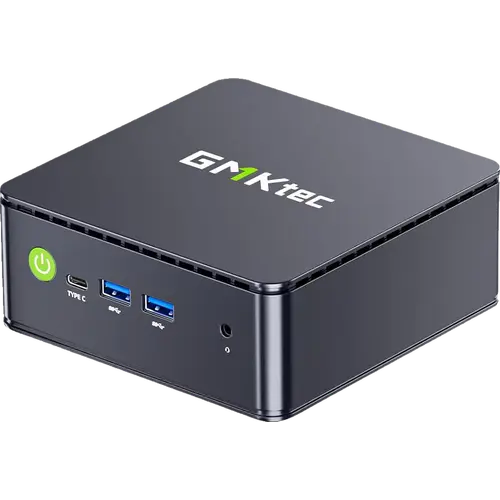
The GMKtec G11 is a small, quiet desktop for the jobs a full tower is overkill for: office work, streaming, a home server, a NAS or a software firewall. Its headline trick is the pair of 2.5 Gigabit Ethernet ports, which is rare at this size and price, backed by triple 4K display output, Wi-Fi 6E and a 16 GB dual-channel, upgradeable setup. The catch is the AMD Ryzen Embedded R2514, a low-power chip that is fine for everyday tasks but no match for a current mainstream CPU under heavy load, and there is no USB4 or Thunderbolt. Treat it as a capable, efficient little workhorse rather than a gaming rig and it delivers a lot for the money.
- Home lab and home servers
- DIY firewall and router builds (pfSense/OPNsense)
- Small office desktops
- Triple-monitor work setups
- Home theater and digital signage
Pros
- Dual 2.5 Gigabit Ethernet, rare on a mini PC at this size
- Quiet, low-power AMD Ryzen Embedded R2514 with Radeon Vega 8 graphics
- Triple 4K display output over two HDMI 2.0 ports and USB-C DisplayPort
- 16 GB dual-channel DDR4 and two M.2 2280 PCIe 3.0 slots, both upgradeable
- Wi-Fi 6E and Bluetooth 5.2
- Windows 11 Pro pre-installed and licensed
- Compact 128.5 x 127 x 51 mm chassis with a VESA mount, HDMI cable and adapter included
Cons
- The embedded R2514 is a low-power chip, not for gaming or heavy multitasking
- No USB4 or Thunderbolt and no SD card slot
- Plastic chassis and a one-year warranty
- Full performance needs the 35W Performance mode set manually in the BIOS
- No built-in speakers or microphone, and the USB-C port does not accept power input
Who is the GMKtec G11 for?
The G11 is for anyone who wants a real Windows desktop or a small always-on machine without giving up a corner of the desk. The dual 2.5 Gigabit Ethernet ports are the reason to pick it over a generic mini PC: they let the same box serve as a software router or firewall, a compact NAS, a virtualisation host or an isolated network for cameras and smart-home gear. The triple 4K output suits a trading or editing desk and digital signage, and the VESA mount plus HDMI cable in the box mean it can disappear behind a monitor or a TV. A recurrent note from owners of GMKtec machines is how little they care about the machine once it is set up, because it is quiet and small enough to forget, which is exactly the job here.
What owners of this family praise
Across the reviews on this listing, the themes repeat: near-silent operation in normal use, a clean Windows 11 Pro install that is ready in minutes, and value that punches above the price. Several buyers run Linux on theirs, and the internals are easy to open, with both memory slots and both M.2 bays reachable for upgrades. Support comes up more than once as a genuine strength: a failed unit was replaced under warranty and a Windows re-activation issue was resolved by GMKtec sending a product key. The honest flip side, from the same reviews, is a plastic case that feels a little basic, occasional thermal throttling under sustained load that a re-paste can fix, and the usual Windows update friction that has nothing to do with the hardware.
What to know before you buy
The single biggest consideration is the processor. The Ryzen Embedded R2514 is built for reliability and low power, not for speed: it handles browsing, documents, video and light multitasking comfortably, but it is not a gaming or heavy-video-editing chip, and it only reaches its full 35W performance once Performance mode is set in the BIOS. Connectivity has clear limits too: no USB4 or Thunderbolt, no SD card slot, and no built-in speakers or microphone. The Type-C port carries video and data but not power input, so the machine runs from its 19V adapter. The chassis is plastic and the warranty is one year. None of these are faults at the price, but they are the lines that separate the G11 from a premium mini PC.
Is the GMKtec G11 worth it?
For a quiet, compact do-it-all desktop, yes. What the money buys is a licensed Windows 11 Pro machine with 16 GB of dual-channel DDR4, a 512 GB PCIe M.2 SSD and a free second M.2 bay, two 2.5 Gigabit Ethernet ports, Wi-Fi 6E and Bluetooth 5.2, triple 4K display output, and a VESA mount and HDMI cable in the box. The value is strongest for buyers who will actually use the dual NICs, the triple display or the upgradeable slots, and weakest for anyone who needs peak CPU performance or Thunderbolt. Inside its lane, which is office work, streaming, home-lab and light server duty in a box that sits behind a screen, it is easy to recommend.
Frequently asked questions
Does the GMKtec G11 have dual 2.5 Gigabit Ethernet?
Yes. It has two 2.5 Gigabit RJ45 ports, which is what makes it a popular pick for a software firewall, a router, a NAS or a small home server. The rest of the networking is Wi-Fi 6E and Bluetooth 5.2.
Can the GMKtec G11 drive three 4K monitors?
Yes. It has two HDMI 2.0 ports and one USB-C port with DisplayPort Alt Mode, each supporting up to 4K at 60Hz, for three independent screens at once. The USB-C port carries video and data but not power input.
Does the GMKtec G11 come with Windows 11 Pro?
Yes, Windows 11 Pro is pre-installed and licensed. Owners also report running Linux on it without trouble, and the memory and storage are user-accessible if you want to upgrade or dual-boot.
How much memory and storage can the GMKtec G11 take?
It ships with 16 GB of dual-channel DDR4 across two SO-DIMM slots and supports up to 32 GB. Storage is two M.2 2280 PCIe 3.0 slots, one NVMe and one SATA/NVMe, with this model carrying a 512 GB SSD and expansion up to 16 TB across both.
Is the GMKtec G11 good for gaming?
Only for light or older titles. The integrated Radeon Vega 8 graphics run at up to 1200 MHz, which is fine for casual games and emulation but not for demanding modern titles. Its strengths are office work, media, networking and home-lab tasks.
Is the GMKtec G11 a good choice for a firewall or home server?
Its dual 2.5 Gigabit Ethernet ports and low power draw make it a good fit for pfSense or OPNsense, a compact NAS or a virtualisation host. Keep it somewhere with airflow, since sustained load can make it run warm.