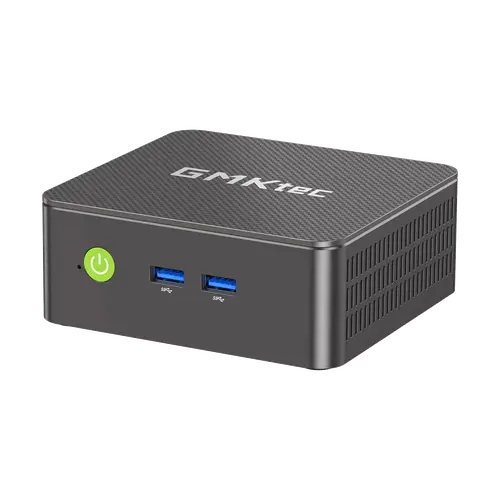


GMKtec NucBox G3S Review: The Cheapest Honest Way to Put a Windows PC Behind a Monitor
The NucBox G3S is a deliberately basic mini PC: a four-core Intel N95, 8 GB of DDR4 and a 256 GB SSD, with two HDMI 2.0 ports for a pair of 4K displays and Windows 11 Pro already installed. Owners describe it as practically silent, quick to set up and comfortably fast for browsing, office work, streaming and older games, with several running it as a home theatre box or a small Plex server. The limits are exactly where the price is: one memory slot capped at 16 GB, Wi-Fi 5 rather than Wi-Fi 6, no DisplayPort or Thunderbolt, and a one-year warranty. The one thing to watch is the listing itself, because several buyers report receiving a different memory and storage configuration than the one they thought they ordered.
- Budget desktop replacement
- Home theatre and small Plex servers
- Office work and browsing
- Light retro gaming and emulation
- VESA-mounted setups
Pros
- Intel N95 bursting to 3.4 GHz, ample for browsing, office work and 4K video
- Two HDMI 2.0 ports driving dual 4K displays at 60 Hz
- Two M.2 slots, one PCIe 3.0 taking up to 8 TB and one SATA up to 2 TB
- Windows 11 Pro pre-installed and ready in minutes
- Practically silent, and light enough at 260 g to move around
- Gigabit Ethernet alongside Wi-Fi 5 and Bluetooth 5.0
- HDMI cable, power adapter and VESA mount included
Cons
- Only one SO-DIMM slot, capped at 16 GB of DDR4
- Wi-Fi 5 and Bluetooth 5.0 rather than the current standards
- No DisplayPort, no USB4 or Thunderbolt and no SD card reader
- Buyers report receiving a different memory and storage configuration than ordered, so check the variant
- Dual-screen and HDMI audio problems reported under Linux
- One-year warranty is short for the category
Who is the GMKtec NucBox G3S for?
This is the machine for someone who needs a real Windows desktop for ordinary tasks and does not want to pay for headroom they will never use. The N95 is a four-core Alder Lake-N chip bursting to 3.4 GHz, which lands squarely on web browsing, documents, video streaming and light multitasking. Two HDMI 2.0 outputs drive a pair of 4K screens at 60 Hz, the VESA mount in the box hides the whole thing behind a monitor or a TV, and at 260 g owners point out it is small enough to carry to a second desk. Recurring uses in the reviews are home theatre boxes for streaming, small always-on servers and secondary machines for people who have stopped needing a full desktop.
What buyers love
Two qualities come up more than any others: how quiet it is and how little setting it up takes. Owners describe it as practically silent in normal use, with fan noise that even critics call unobtrusive, and several report going from box to working desktop in about ten minutes on the pre-installed Windows 11. The performance surprises people at this end of the market: one owner reports Half-Life 2, Portal 2 and emulated titles running at 60 fps and even Rocket League around 40 fps on the N95, and another runs it as a Plex server and general web machine without trouble. Build quality gets consistent praise, and the fact that the memory and both M.2 slots are user-accessible means it can be upgraded rather than replaced.
What to know before you buy
The single biggest warning from owners has nothing to do with performance: this model is sold in several memory and storage configurations, and multiple buyers report opening the box to find less RAM and a smaller SSD than the listing they thought they bought, so check the selected variant carefully at checkout. On the hardware side, there is only one SO-DIMM slot with a 16 GB ceiling, so heavy multitasking has a hard limit. Wireless is Wi-Fi 5 and Bluetooth 5.0 rather than the newer standards, and there is no DisplayPort, no USB4 or Thunderbolt and no SD card reader. Linux is not a guaranteed smooth ride either: one owner could not get dual screens or HDMI audio working under Ubuntu. The warranty is one year, and a few owners report units failing within the first couple of years.
Is the GMKtec NucBox G3S worth it?
For browsing, office work, streaming and a bit of retro gaming, this is close to the least you can spend on a competent Windows machine that is silent and mountable behind a screen, and its sustained sales rank in Amazon's mini computers list reflects that. Two things should push you up the range instead: needing more than 16 GB of memory, or wanting modern connectivity such as Wi-Fi 6, USB4 or DisplayPort. If neither applies, the N95 does more than its price suggests, and the second M.2 slot means storage never has to be the reason you replace it.
Frequently asked questions
How much memory can the GMKtec NucBox G3S take?
It has a single DDR4 SO-DIMM slot with a 16 GB ceiling. This configuration ships with 8 GB installed, so there is one upgrade step available.
Can it run two 4K monitors?
Yes. It has two HDMI 2.0 outputs and supports a dual 4K display setup at 60 Hz. There is no DisplayPort, so both screens connect over HDMI.
Does it come with Windows?
Yes, Windows 11 Pro is pre-installed. Owners report the initial setup taking around ten minutes, with updates finishing in the background.
Can the NucBox G3S handle gaming?
Older and lighter titles, yes. One owner reports Half-Life 2, Portal 2 and emulated games running at 60 fps and Rocket League around 40 fps. Modern demanding titles are out of scope for the integrated graphics.
Can I add more storage?
Yes. There are two M.2 slots: an M.2 2280 PCIe 3.0 slot supporting up to 8 TB and an M.2 2242 SATA slot supporting up to 2 TB, with the 256 GB drive occupying one of them.
Is it noisy?
No. It uses heat pipes with a single quiet fan, and owners consistently describe it as practically silent, with even the more critical reviews calling the noise unobtrusive.