29% OFF
$249.98
$349.99

Full Mini PCs comparison in 2026
New releases and the smart home news worth knowing, in your inbox.
No spam. Unsubscribe in one click.
| Feature | GMKtec NucBox G3S (8GB + 256GB) | GMKtec NucBox K13 (Ultra 7 256V 16GB + 512GB) | Winner |
|---|---|---|---|
| Price | $249.98 | $589.99 | GMKtec NucBox G3S (8GB + 256GB) |
| Rating | 4.2 | 4.7 | GMKtec NucBox K13 (Ultra 7 256V 16GB + 512GB) |
| Memory Type | DDR4 | LPDDR5X | GMKtec NucBox K13 (Ultra 7 256V 16GB + 512GB) |
| Memory Capacity | 8 GB | 16 GB | GMKtec NucBox K13 (Ultra 7 256V 16GB + 512GB) |
| Storage Capacity | 256 GB | 512 GB | GMKtec NucBox K13 (Ultra 7 256V 16GB + 512GB) |
| CPU Model | Intel Processor N95 | Intel Core Ultra 7 256V | Different strengths |
| Memory Configuration | Single-channel | Soldered (non-upgradeable) | Different strengths |
| GPU Model | Intel UHD Graphics (up to 1200 MHz) | Intel Arc 140V | Different strengths |
| Warranty | 1 year | 1 year | Tie |
The GMKtec NucBox K13 runs an Intel Core Ultra 7 256V with eight cores on the Lunar Lake platform, while the GMKtec NucBox G3S uses a four-core Intel N95. The K13 covers heavier multitasking and light creative work; the G3S is aimed at browsing, office apps and video.
The GMKtec NucBox K13 ships 16GB of LPDDR5X-8533, soldered and fast. The GMKtec NucBox G3S ships 8GB of DDR4 in a single SO-DIMM slot that tops out at 16GB, so it is both slower and much harder to grow.
The GMKtec NucBox K13 has a 512GB drive against 256GB in the GMKtec NucBox G3S. The K13's second slot runs PCIe, while the G3S pairs its PCIe 3.0 slot with an M.2 2242 SATA slot.
The GMKtec NucBox K13 pairs Intel Arc 140V graphics with a 47 TOPS NPU. The GMKtec NucBox G3S uses Intel UHD graphics with no NPU, so on-device AI features and anything GPU-heavy are out of reach.
The GMKtec NucBox K13 connects over 5 Gigabit Ethernet, Wi-Fi 6E and Bluetooth 5.2. The GMKtec NucBox G3S makes do with Gigabit Ethernet, Wi-Fi 5 and Bluetooth 5.0, which is fine for streaming but slower for file transfers.
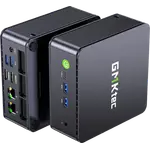
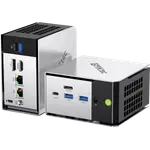
The GMKtec NucBox G3S actually has two HDMI 2.0 ports that run dual 4K at 60Hz, while the GMKtec NucBox K13 offers one HDMI 2.1 output plus display over its two USB4 ports.
The GMKtec NucBox G3S is the cheapest of the pair and still handles browsing, documents and 4K streaming.
The GMKtec NucBox K13 pairs a Lunar Lake processor with Arc 140V graphics and a 47 TOPS NPU.
The GMKtec NucBox K13 ships 16GB and 512GB against 8GB and 256GB in the GMKtec NucBox G3S.
The GMKtec NucBox G3S has two HDMI 2.0 outputs rated for dual 4K at 60Hz.
The GMKtec NucBox G3S is described as practically silent and draws little power.
Owners of the GMKtec NucBox G3S (8GB + 256GB) describe a Windows desktop that is practically silent and ready in minutes, with the pre-installed Windows 11 Pro taking around ten minutes to set up. The Intel N95 does more than its price suggests: browsing, documents, 4K streaming and even older titles at 60 fps, and some run it as a home theatre box or a small Plex server. They like the two M.2 slots, the VESA mount and the 260 g body. The recurring warnings are the single memory slot capped at 16GB, Wi-Fi 5 and Bluetooth 5.0 rather than newer standards, no USB-C, and listing variants that ship with less memory and storage than buyers expected.
The GMKtec NucBox K13 (Ultra 7 256V 16GB + 512GB) is the better mini PC, with a newer Intel Core Ultra 7 processor, Arc 140V graphics, a 47 TOPS NPU, twice the memory, twice the storage, dual USB4 and 5 Gigabit Ethernet. The GMKtec NucBox G3S (8GB + 256GB) wins on price, on dual HDMI 2.0 outputs and on how quiet it is.
The platform and the memory. The GMKtec NucBox K13 (Ultra 7 256V 16GB + 512GB) uses an eight-core Intel Core Ultra 7 256V with 16GB of LPDDR5X-8533, while the GMKtec NucBox G3S (8GB + 256GB) uses a four-core Intel N95 with 8GB of slower DDR4 in a single slot.
The GMKtec NucBox G3S (8GB + 256GB) has one DDR4 SO-DIMM slot with a 16GB ceiling, so there is a single upgrade step. The GMKtec NucBox K13 (Ultra 7 256V 16GB + 512GB) has 16GB of LPDDR5X soldered, so its memory cannot be changed.
The GMKtec NucBox K13 (Ultra 7 256V 16GB + 512GB) has two USB4 Type-C ports carrying data, display and 100W power delivery. The GMKtec NucBox G3S (8GB + 256GB) has no USB-C at all, with three USB 3.2 Type-A ports and one USB 2.0 port.
Buyers who want the least expensive competent Windows 11 Pro desktop for browsing, office work, 4K streaming or a home theatre box, and who do not need more than 16GB of memory or USB-C.
Anyone who wants a compact Windows 11 Pro desktop with a current Intel Core Ultra processor, USB4, 5 Gigabit Ethernet and a 47 TOPS NPU, and who needs twice the memory and storage of a budget N95 box.
You are looking at two of them. The full table lines up all Mini PCs in the catalog with the same specs, so you can filter by what you need and sort by price or rating.