



GMKtec K15 Review: An Intel Core Ultra Mini PC With OCuLink and Room for Three SSDs
The GMKtec K15 is a compact Windows 11 Pro desktop for buyers who want plenty of ports and expansion in a small box. Its Intel Core Ultra 5 125U, 32GB of upgradeable DDR5 and three M.2 slots cover office work, home-lab jobs and light gaming, and the OCuLink and USB4 ports can drive an external GPU. The trade-offs are modest integrated graphics, no Thunderbolt and a one-year warranty.
- Home lab and virtualization
- Compact desks and kiosks
- Light gaming with an eGPU
- Always-on 24/7 setups
Pros
- Intel Core Ultra 5 125U with 12 cores and 14 threads, up to 4.3 GHz
- 32GB of dual-channel DDR5 in two upgradeable SO-DIMM slots, up to 96GB
- Three M.2 2280 slots for up to 24TB of NVMe storage
- Native OCuLink port plus USB4 for an external GPU
- Dual 2.5GbE Ethernet, Wi-Fi 6E and Bluetooth 5.2
- Quad display output over HDMI 2.1, DisplayPort 1.4 and USB4, up to 8K
- Dual-fan cooling with copper heat pipes and RGB lighting
- Windows 11 Pro preinstalled, with a VESA mount and HDMI cable in the box
Cons
- Integrated Intel graphics are modest for gaming and GPU work
- No Thunderbolt
- One-year warranty
- External power brick rather than a built-in supply
- No SD card slot, fingerprint sensor, speakers or microphone
Who is the GMKtec K15 for?
The K15 suits a desk or shelf that has to stay small without giving up ports. Its Intel Core Ultra 5 125U runs 12 cores and 14 threads up to 4.3 GHz, with 32GB of dual-channel DDR5 and Windows 11 Pro preinstalled, so it is comfortable for browsing, office work, media playback, coding and running a few virtual machines. With dual 2.5GbE Ethernet, Wi-Fi 6E and three M.2 slots it also fits home-lab jobs such as a firewall, a NAS or a virtualisation host. Buyers who want to add a discrete GPU later get a rare option at this size, a native OCuLink port that carries PCIe 4.0 x4 to a supported external dock.
What the GMKtec K15 offers
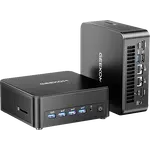
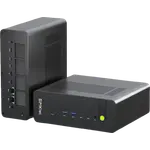
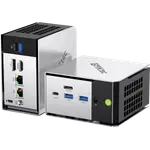
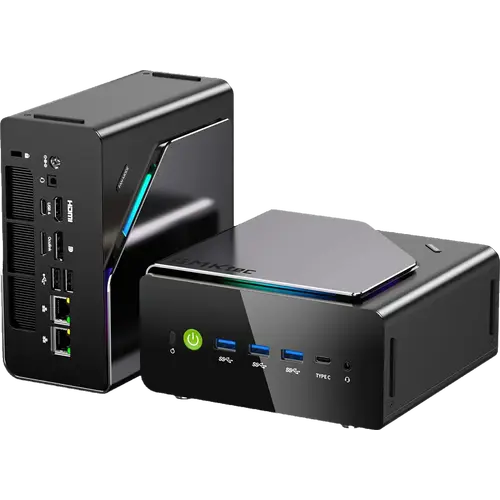
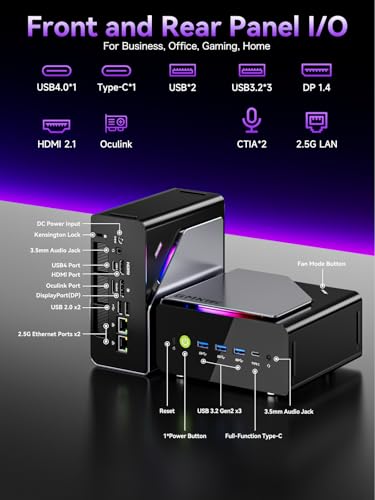
The headline is expansion for the footprint. Memory is two SO-DIMM slots, not soldered, so the 32GB installed (2 x 16GB at 4800 MT/s) can be raised to as much as 96GB. Storage is a 512GB M.2 2280 NVMe SSD with two more M.2 2280 slots free, for up to 24TB in total. Connectivity covers dual 2.5GbE Ethernet, Wi-Fi 6E and Bluetooth 5.2, plus a front set of three USB-A 3.2 Gen2 ports, a USB-C 3.2 Gen2 port and a 3.5mm jack, and a rear OCuLink port, a full USB4 port, HDMI 2.1, DisplayPort 1.4 and two USB 2.0 ports. Video can drive up to four displays at once, at up to 8K. A dual-fan setup with copper heat pipes handles cooling, and the machine can be stood flat or upright, or mounted behind a monitor with the VESA mount that comes in the box.
What to know before you buy
The integrated Intel graphics are modest, so treat the K15 as a productivity machine rather than a gaming rig unless you add an external GPU over OCuLink or USB4. There is no Thunderbolt, and the NPU is a low-power Intel AI Boost engine rated at 11 TOPS, so local AI workloads stay light. The power supply is an external brick rather than an internal one, and the warranty is one year. There is no SD card slot, no fingerprint sensor, and no built-in speakers or microphone, so you will need your own peripherals for audio.
Is the GMKtec K15 worth it?
It earns its place when compact size, generous ports and future upgrade paths matter more than raw graphics. Two RAM slots, three M.2 slots, dual 2.5GbE and an OCuLink port are unusual in a chassis this small, and they let the machine grow instead of being replaced. If you need Thunderbolt, stronger integrated graphics or a longer warranty out of the box, a larger or pricier machine will suit you better. For a small, well-connected Windows desktop that can take more memory, more drives and an external GPU later, the K15 is a strong pick.
Frequently asked questions
Can you upgrade the memory on the GMKtec K15?
Yes. It has two DDR5 SO-DIMM slots, so the 32GB (2 x 16GB at 4800 MT/s) can be swapped or raised to as much as 96GB.
Does the GMKtec K15 support an external GPU?
Yes. It has a native OCuLink port running PCIe 4.0 x4 and a full USB4 port, both of which can drive a supported external graphics dock.
How much storage can the GMKtec K15 hold?
This configuration ships with a 512GB M.2 2280 NVMe SSD. There are three M.2 2280 slots in total, for up to 24TB.
How many monitors can the GMKtec K15 drive?
Up to four displays at once, through HDMI 2.1, DisplayPort 1.4 and the USB-C and USB4 ports, with up to 8K output depending on the connection.
Does the GMKtec K15 have Wi-Fi 6E and 2.5GbE Ethernet?
Yes. It has Wi-Fi 6E, Bluetooth 5.2 and two 2.5GbE Ethernet ports.
What operating system does the GMKtec K15 run?
It ships with Windows 11 Pro preinstalled and activated.