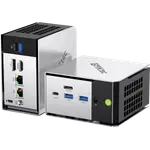



GMKtec K16 Review: A Compact Ryzen Mini PC With OCuLink and Dual 2.5GbE
The GMKtec K16 is a compact Windows 11 Pro desktop built around an AMD Ryzen 7 7735HS with Radeon 680M graphics, aimed at buyers who want strong everyday performance and serious connectivity in a small box. Its standout is the native OCuLink port, which lets you attach an external desktop GPU over PCIe 4.0 x4, backed by USB4, dual 2.5GbE Ethernet and triple display output. The main trade-off is that the 32GB of LPDDR5 memory is soldered and not upgradeable, and the warranty runs only one year.
- Home lab and virtualization
- Compact desks and media setups
- Light gaming and emulation
- External GPU builds
Pros
- AMD Ryzen 7 7735HS, 8 cores and 16 threads up to 4.75 GHz
- Radeon 680M integrated graphics for light gaming and emulation
- Native OCuLink port (PCIe 4.0 x4) for an external GPU
- USB4 at 40Gbps with 100W power delivery and DisplayPort output
- Dual 2.5GbE Ethernet, Wi-Fi 6E and Bluetooth 5.2
- Triple display output through HDMI 2.0, DisplayPort 1.4 and USB4, up to 8K
- Two M.2 2280 slots supporting up to 16TB of storage
- Windows 11 Pro preinstalled in a compact 590g metal chassis
Cons
- 32GB of LPDDR5 memory is soldered and not upgradeable
- No Thunderbolt certification (USB4 and OCuLink instead)
- No dedicated NPU for local AI acceleration
- One-year warranty
- No SD card slot, fingerprint sensor, speakers or microphone
- No VESA mount in the box
- Fan noise rises under sustained load
Who is the GMKtec K16 for?
The K16 suits a desk that has to stay small without giving up desktop-class hardware. The AMD Ryzen 7 7735HS runs eight cores and sixteen threads up to 4.75 GHz, and Radeon 680M graphics make it comfortable for office work, development, media playback, emulation and light gaming. With dual 2.5GbE Ethernet, USB4 and Wi-Fi 6E it also fits home lab jobs such as a NAS, a firewall or a virtualization host, which is how many owners describe using GMKtec mini PCs. Buyers who want to add a discrete GPU later get a rare option at this size: a native OCuLink port that carries PCIe 4.0 x4 to a supported external dock.
What buyers appreciate
Owners consistently describe a fast, easy-to-live-with machine. Setup is quick, with Windows 11 Pro preinstalled, and the system feels responsive for multitasking, emulation and lighter games thanks to the Zen 3+ CPU and Radeon 680M. People who run Linux on it report that the hardware is well supported, and home lab users single out the dual 2.5GbE ports for fast file transfers and routing. The small metal chassis stays cool in normal use and is quiet for most tasks, and the port selection (USB4, HDMI, DisplayPort, OCuLink and multiple USB-A) is repeatedly called out as generous for the size.
What to know before you buy
The 32GB of LPDDR5-6400 is soldered to the board, so the memory you buy is the memory you keep, even though storage is upgradeable through two M.2 slots. There is no Thunderbolt and no dedicated NPU, so an external GPU goes through OCuLink or USB4 and AI acceleration leans on the CPU and GPU. The fan can become audible under sustained load, and a few owners report hardware faults and slow after-sales support, so buying from a seller with clear warranty terms matters. The one-year warranty is shorter than some rivals, and the box includes the power adapter and an HDMI cable but no VESA mount.
Is the GMKtec K16 worth it?
It earns its place when compact size, strong Ryzen performance and fast connectivity matter more than upgrading the memory later. The combination of an eight-core CPU, Radeon 680M graphics, USB4 with power delivery, dual 2.5GbE and a native OCuLink port is unusual in a chassis this small, and it makes the K16 a flexible base for a home lab, a media center or a light gaming setup. If you need socketed memory, Thunderbolt certification or a longer warranty, a larger or pricier machine will suit you better. For a small, well-connected Windows desktop that can grow through its storage slots and an external GPU, it is a strong pick.
Frequently asked questions
Can you upgrade the memory on the GMKtec K16?
No. The 32GB of LPDDR5-6400 is soldered on board and cannot be expanded, so choose the configuration you need at purchase. Storage is different: there are two M.2 2280 slots that can be upgraded.
Does the GMKtec K16 support an external GPU?
Yes, through its OCuLink port, which runs PCIe 4.0 x4 and is designed for a supported external graphics dock. The port does not support hot-plugging, so the cable should only be connected or removed with the PC powered off. USB4 can also drive an external GPU, at lower bandwidth.
How much storage can the K16 hold?
This configuration ships with a 1TB M.2 2280 NVMe SSD. There are two M.2 2280 slots in total, each supporting up to 8TB, for a maximum of 16TB. SATA drives are not supported.
How many monitors can the GMKtec K16 drive?
Up to three displays at once, using one HDMI 2.0 port, one DisplayPort 1.4 port and the USB4 port, with support for up to 8K output depending on the connection.
What ports does the GMKtec K16 have?
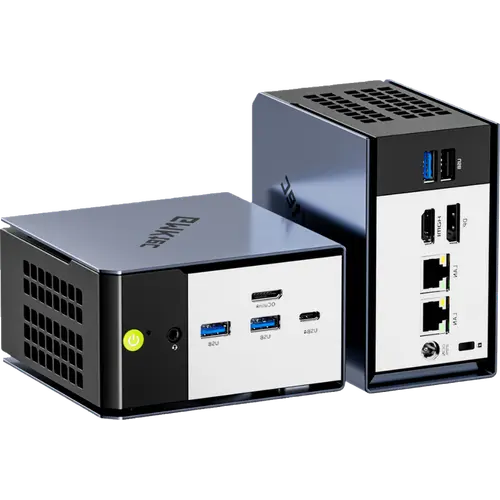
Three USB 3.2 Gen2 Type-A ports and one USB 2.0 port, a full-featured USB4 Type-C port, HDMI 2.0, DisplayPort 1.4, a native OCuLink port, a 3.5mm audio jack, two 2.5G Ethernet ports, a security lock slot and a DC power input.
What operating system does the GMKtec K16 run?
It ships with Windows 11 Pro preinstalled, and the hardware is also well supported under Linux for owners who prefer it.