



GMKtec K17 Plus Review: A Lunar Lake Mini PC With USB4 and a 47 TOPS NPU
The GMKtec K17 Plus is a compact Windows 11 Pro desktop for anyone who wants current Intel silicon and fast connectivity without a tower. Its Intel Core Ultra 7 258V pairs Arc 140V graphics with a 47 TOPS NPU, with a USB4 port that also carries DisplayPort video, two HDMI 2.1 outputs and 2.5G Ethernet. The trade-off is flexibility: the 32GB of LPDDR5X memory is soldered and not upgradeable, and there is no Thunderbolt, so it suits a fixed compact setup rather than a machine you plan to grow.
- Compact home and office desktops
- Local AI and light content work
- Multi-display productivity
- VESA-mounted desks
Pros
- Intel Core Ultra 7 258V with Arc 140V graphics and a 47 TOPS NPU (115 TOPS total)
- USB4 Type-C port with DisplayPort video output
- Three video outputs through two HDMI 2.1 ports and USB4, up to 8K at 60Hz
- 32GB of LPDDR5X at 8533 MT/s and a 1TB M.2 NVMe drive with a second M.2 slot
- Wi-Fi 6E, Bluetooth 5.2 and Intel 2.5G Ethernet
- Windows 11 Pro preinstalled, with an HDMI cable and VESA mount included
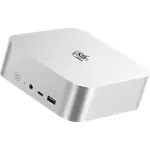
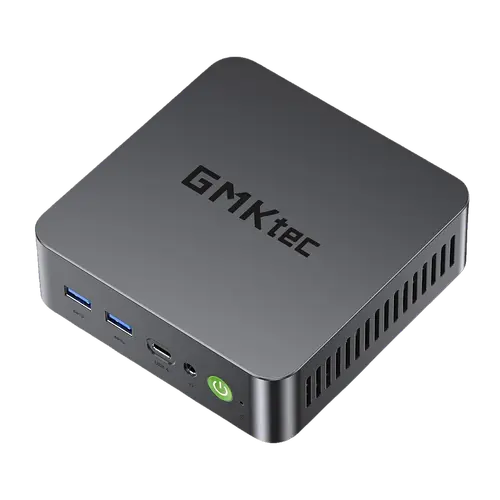
- Compact 127.5 x 127 x 44.5 mm metal chassis weighing around 460g
Cons
- Soldered LPDDR5X memory, capped at the shipped 32GB and not upgradeable
- No Thunderbolt support
- Integrated graphics only, with no discrete GPU option
- External 100W power adapter rather than an internal supply
- One-year warranty
- No SD card slot, fingerprint sensor, speakers or microphone
Who is the GMKtec K17 Plus for?
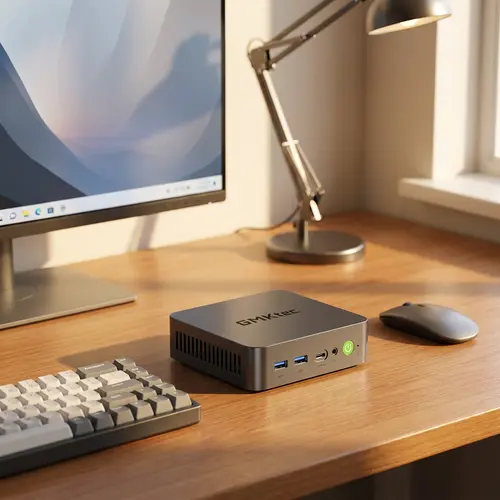
This is a mini PC for a desk that has to stay small without giving up current hardware. The Intel Core Ultra 7 258V is a Lunar Lake part with eight cores and eight threads running up to 4.8 GHz, backed by Intel Arc 140V graphics, so it covers office work, development tools, media playback and light creative tasks. The dedicated NPU, rated at 47 TOPS and 115 TOPS across the whole platform, is what makes it a machine for on-device AI features and small local models rather than a cloud round trip. At 127.5 x 127 x 44.5 mm and around 460g, and with a VESA mount in the box, it can sit behind a monitor or under a desk, which is where a compact all-in-one desktop usually ends up.
What the GMKtec K17 Plus offers
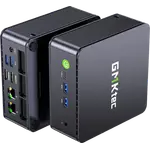
The connectivity is the standout. A USB4 Type-C port carries DisplayPort video output at up to 4K 60Hz alongside data, and on top of that there are two HDMI 2.1 outputs, one of them FRL at up to 8K 60Hz and the other TMDS at 4K 60Hz, for three video outputs in total. Networking is current rather than basic: Wi-Fi 6E, Bluetooth 5.2 and an Intel I226-V 2.5G Ethernet port. The ports are generous for the size, with four USB 3.2 Type-A ports, a USB 2.0 port and a 3.5 mm audio jack on the front. Storage is a 1TB M.2 2280 NVMe drive, with one PCIe Gen5 x4 slot and a second PCIe Gen4 x2 slot for expansion. Cooling uses dual heat pipes with a single low-noise fan, there is a security lock slot, and the machine ships with Windows 11 Pro, an HDMI cable and a VESA mount already in the box.
What to know before you buy
The main limitation is upgradeability. The 32GB of LPDDR5X-8533 memory is soldered to the board, so the configuration you buy is the configuration you keep, which is unusual for a category where many rivals still use SODIMM slots. Graphics are integrated only, and there is no Thunderbolt certification, so fast external peripherals go through the USB4 port. Power comes from an external 100W adapter instead of an internal supply, and the warranty is one year. The chassis also leaves out a few things worth noting: there is no SD card slot, no fingerprint reader, no built-in speakers and no microphone, so audio and biometric sign-in need external hardware.
Is the GMKtec K17 Plus worth it?
It earns its place when current Intel silicon, USB4, three video outputs and 2.5G networking matter more than upgrading later. The Core Ultra 7 258V with its Arc 140V graphics and NPU puts it in a different class from the older N100 and N150 mini PCs that dominate the budget end, and the metal chassis plus VESA mount make it easy to live with. If you need to add memory over time, a dedicated DisplayPort connector or a second Ethernet port, a larger or more flexible machine will serve you better. For a fixed compact desktop that runs Windows 11 Pro and handles AI-accelerated everyday work, it is a well-rounded pick.
Frequently asked questions
What processor does the GMKtec K17 Plus use?
It uses the Intel Core Ultra 7 258V, a Lunar Lake processor with eight cores and eight threads clocking up to 4.8 GHz, paired with Intel Arc 140V integrated graphics and an Intel AI Boost NPU rated at 47 TOPS.
Can you upgrade the memory on the K17 Plus?
No. The 32GB of LPDDR5X-8533 is soldered to the board and cannot be expanded, so choose the configuration you need at purchase. The drive is different: storage sits in M.2 slots and can be upgraded.
How much storage can the GMKtec K17 Plus hold?
This configuration ships with a 1TB M.2 2280 NVMe SSD. The board has two M.2 2280 slots, one PCIe Gen5 x4 and one PCIe Gen4 x2, so a second drive can be added.
How many monitors can the K17 Plus drive?
Up to three displays, using the two HDMI 2.1 ports and the USB4 port. One HDMI port reaches 8K at 60Hz over FRL, the other handles 4K at 60Hz, and the USB4 output supports 4K at 60Hz.
Does the GMKtec K17 Plus support Thunderbolt or an external GPU?
It is not Thunderbolt certified. Fast peripherals connect through the USB4 Type-C port, which also carries DisplayPort video output at up to 4K 60Hz.
What operating system does the K17 Plus run?
It ships with Windows 11 Pro, with the HDMI cable, VESA mount and 100W adapter included.