



GMKtec NucBox M2 Pro S Review: A Palm-Sized Triple-4K Desktop With Room to Grow
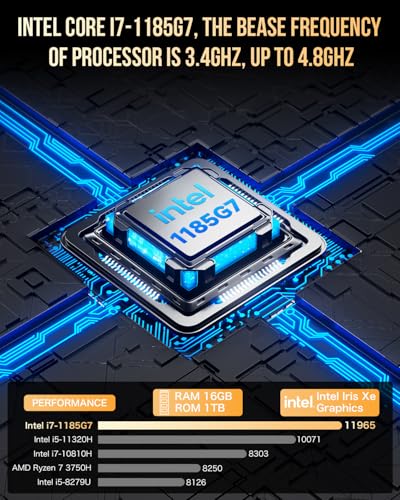
The NucBox M2 Pro S is a small, quiet, upgradable desktop for people whose work happens in browsers, office suites and video calls rather than in renders or games. The four-core, eight-thread Core i7-1185G7 runs to 4.8 GHz with Iris Xe graphics driving three 4K 60Hz displays, and the chassis stays open: two SODIMM slots take 64 GB of DDR4-3200 and two M.2 bays take up to 10TB between them. The trade-off is the platform generation. This is an 11th Gen part with no NPU, no USB4 and no Thunderbolt, and its Type-C port runs at 5Gbps, so anyone shopping for on-device AI acceleration or a fast external dock should look at a newer chip. As an everyday Windows 11 Pro machine that hides behind a monitor, it is a lot of computer for very little desk space.
- Home and office desktops
- Triple-monitor setups
- Media centers and digital signage
- VESA-mounted builds
- Budget buyers
Pros
- Four cores and eight threads up to 4.8 GHz in a 114 x 106 x 42.5 mm, 361g chassis
- Drives three 4K 60Hz displays from two HDMI 2.0 ports and the Type-C output
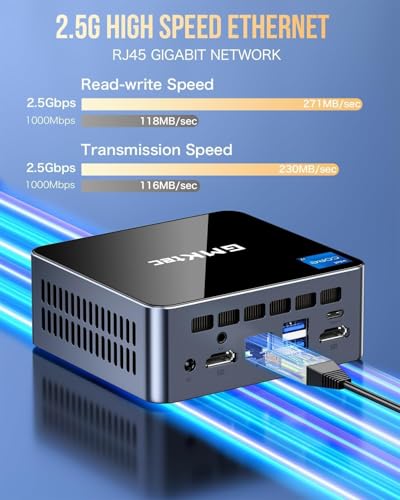
- 2.5G Ethernet on an Intel I226-V controller, plus Wi-Fi 6 and Bluetooth 5.2
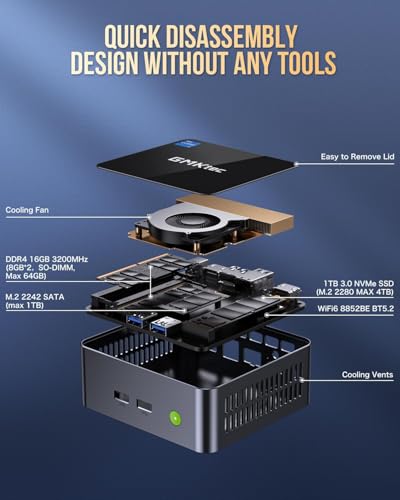
- Two SO-DIMM slots take up to 64 GB of dual-channel DDR4-3200
- Two M.2 bays (2280 and 2242) for up to 10TB of storage, with one left free
- Five USB ports, including two 10Gbps USB 3.2 Gen 2 Type-A on the front
- Metal chassis with copper dual-turbine cooling
- Windows 11 Pro preinstalled, with an HDMI cable and VESA bracket in the box
Cons
- 11th Gen processor with no NPU, so no on-device AI acceleration
- No USB4 and no Thunderbolt: the single Type-C port runs at 5Gbps
- DDR4-3200 memory rather than DDR5, capped at 64 GB
- Integrated Iris Xe graphics only, with no route to a discrete GPU
- No SD card reader, no fingerprint sensor and no Kensington lock slot
- No built-in speaker or microphone
- External 100W power brick instead of an internal supply
- Only a one-year warranty
Who is the GMKtec NucBox M2 Pro S for?
This is a full Windows desktop that measures 114 x 106 x 42.5 mm and weighs 361g, which is the whole pitch: it mounts behind a monitor on the bundled VESA bracket or sits under a TV without looking like a computer. The Intel Core i7-1185G7 gives it four cores and eight threads with a 4.8 GHz turbo and 12MB of L3 cache, a combination sized for browsers with many tabs open, office documents, video conferencing and streaming rather than for heavy compute. Intel Iris Xe Graphics with 96 execution units handles the display side, feeding two HDMI 2.0 outputs and a Type-C video output for three simultaneous 4K screens at 60Hz. The 2.5G Ethernet port uses an Intel I226-V controller, so a wired connection keeps up with a modern home network, and Wi-Fi 6 with Bluetooth 5.2 covers everything else.
What stands out on paper
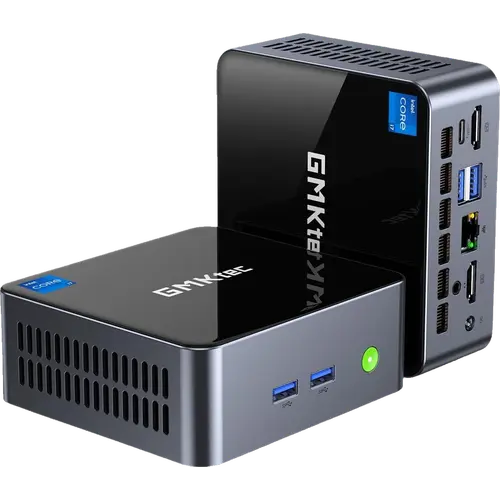
Two things separate this from the sealed mini PCs it competes with. The first is upgradability: the memory is socketed across two SO-DIMM slots rather than soldered, so the 16 GB of dual-channel DDR4-3200 it ships with can be taken to 64 GB later, and storage runs through two separate M.2 bays, an M.2 2280 slot rated by GMKtec for PCIe 4.0 x4 and up to 8TB alongside an M.2 2242 SATA slot good for another 2TB. That is up to 10TB in a machine the size of a sandwich, and the 1 TB drive it arrives with leaves the second bay free. The second is port count for the volume: two USB 3.2 Gen 2 Type-A ports at 10Gbps sit on the front next to the power button, with a USB 3.2 Gen 1 Type-A, a USB 2.0 Type-A, the Type-C output, both HDMI ports, the 2.5G RJ45 jack, a 3.5mm CTIA audio jack and the DC input on the back. Cooling is a copper dual-turbine air design, and Windows 11 Pro, an HDMI cable and the VESA mount are all included.
What to know before you buy
The processor is an 11th Gen mobile part, and the generation shows in what is absent rather than in what is slow. There is no NPU, so nothing accelerates local AI workloads in hardware, and the graphics are integrated with no path to a discrete card. The single Type-C port carries DisplayPort video and data at 5Gbps: despite what the marketplace listing title claims, this is not a USB4 port and the machine is not Thunderbolt certified, so a high-bandwidth dock or an external GPU enclosure is off the table. Memory is DDR4-3200 rather than DDR5 and stops at 64 GB. On the chassis, there is no SD card reader, no fingerprint sensor and no Kensington lock slot, and there is no built-in speaker or microphone, so audio goes through the 3.5mm jack or over HDMI. Power comes from an external 100W brick (20V, 5A) through a barrel connector rather than an internal supply, which is one more thing to find room for behind the desk, and the warranty is one year.
Is the GMKtec NucBox M2 Pro S worth it?
Judged as an everyday desktop rather than a workstation, it holds up well. You get a metal-cased machine with a genuine Core i7, triple 4K output, 2.5G wired networking, Wi-Fi 6, five USB ports and an upgrade path on both memory and storage, in a footprint that disappears behind a monitor and at a price tier well below a comparable tower. What you give up is the current generation of silicon: no NPU, no USB4, no Thunderbolt, DDR4 instead of DDR5 and a single one-year warranty term. If the workload is browsing, documents, calls, media playback, signage or a light home server, that is a sensible trade. If it involves AI acceleration, serious gaming or a docked laptop-replacement setup, the money is better spent a generation forward.
Frequently asked questions
How many monitors can the GMKtec NucBox M2 Pro S drive?
Three at once, each at up to 4K 60Hz. Two come from the HDMI 2.0 ports on the rear panel and the third from the Type-C port, which carries DisplayPort video.
Can you upgrade the memory and storage yourself?
Yes, both. Memory sits in two SO-DIMM slots and accepts up to 64 GB of DDR4-3200 in dual channel, and there are two M.2 bays: an M.2 2280 slot GMKtec rates for up to 8TB and an M.2 2242 SATA slot for up to 2TB, 10TB in total. This configuration fills one bay with a 1 TB drive and leaves the other empty.
Does the M2 Pro S have USB4 or Thunderbolt?
No. The marketplace listing title mentions USB4, but the GMKtec specification table rates the single Type-C port at 5Gbps with DisplayPort output, which is USB 3.2 Gen 1 speed, and the machine is not Thunderbolt certified. The remaining four USB ports are Type-A: two at 10Gbps, one at 5Gbps and one USB 2.0.
What operating system does it come with, and can it run Linux?
It ships with Windows 11 Pro preinstalled. GMKtec also lists Linux and Ubuntu among the compatible systems for this model.
How is the M2 Pro S powered and cooled?
Power comes from an external 100W adapter (20V, 5A) plugged into a 5.5/2.5 mm DC input on the rear panel, not from an internal power supply. Cooling is an active copper dual-turbine air design, and the metal chassis is vented on the top and sides.
Does it have a headphone jack, an SD card reader or a lock slot?
There is one 3.5mm CTIA audio jack on the rear panel. There is no SD card reader, no fingerprint sensor and no Kensington security slot, and the unit has no built-in speaker or microphone.