



GMKtec NucBox M5 Ultra Review: The Dual-2.5G Homelab Box That Undercuts Everything
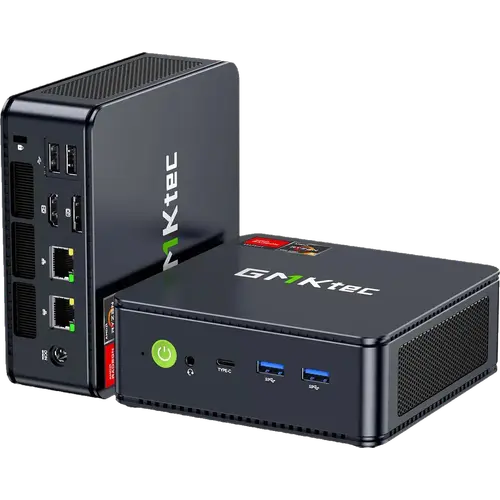
The GMKtec NucBox M5 Ultra is a small, quiet mini PC built around the 8-core Ryzen 7 7730U, 32 GB of dual-channel DDR4 and a 512 GB PCIe 3.0 SSD, with two 2.5 Gb Ethernet ports that make it an obvious fit for pfSense, Proxmox and home servers. Owners consistently describe it as fast for the money, silent at idle and easy to set up, and several run it as a Linux development machine or a virtualisation node without complaint. The compromises are deliberate: DDR4 rather than DDR5, PCIe 3.0 rather than 4.0, and integrated Radeon graphics that handle light gaming but not much more. Support gets unusually good reviews for a budget brand.
- Homelab and Proxmox users
- Linux developers
- pfSense and router builds
- Budget desktop replacement
Pros
- Dual 2.5 Gb Ethernet, ideal for pfSense, Proxmox and home servers
- 8-core, 16-thread Ryzen 7 7730U with boost up to 4.5 GHz
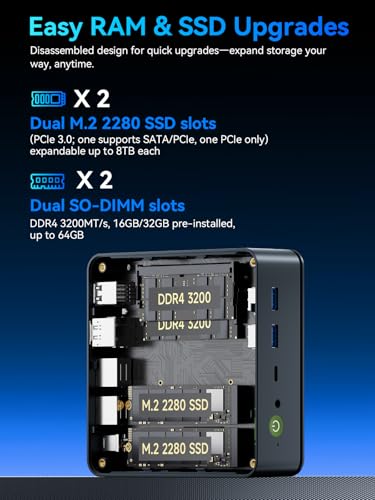
- 32 GB dual-channel DDR4, upgradeable to 64 GB
- Two M.2 2280 slots supporting up to 8 TB each
- Wi-Fi 6E and Bluetooth 5.2, triple display output over HDMI, DisplayPort and USB-C
- Quiet dual-fan cooling in a 528 g chassis
- HDMI cable and VESA mount included
Cons
- DDR4 and PCIe 3.0 rather than DDR5 and PCIe 4.0
- Integrated graphics run hot under sustained gaming
- No USB4 or Thunderbolt, no SD card slot
- One-year warranty is short for the category
- Isolated reports of a sleep-wake bug forcing a hard reset
Who is the GMKtec NucBox M5 Ultra for?
Two audiences show up over and over in the reviews. The first is homelab builders: the dual 2.5 Gb NICs, dual M.2 2280 slots supporting up to 8 TB each and 64 GB memory ceiling make it a cheap Proxmox node or a firewall appliance, and owners report running virtualisation stacks and Kubernetes distributions on it without performance problems. The second is people who want a small, quiet desktop: Wi-Fi 6E, Bluetooth 5.2, triple display output over HDMI, DisplayPort and USB-C, and Windows 11 Pro preinstalled cover ordinary office and media work in a 128.8 x 127 x 47.8 mm box.
What buyers love
Performance per watt is the theme that opens most reviews: owners are surprised how much the 7730U does for how little power it draws, and several benchmark it favourably against older desktop i7 machines. Silence and size come next, with the dual-fan design keeping it quiet in normal use. Linux support gets specific praise, with owners reporting clean installs of Fedora KDE and Linux Mint that run flawlessly, sometimes after Windows gave them trouble. Support is the surprise: multiple reviewers describe GMKtec responding quickly and replacing or repairing units well after purchase.
What to know before you buy
This is a value build and the spec sheet says so: DDR4-3200 and PCIe 3.0 storage rather than the DDR5 and PCIe 4.0 you get further up the range, and integrated Radeon graphics that a few owners note get hot under sustained gaming. One reviewer hit a sleep-wake bug that hard reset the machine and simply disabled sleep. There is no USB4 or Thunderbolt, no SD card slot and no fingerprint reader. The warranty is one year, shorter than some competitors, and the pre-installed configuration here is 32 GB with a 512 GB SSD, so factor in an SSD upgrade if you need more room.
Is the GMKtec NucBox M5 Ultra worth it?
For homelab and light desktop duty it is very hard to beat at this price: the dual 2.5 Gb networking alone usually costs more elsewhere, and the memory and storage are both user-upgradeable. If you want a machine for serious gaming, video work or Thunderbolt peripherals, the older DDR4 and PCIe 3.0 platform will hold you back and you should spend more. As a quiet, always-on box that runs Proxmox, pfSense or a Linux desktop, it is exactly the right tool.
Frequently asked questions
Can the GMKtec NucBox M5 Ultra run Proxmox or pfSense?
Yes, and that is one of its most common uses. The two 2.5 Gb Ethernet ports, 32 GB of memory and dual M.2 slots make it a practical virtualisation node or firewall appliance, and owners report running Proxmox and Kubernetes on it without performance issues.
How much memory and storage can it take?
It has two SO-DIMM slots and supports up to 64 GB of DDR4-3200. Storage is two M.2 2280 PCIe 3.0 slots, each supporting up to 8 TB, with a 512 GB SSD pre-installed in this configuration.
Does it come with Windows?
Yes, Windows 11 Pro is pre-installed. Owners also report clean installs of Linux distributions such as Fedora KDE and Linux Mint running without issues.
How many monitors can it drive?
Three, using HDMI 2.0, DisplayPort 1.4 and the USB-C port. DisplayPort supports up to 8K at 60 Hz, HDMI and USB-C up to 4K at 60 Hz.
Is it quiet?
Yes in normal use. It uses a dual-fan air cooling design, and owners describe it as quiet for office work, though the fans do become audible during sustained gaming.