


GMKtec NucBox M8 Review: The Budget Ryzen Mini PC With OCuLink and Dual 2.5G LAN
The GMKtec NucBox M8 is a compact desktop for buyers who want wired-first connectivity and an upgrade path without paying for a current-generation chip. The AMD Ryzen 5 PRO 6650H and Radeon 660M handle office work, light photo editing and light gaming, while a front OCuLink port, one USB4 port and dual 2.5G Ethernet add expandability rare at this size. The trade-offs are the soldered 16 GB of memory that cannot be upgraded, the aging Zen 3+ silicon with no NPU, and the modest integrated graphics. For a quiet, mountable Windows 11 Pro box for a home office or light home server, it is strong value.
- Home office desktops
- Home lab and light server use
- Budget buyers
- eGPU tinkerers
Pros
- Front OCuLink port gives an external GPU a PCIe Gen4 x4 link
- Two M.2 2280 PCIe 4.0 slots for easy storage expansion
- Dual 2.5G Ethernet plus Wi-Fi 6E and Bluetooth 5.2
- USB4 Type-C port with 40 Gbps data and power delivery
- Triple display output via HDMI 2.0, DisplayPort 1.4 and USB4
- Runs quietly in a small all-metal chassis
- Windows 11 Pro preinstalled, with an HDMI cable in the box
Cons
- 16 GB of soldered memory cannot be upgraded
- Zen 3+ processor with no NPU for on-device AI
- Integrated Radeon 660M graphics are not for serious gaming
- No VESA mount included despite a mountable chassis
- No SD card reader and no fingerprint sensor
- One-year warranty, and some buyers hit Windows activation problems
Who is the GMKtec NucBox M8 for?
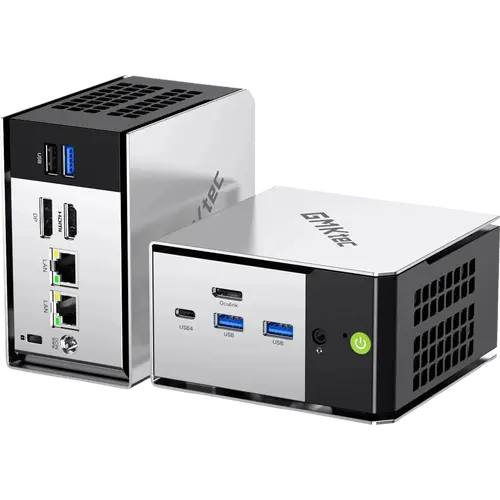
This is a machine for people who need a real desktop in a very small box. The six-core, twelve-thread Ryzen 5 PRO 6650H boosts to 4.5 GHz and pairs with Radeon 660M integrated graphics, which is enough for browsers, office suites, media playback and lighter creative work; buyers describe it as a proper desktop replacement for everyday tasks and light photo editing. The dual 2.5G Ethernet ports, the front OCuLink connector and the single USB4 port push it into territory most small PCs never reach: it can drive an external GPU over OCuLink, run as a firewall or light server, or sit behind a monitor. It ships with Windows 11 Pro preinstalled in a 107 x 111 x 63 mm all-metal chassis that weighs roughly half a kilogram.
What buyers love
The recurring theme is performance for the money. Buyers repeatedly call it fast, reliable and a great price-to-performance pick, with one running benchmarks and calling the result amazing for the cost. Several mention it as a second PC for a monitor or TV, handling 4K streaming without stutter and even lighter games at medium settings. Quiet operation comes up as a plus, as does the small, clean design. A few buyers had to contact support over a Windows licensing issue and report that it was resolved quickly, which is worth knowing given the one-year warranty.
What to know before you buy
The limits are documented as much as felt. The 16 GB of LPDDR5-6400 memory is soldered, so it cannot be upgraded later, and the Ryzen 5 PRO 6650H is a Zen 3+ part with no NPU for on-device AI acceleration. Graphics come from the integrated Radeon 660M, which is fine for everyday use but not for serious gaming or PC-tethered VR. Storage ships at 512 GB but there are two M.2 2280 PCIe 4.0 slots, so a second drive is easy to add. A couple of buyers received a unit with a Windows activation problem or, in one case, a dead unit, so buying from a seller with easy returns matters. There is no VESA mount in the box even though the machine can be mounted, and no SD card reader or fingerprint sensor.
Is the GMKtec NucBox M8 worth it?
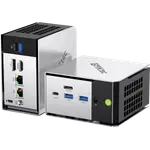
Judged against other mini PCs at its tier, the M8 buys connectivity that usually costs more: front OCuLink at PCIe Gen4 x4, USB4 with 40 Gbps data and power delivery, dual 2.5G Ethernet, Wi-Fi 6E, Bluetooth 5.2, HDMI 2.0 and DisplayPort 1.4 for up to three displays, plus a 3.5 mm combo jack and a Kensington lock slot. You give up the newest CPU generation, its AI acceleration and memory upgradability, and you accept a short warranty. If your workload is office and home use, media, light server duty or a future external GPU, that is a good trade. If you want on-device AI or demanding gaming without an eGPU, spend more on a newer chip.
Frequently asked questions
Can you connect an external GPU to the GMKtec NucBox M8?
Yes. There is an OCuLink port on the front panel that exposes PCIe Gen4 x4, a faster and lower-latency route to an eGPU dock than tunneling graphics over USB. The USB4 port is an alternative for docks that use it.
How much memory and storage can the NucBox M8 take?
Memory is fixed: 16 GB of LPDDR5-6400 soldered to the board, dual channel, with no upgrade path. Storage ships at 512 GB and can be expanded through two M.2 2280 PCIe 4.0 slots, each supporting a large NVMe drive.
How many monitors can it drive?
Up to three at once, using HDMI 2.0, DisplayPort 1.4 and the USB4 Type-C port.
Does it have Thunderbolt?
No. The USB-C port is USB4 at 40 Gbps with DisplayPort and power delivery, which covers most of the same uses but is not Thunderbolt certified.
Does the NucBox M8 run Linux?
It ships with Windows 11 Pro preinstalled and GMKtec lists Linux and Ubuntu support. Owners report using it as a home server with virtual machines and containers.
Is the GMKtec NucBox M8 good for gaming?
Only lightly. The integrated Radeon 660M handles older and lighter titles at reduced settings, and the OCuLink or USB4 ports allow an external GPU for more demanding games.