
GMKtec NucBox M3 Pro Review: A 12-Core Mini PC With Triple 4K Output
The GMKtec NucBox M3 Pro (16GB + 512GB) is a compact Windows desktop built around a 12-core, 16-thread Intel Core i5-13500H, with enough graphics and ports for three 4K 60Hz screens, 2.5G wired networking and Wi-Fi 6. Its appeal is upgradability in a tiny metal chassis: two SO-DIMM slots take up to 64GB and a second M.2 slot sits free next to the 512GB drive. The trade-offs are last-generation memory and I/O, with DDR4-3200, no USB4 or Thunderbolt and a single Type-C port limited to 5Gbps for data.
- Home and office desktops
- Triple-monitor setups
- Media centers and digital signage
- VESA-mounted builds
- Everyday productivity
Pros
- 12 cores and 16 threads up to 4.7 GHz in a 114 x 106 x 42.5 mm, 430g chassis
- Drives three 4K 60Hz displays from two HDMI 2.0 ports and the USB-C output
- 2.5GbE on an Intel I226 controller, plus Wi-Fi 6 and Bluetooth 5.2
- Two SO-DIMM slots take up to 64GB of dual-channel DDR4-3200
- Two M.2 slots, with the second one free next to the 512GB drive
- Three 10Gbps USB 3.2 Gen 2 Type-A ports and a USB-C port with DisplayPort
- Metal chassis with a copper heat pipe and selectable 28W, 35W and 40W power modes
- Windows 11 Pro preinstalled, with an HDMI cable and VESA bracket in the box
Cons
- DDR4-3200 memory rather than DDR5, capped at 64GB
- No USB4 or Thunderbolt, and the Type-C port runs at 5Gbps for data
- Integrated Iris Xe graphics only, with no discrete GPU option
- No NPU, so no hardware acceleration for local AI workloads
- No built-in speaker or microphone, no SD card reader and no Kensington lock slot
- External 100W power adapter instead of an internal supply
- Only a one-year warranty
Who is the GMKtec NucBox M3 Pro (16GB + 512GB) for?
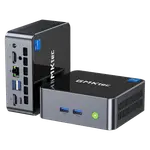
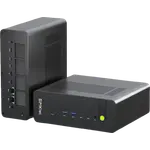
This is a full desktop that measures 114 x 106 x 42.5 mm and weighs about 430g as a barebone, so it disappears behind a monitor on the bundled VESA bracket or sits under a TV without looking like a computer. The Intel Core i5-13500H pairs 12 cores and 16 threads with a 4.7 GHz turbo and 18MB of cache, which is sized for browsers with many tabs, office documents, video calls and media playback rather than for sustained rendering or gaming. The 16GB kit runs in dual channel at DDR4-3200, which matters here because Intel Iris Xe graphics needs dual-channel memory to reach its rated 80 execution units. Three 4K displays at 60Hz are driven from two HDMI 2.0 ports and the USB-C port, a combination that suits a trading desk, a dashboard wall or a small signage setup.
What stands out on paper
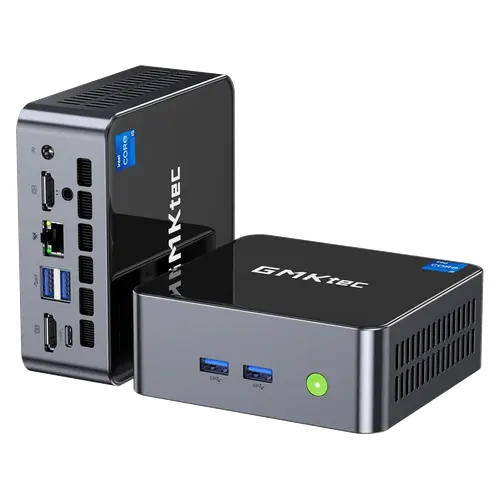
The upgrade path is unusually open for the size. Memory sits in two SO-DIMM slots and can be taken to 64GB, and there are two M.2 bays: the 512GB PCIe 3.0 drive occupies the M.2 2280 slot, and an M.2 2242 slot (SATA 3.0 or PCIe 3.0 x4) is left free. GMKtec rates both slots for large drives, though its launch material quotes a lower combined expansion figure than the store specification table, so check capacity before buying a drive. Networking is well covered with an Intel I226 2.5GbE port, Wi-Fi 6 on a Realtek 8852BE module and Bluetooth 5.2. Around the chassis there are three USB 3.2 Gen 2 Type-A ports at 10Gbps, one USB 2.0 port, the USB-C port with DisplayPort output, two HDMI 2.0 ports, a 3.5mm CTIA audio jack and the DC input. The enclosure is an all-metal CNC frame with a tempered glass top, cooled by a copper heat pipe and a single fan, and the processor can run at 28W, 35W or 40W depending on the mode.
What to know before you buy
The platform is 13th Gen and the limits show in what is missing. Memory is DDR4-3200 rather than DDR5 and stops at 64GB, graphics are integrated only, and there is no neural processing unit for local AI acceleration. The single Type-C port is not USB4 or Thunderbolt: it carries DisplayPort video at 4K 60Hz but moves data at 5Gbps, so a high-bandwidth dock or an external GPU enclosure is off the table. The machine has no built-in speaker or microphone, no SD card reader, no fingerprint sensor and no Kensington lock slot, so audio goes through the 3.5mm jack or over HDMI. Power comes from an external 100W adapter (20V, 5A) through a barrel connector rather than an internal supply, which is one more item to place behind the desk, and the warranty is one year. Windows 11 Pro is preinstalled, and the box includes an HDMI cable and the VESA mount.
Is the GMKtec NucBox M3 Pro (16GB + 512GB) worth it?
As an everyday desktop, the value is in the combination: a genuine 12-core Core i5, three 4K outputs, 2.5G wired networking, Wi-Fi 6, five USB ports and room to add memory and a second SSD, all in a metal case that hides behind a screen. What you give up is the current generation of connectivity and memory. There is no USB4, no Thunderbolt, no NPU and no DDR5, and the Type-C port is a 5Gbps data port with video output rather than a do-everything connector. For browsing, documents, calls, media playback, signage or a light always-on home server, those omissions matter less than the core count and the port selection. For a docked workstation, local AI work or anything that needs fast external storage, a newer platform is the better spend.
Frequently asked questions
How many monitors can the GMKtec NucBox M3 Pro drive?
Three at once, each at up to 4K 60Hz. Two come from the HDMI 2.0 ports and the third from the USB-C port, which carries DisplayPort video.
Can you upgrade the memory and storage yourself?
Yes. Memory sits in two SO-DIMM slots and takes up to 64GB of DDR4-3200 in dual channel. There are two M.2 bays: the 512GB drive uses the M.2 2280 slot, and an M.2 2242 slot is free, so a second drive can be added without removing the first.
Does the GMKtec NucBox M3 Pro have USB4 or Thunderbolt?
No. The Type-C port carries DisplayPort video at up to 4K 60Hz but moves data at 5Gbps, so it is not a USB4 or Thunderbolt port. The other three high-speed ports are USB 3.2 Gen 2 Type-A at 10Gbps, alongside one USB 2.0 Type-A.
What operating system does the GMKtec NucBox M3 Pro come with?
It ships with Windows 11 Pro preinstalled. The 16GB + 512GB configuration is a fully built machine, not a barebone, so it is ready to set up out of the box.
What is included in the box?
The NucBox M3 Pro, its 100W power adapter, an HDMI cable, a VESA mount, a user manual and a warranty card.
Does it have Wi-Fi and Ethernet?
Yes. It has Wi-Fi 6 on a Realtek 8852BE module with Bluetooth 5.2, and a 2.5GbE RJ45 port driven by an Intel I226 controller.