


Apple Mac Mini M2 Pro Review: Four Thunderbolt Ports and Three Displays in an Aluminium Slab
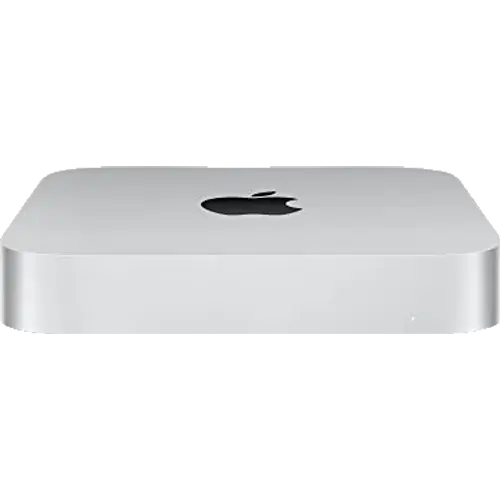
The Mac Mini with the M2 Pro chip pairs a 10-core CPU (six performance and four efficiency cores) with a 16-core GPU and a 16-core Neural Engine, backed by 16GB of unified memory at 200GB/s and a 512GB SSD, in a 197 mm aluminium square just 36 mm tall. Its case rests on connectivity: four Thunderbolt 4 ports at 40Gb/s, two USB-A ports, an HDMI output that reaches 8K at 60Hz, Gigabit Ethernet that can be configured to 10Gb, Wi-Fi 6E and a headphone jack designed for high-impedance headphones. Three displays can run at once. The compromises are permanent by design: memory and storage are soldered and cap at 32GB and 8TB respectively at purchase, and every port sits on the back panel. For creative and professional work in a small footprint, it remains one of the better equipped machines in the category.
- Video and photo editing
- Music production and audio work
- Three-display professional desks
- Quiet always-on desktops
Pros
- 10-core M2 Pro with a 16-core GPU and 200GB/s memory bandwidth
- Four Thunderbolt 4 ports at 40Gb/s with DisplayPort and USB4
- HDMI output up to 8K at 60Hz or 4K at 240Hz
- Drives three displays simultaneously
- Two USB-A ports alongside the Thunderbolt array
- Internal power supply, so no adapter on the desk
- Gigabit Ethernet configurable to 10Gb at purchase
- Built-in speaker plus a headphone jack for high-impedance headphones
- Recycled aluminium enclosure, rated at 5 dBA idle
Cons
- Memory is soldered and caps at 32GB
- Storage cannot be changed after purchase
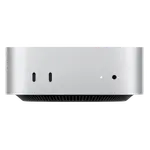
- Every port is on the rear panel, none on the front
- No SD card reader, fingerprint sensor or Kensington lock slot
- No built-in microphone
- Display, keyboard, mouse and HDMI cable are not included
Who is the Apple Mac Mini M2 Pro for?
This is the step up from the entry-level Mac Mini, aimed at people whose work actually uses the extra silicon. The M2 Pro brings ten CPU cores instead of eight, doubles the GPU to sixteen cores, and doubles memory bandwidth to 200GB/s, which matters most for video editing, 3D and rendering, large photo libraries, audio production with many plugins, and compiling code. It also unlocks the machine's port advantage: four Thunderbolt 4 ports rather than two, and HDMI output up to 8K at 60Hz or 4K at 240Hz. The 16-core Neural Engine handles on-device AI features, and macOS runs the whole thing in a chassis of 197 x 197 x 36 mm weighing 1.28 kg.
What stands out on paper
Connectivity is the headline. Four Thunderbolt 4 ports each carry DisplayPort, USB4 and 40Gb/s data, so external drives, docks and monitors all connect without adapters, and alongside them sit two USB-A ports at 5Gb/s, an HDMI port and Gigabit Ethernet that can be specified as 10Gb at purchase. Three displays run simultaneously: two at up to 6K over Thunderbolt plus one at 4K over HDMI. The power supply is internal, so no brick shares the desk, drawing up to 185W at maximum continuous load. Audio covers a built-in speaker, multichannel output over HDMI and a 3.5 mm jack with advanced support for high-impedance headphones. Wireless is Wi-Fi 6E with Bluetooth 5.3, and the enclosure uses fully recycled aluminium. Apple rates idle noise at 5 dBA, which is close to inaudible.
What to know before you buy
Everything internal is decided at purchase. Unified memory is soldered to the chip and tops out at 32GB on this model, and while the SSD can be specified up to 8TB, it cannot be changed afterwards, so the configuration you order is the one you keep for the life of the machine. Every port is on the rear panel, with nothing on the front, which is awkward for peripherals that get plugged and unplugged often. There is no SD card reader, no fingerprint sensor, no Kensington lock slot and no built-in microphone. The box holds the machine and a power cord only, so a display, keyboard and mouse are extra, and no HDMI cable is included despite the HDMI port. Graphics are integrated, and Windows software will not run natively.
Is the Apple Mac Mini M2 Pro worth it?
It earns its place when the workload uses what separates it from the base model: the extra CPU and GPU cores, the doubled memory bandwidth, the two additional Thunderbolt ports and the higher HDMI ceiling. Anyone doing office work and browsing will get the same experience from a cheaper machine. Buyers who want more memory than 32GB, upgradeable components or more ports without a dock should look at the Windows mini PCs in this category, several of which take 96GB or more of SO-DIMM memory. For a compact, near-silent creative workstation with a real port array and an internal power supply, this configuration still holds up well against its successors.
Frequently asked questions
How much memory can the Apple Mac Mini M2 Pro take?
Up to 32GB of unified memory, specified at purchase. The memory is part of the chip package and soldered, so it cannot be upgraded afterwards. This configuration ships with 16GB.
How many displays can it drive?
Three at once: two at up to 6K and 60Hz over Thunderbolt plus one at up to 4K and 60Hz over HDMI. Alternatively it can drive a single display at 8K and 60Hz or 4K at 240Hz over HDMI.
What is the difference between the M2 and M2 Pro Mac Mini?
The M2 Pro adds two CPU cores (ten against eight), six more GPU cores, doubles memory bandwidth to 200GB/s, and doubles the Thunderbolt ports from two to four. It also raises the memory ceiling to 32GB and the HDMI output to 8K.
Does it need an external power brick?
No. The power supply is built into the chassis, so only a power cord runs to the wall. Maximum continuous power draw is 185W.
Can it be configured with faster networking?
Yes. The standard port is Gigabit Ethernet, and Apple offers a 10Gb Ethernet option that also supports 2.5Gb and 5Gb, but it has to be chosen at purchase.
Does it have front-facing ports?
No. All four Thunderbolt 4 ports, both USB-A ports, HDMI, Ethernet and the headphone jack are on the rear panel, so frequently swapped peripherals are easier to handle through a hub.