



Apple Mac Mini M4 Review: The Small Desktop That Keeps Winning on Value
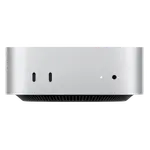
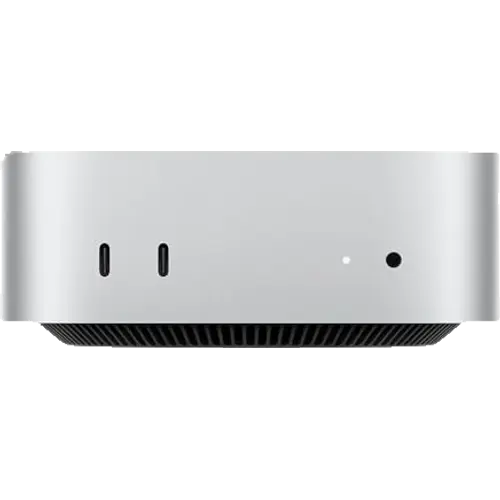
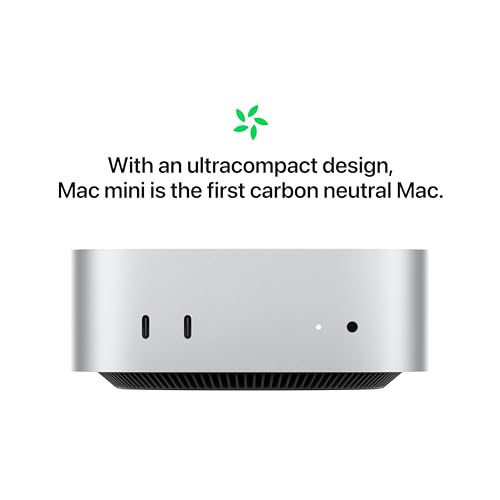
The Mac Mini with the M4 chip pairs a 10-core CPU and 10-core GPU with 16GB of unified memory and a 512GB SSD in a body just 127 mm square and 50 mm tall, weighing 670 grams. Owners consistently describe it as extremely fast for the money, whisper quiet even under load, and surprisingly small when it arrives, with several replacing 27-inch iMacs or failing Windows towers and calling it the best value computer they have bought. Ports are the compromise: two USB-C on the front, three Thunderbolt 4 and one HDMI on the back, and buyers frequently end up adding a hub. Memory is soldered and can only be specified at purchase (up to 32GB on this chip), so the configuration you buy is the one you keep. For office work, development, photo and video editing on a small desk, it is very hard to beat.
- Compact desktop replacement
- Creative and office productivity
- Switchers coming from Windows
- Quiet always-on machines
Pros
- Fast for the price, with the 10-core M4 handling multitasking and creative work easily
- Whisper quiet, even under sustained load
- Very small and light at 127 mm square and 670 g
- Premium aluminium construction
- Three Thunderbolt 4 ports plus HDMI and two front USB-C
- Setup described as effortless, including for first-time Mac users
- 16-core Neural Engine for on-device AI features
- Internal power supply, so no brick on the desk
Cons
- Memory and storage are soldered, so the configuration cannot be changed later
- Memory is soldered: 16GB is what this configuration keeps (32GB only at purchase)
- Owners frequently add an external drive or a dock to work around storage and port limits
- Power button is awkwardly placed underneath the chassis
- No SD card reader, fingerprint sensor or Kensington lock slot
- Monitor, keyboard and mouse are not included
Who is the Apple Mac Mini M4 for?
This suits someone who wants a full desktop without the desk footprint and already has, or plans to buy, a monitor, keyboard and mouse. The M4 with its 10-core CPU and 10-core GPU covers everyday productivity, browser-heavy work, photo editing, coding and video work comfortably, and the 16-core Neural Engine handles on-device AI features. Owners describe using it for exactly this range: office and internet work, creative software, multitasking with many applications open. Several reviewers came from Windows machines or older Macs and describe the transition as easy, with one non-technical user upgrading from an old all-in-one and finding the difference night and day.
What buyers love
Three themes dominate. Speed for the price comes first: reviewers repeatedly call it a performance bargain, saying apps launch instantly, multitasking is effortless and rendering finishes without hiccups. Silence is second, described as whisper quiet or silent even under load, which matters for a machine that sits on a desk all day. Size is third, and it genuinely surprises people, with one owner noting a lunchbox this size would fit only two sandwiches. Build quality gets consistent praise as premium metal construction, and setup is repeatedly described as a breeze, including for people who had never used macOS. Several owners replaced 27-inch iMacs or failing Windows desktops and consider it the best value computer on the market.
What to know before you buy
Storage and memory are the recurring complaints, and both are permanent decisions: the SSD and the unified memory are soldered, memory can only be specified at purchase (up to 32GB on this chip), and multiple owners describe buying an external drive because the built-in storage felt inadequate, or wishing they had specified more memory. Ports are limited to two USB-C on the front plus three Thunderbolt 4 and one HDMI on the back, and buyers regularly mention adding a dock or hub to connect everything. The power button placement on the underside of the chassis draws specific criticism as awkward to reach. There is also no SD card reader, no fingerprint sensor and no Kensington lock slot, and the box contains only the machine and a power cord, so a monitor, keyboard and mouse are extra.
Is the Apple Mac Mini M4 worth it?
By owner consensus, yes, and the value argument is the strongest part of its case: this is the cheapest way into current Apple silicon, and reviewers who have spent far more on Apple laptops describe it as the better buy. The caveats are ones you decide at purchase rather than live with later, so specify the storage and memory you will actually need, and budget for a hub if you have many peripherals. Anyone who needs upgradeable memory, more ports without adapters, or Windows software should look at the Intel and AMD mini PCs in this category instead.
Frequently asked questions
Can the Apple Mac Mini M4 memory be upgraded later?
No. The unified memory is soldered to the chip, so the configuration you buy is permanent. This model ships with 16GB and can be specified with 24GB or 32GB at purchase.
How many displays and ports does it have?
Three Thunderbolt 4 ports and one HDMI port on the back, plus two USB-C ports and a headphone jack on the front. Many owners add a hub or dock, since there are no USB-A ports.
Is it noisy under load?
Owners consistently report the opposite, describing it as whisper quiet or effectively silent even during demanding tasks, which is one of its most praised qualities.
Does it come with a monitor, keyboard or mouse?
No. The box contains the Mac Mini and a power cord only, so budget for a display and input devices if you do not already have them.
Is 512GB of storage enough?
That depends on your library, and it is the most common complaint from owners of smaller configurations. The SSD cannot be replaced later, so several buyers pair the machine with an external drive over Thunderbolt.
Is it a good first Mac for someone coming from Windows?
Reviewers who switched describe the setup as straightforward and the transition as positive, including users who had never touched macOS. Software compatibility is the thing to check before buying, since Windows-only applications will not run natively.