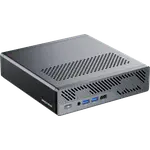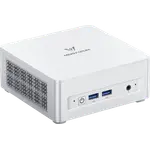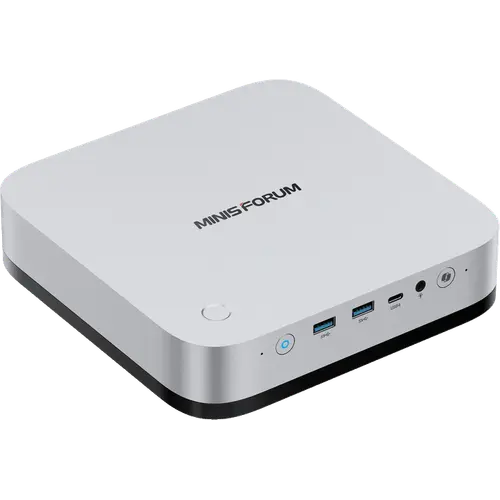

Image Slideshow Items

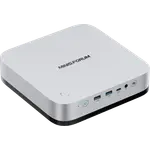
  • MINISFORUM M2 Pro-358H (32GB + 1TB)
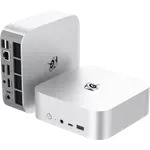
  • MINISFORUM M2 Pro-358H (32GB + 1TB) photo 2
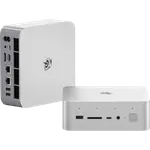
  • MINISFORUM M2 Pro-358H (32GB + 1TB) photo 3
  • MINISFORUM M2 Pro-358H (32GB + 1TB) photo 4
  • MINISFORUM M2 Pro-358H (32GB + 1TB) photo 5
  • MINISFORUM M2 Pro-358H (32GB + 1TB) photo 6
  • MINISFORUM M2 Pro-358H (32GB + 1TB) photo 7
  • MINISFORUM M2 Pro-358H (32GB + 1TB) photo 8
Last updated October 2026

MINISFORUM M2 Pro-358H (32GB + 1TB)

A Core Ultra X7 358H and Arc B390 in a 1.81-litre aluminium chassis, with 10GbE, Wi-Fi 7, three USB4 ports and three M.2 slots.

$1439.00
As an Amazon Associate I earn from qualifying purchases
Launch Year: 2026

Model: M2 Pro-358H

See the 10 best selling mini pcs
Open selection
News by email

Not buying today? Get what's new by email

New releases and the smart home news worth knowing, in your inbox.

Smart home news and new releases, straight to your inbox

New releases, comparisons and the smart home news worth knowing.

No spam. Unsubscribe in one click.

Your subscription could not be saved. Please try again.
Please enter a valid email address.
Tick the box above to finish signing up.
We couldn't verify you're human. Please try again.
Too many attempts. Please try again in an hour.
Your subscription has been successful.
Our review

MINISFORUM M2 Pro Review: A 16-Core Panther Lake Mini PC With 10GbE On Board

The verdict

The MINISFORUM M2 Pro-358H packs a 16-core Intel Core Ultra X7 358H, Intel Arc B390 graphics rated at 122 TOPS and a 50 TOPS NPU into a 1.81-litre aluminium chassis. It stands out for workstation-class networking (10GbE and 2.5GbE), three USB4 ports, Wi-Fi 7 and room for three M.2 drives, while the 32GB of soldered memory is the ceiling and there is no Thunderbolt certification. It suits a compact always-on server, a local AI box or a living-room PC, and the premium price is the main trade-off.

Best for
  • Home lab and always-on servers
  • Local AI and virtualisation
  • Media centre and HTPC use
  • Compact workstations

Pros

  • 16-core Intel Core Ultra X7 358H with Intel Arc B390 graphics
  • 122 TOPS GPU and 50 TOPS NPU for local AI work
  • 32GB of LPDDR5X at up to 7467 MT/s
  • 10GbE and 2.5GbE wired networking
  • Wi-Fi 7 and Bluetooth 6.0
  • Three USB4 ports at 40Gbps
  • Three M.2 2280 slots with up to 24TB total
  • Internal 134.9W power supply
  • Fingerprint sensor and SD card reader
  • Windows 11 Pro preinstalled
  • Two-year warranty

Cons

  • Memory is soldered and capped at 32GB
  • No Thunderbolt certification, USB4 only
  • Fan reaches 43.2 dBA in Performance mode under load
  • Premium price for the configuration

Who is the MINISFORUM M2 Pro for?

This is a mini PC for someone who wants desktop-class connectivity and a strong built-in GPU without a tower. The 16-core Core Ultra X7 358H, the Arc B390 graphics and the 50 TOPS NPU cover virtual machines, Docker containers, local AI inference, media playback and everyday professional work. The built-in 10GbE and 2.5GbE ports and the three M.2 slots make it a natural fit next to a NAS or as a small always-on server, and HDMI CEC makes it usable as a living-room machine.

What the MINISFORUM M2 Pro offers

The 195 x 195 x 47.5 mm aluminium chassis holds a 134.9W power supply, so there is no external brick. Memory is 32GB of LPDDR5X soldered at up to 7467 MT/s, and storage runs on three M.2 2280 slots: two PCIe 4.0 x4 and one PCIe 4.0 x1, each up to 8TB. Networking is a 10GbE RJ45 port on a Realtek RTL8127 controller plus a 2.5GbE RJ45 port on an Intel i226-V, alongside Wi-Fi 7 and Bluetooth 6.0. There are three USB4 ports at 40Gbps (one front, two rear), two USB 3.2 Gen2 Type-A ports, one USB 2.0 port, HDMI 2.1, DisplayPort 1.4, a 3.5 mm combo jack, an SD card reader, a fingerprint button, dual microphones and a built-in speaker. Windows 11 Pro is the listed operating system.

What to know before you buy

The 32GB of memory is soldered and is also the maximum, so buy the capacity you need up front. The high-speed ports are USB4, not Thunderbolt-certified, which matters if a specific Thunderbolt device or dock is required. Cooling uses phase-change material, dual heat pipes and a turbo fan that reaches 5000 rpm; MINISFORUM rates the Performance mode at 43.2 dBA under full load, so the machine can be heard when it is working hard. The box includes a base bracket, a suspension stand, a mounting screw set, an HDMI cable and a power cord, and the chassis carries a two-year warranty.

Is the MINISFORUM M2 Pro worth it?

On the spec sheet this is a compact machine with unusually deep networking and expansion for its size: 10GbE, Wi-Fi 7, three USB4 ports, three drive slots and an internal power supply. The trade-offs are fixed 32GB memory, no Thunderbolt certification and fan noise under sustained load. If you need a small always-on host, a local AI box or a media PC that can also run virtual machines, the combination is hard to match in this footprint; if you need upgradeable memory or a certified Thunderbolt workflow, another mini PC in this category fits better.

Frequently asked questions

Does the MINISFORUM M2 Pro have Thunderbolt?

No. MINISFORUM lists the three high-speed ports as USB4 at 40Gbps with DisplayPort 2.1 Alt Mode and makes no Thunderbolt claim.

Can you upgrade the RAM on the MINISFORUM M2 Pro?

No. The 32GB of LPDDR5X is soldered to the board and 32GB is also the maximum capacity.

How much storage can the MINISFORUM M2 Pro hold?

It has three M.2 2280 NVMe slots, two at PCIe 4.0 x4 and one at PCIe 4.0 x1. Each supports up to 8TB, for up to 24TB in total. The configured model ships with a 1TB drive.

What operating system does the MINISFORUM M2 Pro ship with?

The 32GB + 1TB configuration is listed with Windows 11 Pro.

Does the MINISFORUM M2 Pro have a built-in power supply?

Yes. The chassis contains a 19V/7.1A 134.9W power supply, so the machine takes an AC cable rather than an external power brick.

What ports does the MINISFORUM M2 Pro have?

Front: one USB4 at 40Gbps with 15W power output, two USB 3.2 Gen2 Type-A and a 3.5 mm combo jack. Rear: one USB 2.0, two USB4 at 40Gbps (one with 65-100W power input), HDMI 2.1, DisplayPort 1.4, 10GbE, 2.5GbE and AC input. There is also an SD card reader on the side.


Company
MINISFORUM logo

MINISFORUM

4.4/ 5 avg ratingChina flagHeadquartered in China

MINISFORUM is a Chinese manufacturer of compact desktop computers, ranging from pocket-sized Desk and Elite mini PCs to AtomMan gaming systems, AI workstations and multi-bay NAS units. In the smart home its mini PCs are commonly used as always-on local servers for Home Assistant, media libraries and other automation workloads that benefit from x86 performance and low power draw. Machines ship with Windows and are widely run with Linux, and the brand supports them with its own driver, BIOS and manual downloads.

Full specifications

Every spec, organized

Browse the full breakdown by category. Tap the on any row for what it means, or the for sources and documentation.

Dimensions

7.7 × 7.7 × 1.9 in 195 × 195 × 47.5 mm

MINISFORUM's store page, TechPowerUp and Notebookcheck all state 195 x 195 x 47.5 mm for the 1.81-litre chassis.

Weight

3.1 lb 1.39 kg

MINISFORUM's Japanese store page and Notebookcheck state 1.39 kg.

Chassis Material

Aluminum

TechPowerUp describes the 195 x 195 x 47.5 mm chassis as aluminium.

Model

Intel Core Ultra X7 358H (16 cores, 16 threads, up to 4.8 GHz)

MINISFORUM's specification sheet lists 16 cores, 16 threads, a 1.5 GHz efficient-core base clock and a 4.8 GHz maximum turbo frequency.

Configuration

Soldered (non-upgradeable)

Notebookcheck states the 32 GB of LPDDR5X is soldered and 32 GB is the maximum.

Type

LPDDR5X

Speed

7467 MT/s

MINISFORUM lists a maximum memory speed of 7467 MT/s and Notebookcheck confirms the shipping build runs at 7,467 MT/s.

Form Factor

Soldered

Capacity

32 GB

Maximum Capacity

32 GB

The shipping configuration is 32 GB onboard; Notebookcheck gives 32 GB as the maximum.

Model

Intel Arc B390 (12 Xe3 cores, up to 2.5 GHz, 122 TOPS Int8)

MINISFORUM lists the Intel Arc B390 GPU with 122 peak TOPS and a 2.5 GHz maximum dynamic frequency; Notebookcheck states 12 Xe3 cores.

Model

Intel NPU (50 TOPS Int8)

MINISFORUM's specification sheet lists an NPU peak of 50 TOPS Int8.

Technology

PCM and dual heat pipes with a turbo fan, up to 5000 rpm

MINISFORUM lists phase-change material, dual heat pipes and a turbo fan running up to 5000 rpm.

Power Supply Capacity

134.9W

MINISFORUM lists an internal 19V/7.1A 134.9W DC adapter; Notebookcheck states a 134.9 W supply inside the chassis.

Built-in Power Supply

YES

Adapter

-

Technology

3x M.2 2280 NVMe (2x PCIe 4.0 x4, 1x PCIe 4.0 x1), up to 8TB per slot

MINISFORUM lists two PCIe 4.0 x4 M.2 2280 slots and one PCIe 4.0 x1 slot, each up to 8TB.

Capacity

1 TB

Ethernet

1x 10GbE RJ45 (Realtek RTL8127) + 1x 2.5GbE RJ45 (Intel i226-V)

MINISFORUM's specification sheet names the 10G port as RTL8127 and the 2.5G port as i226-V.

Wi-Fi

Wi-Fi 7 (Intel BE211)

Bluetooth

Bluetooth 6.0

USB 2.x

1x USB 2.0 (rear)

USB 3.x

2x USB 3.2 Gen2 Type-A (front)

USB 4.x

3x USB4 40Gbps (1x front with 15W PD out, 2x rear, one with 65-100W PD in)

HDMI

1x HDMI 2.1 FRL (up to 8K@60Hz / 4K@144Hz, CEC)

Display Port

1x DisplayPort 1.4 (up to 4K@144Hz) + DP 2.1 Alt Mode over USB4

Thunderbolt

NO

MINISFORUM's specification sheet lists the three high-speed ports as USB4 and makes no Thunderbolt claim.

3.5mm stereo headset jack

YES

Speakers

YES

MINISFORUM's product page lists a built-in speaker.

Microphone

YES

MINISFORUM's product page lists dual DMIC microphones.

SD Card Slot

YES

MINISFORUM lists an SD card reader on the right side, over USB 2.0 at up to 480 Mbps.

Fingerprint Sensor

YES

MINISFORUM lists a fingerprint button on the top of the chassis.

Kensington Lock

YES

Operating System

Windows 11 Pro

MINISFORUM's Japanese store page lists Windows 11 Pro for this configuration.

HDMI Cable

YES

MINISFORUM's in-box list includes an HDMI cable.

VESA Mount

YES

MINISFORUM includes a base bracket, a suspension stand and a mounting screw set, and lists wall-mount support as YES; its Japanese page describes mounting the machine behind a monitor with the included bracket.

Ask Chip

Got a question about the MINISFORUM M2 Pro-358H (32GB + 1TB)?

I know its spec sheet, what owners say about it and the rest of the catalog. Ask me about compatibility, alternatives or how it stacks up.

AmazonOur store on AmazonShop our ideas on AmazonLists of the smart home setups we would put together ourselves, ready to add to your Amazon cart.Shop on Amazon
On sale now

More Mini PCs on sale

View all
Full comparison table

Compare the MINISFORUM M2 Pro-358H (32GB + 1TB) with the other 106 Mini PCs

All Mini PCs in the catalog in one table: filter by what you need, sort by price or rating, and see exactly where this one lands.

  • 106 other Mini PCs
  • 41 specs compared
  • 38 filters
Open the full comparison
Head to head

MINISFORUM M2 Pro-358H (32GB + 1TB) vs the competition

View all
MINISFORUM

More from MINISFORUM

View all