


MINISFORUM X1 Lite-255 Review: A Quiet 8-Core Mini PC With OCuLink eGPU Headroom
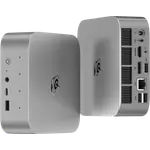
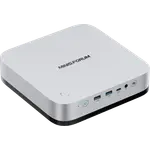
The X1 Lite-255 is a compact eight-core desktop built for people who want desktop-class throughput without a desktop-sized machine. Its Ryzen 7 255 and Radeon 780M handle office work, light video and music editing and 1080p gaming comfortably, while an OCuLink port, a full-function USB4 port and 2.5G Ethernet give it far more expansion than its price tier usually buys. Two SO-DIMM slots and two M.2 slots make it genuinely upgradeable, and it stays quiet enough to sit on a desk or run around the clock as a home server. The trade-offs are the missing conveniences: no NPU for on-device AI, no speakers, no card reader and no Kensington slot.
- Home lab and virtualization servers
- Linux desktops
- Compact office workstations
- eGPU upgraders
- Living-room and emulation boxes
Pros
- Eight-core Ryzen 7 255 with Radeon 780M graphics in a 0.67 kg chassis
- OCuLink eGPU port with the M.2 adapter included in the box
- Full-function USB4 with 40 Gbps transfer, 8K video out and 65-100W power input
- Two DDR5-5600 SO-DIMM slots reaching 128 GB, plus two M.2 2280 PCIe 4.0 x4 slots
- Very quiet under load thanks to phase-change cooling and a single large fan
- 2.5G Ethernet, Wi-Fi 6E and Bluetooth 5.2 as standard
- Three simultaneous displays over HDMI 2.1, DisplayPort 1.4 and USB4
- Two-year warranty backed by after-sales support owners rate highly
Cons
- No NPU, so local AI workloads are a poor fit
- The OCuLink adapter ships uninstalled and consumes one of the two M.2 slots
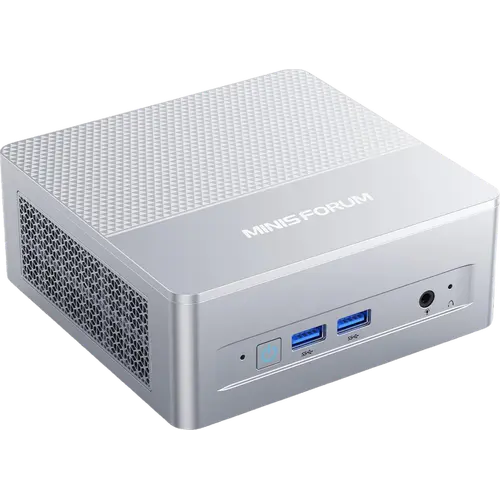
- No built-in speakers, so audio needs the 3.5 mm jack, HDMI or DisplayPort
- USB4 is not certified as a Thunderbolt port
- No SD card reader, fingerprint sensor or Kensington lock
- Reinstalling Windows from scratch can be awkward with the published driver package
- External 19V power brick rather than an internal power supply
Who is the MINISFORUM X1 Lite-255 for?
This is a machine for the buyer who has outgrown a low-power mini PC but does not want a tower. The Ryzen 7 255 brings eight cores and sixteen threads up to 4.9 GHz, and the 32 GB of DDR5-5600 that ships in it is enough headroom to run several virtual machines at once, which is exactly what a chunk of its owners do: a Proxmox host on a shelf, a Steam box under a television, a day-to-day desktop that does not heat up a room the way a gaming rig does. It suits Linux users particularly well, since owners report that Arch-based and Fedora-based distributions pick up the hardware without hunting for drivers. At 130 x 126 x 47.2 mm and 0.67 kg it also travels, and the bundled bracket puts it behind a monitor or under a desk when space is the constraint.
What buyers love
Two things come up again and again: how quiet it is and how much machine fits in the box. Owners describe it as effectively silent at idle, with a faint hiss from the fan under sustained load, which the phase-change cooling and the single large-diameter fan are built for. Performance draws the same reaction, with people citing smooth 4K streaming, comfortable multitasking and enough from the Radeon 780M for 1080p gaming and console emulation. The port selection gets named specifically, the USB4 port, the OCuLink connector and the 2.5G Ethernet jack, because those three are what make it expandable rather than sealed. Windows 11 Pro arrives pre-installed with a full license. And when something has gone wrong, MINISFORUM's after-sales handling is one of the most praised things about the product: owners describe a responsive support team that walked them through diagnosis and shipped a replacement unit under the two-year warranty.
What to know before you buy
The OCuLink port is not wired up out of the box: the M.2 to OCuLink adapter ships in a separate bag and, once installed, it occupies one of the two M.2 SSD slots, so an external GPU costs you a storage bay. Owners have also flagged smaller irritations, including USB ports mounted upside down on both the front and the back, and one report of a USB-C port failing after several weeks of use, which the manufacturer replaced. Reinstalling Windows from scratch is another rough edge: the driver package and instructions MINISFORUM publishes did not go smoothly for at least one owner, so it is worth keeping the factory image until you know you need a clean install. Onboard Wi-Fi has been called awkward on some Linux distributions, though the card is replaceable. Finally, the spec sheet is honest about what is absent: there is no NPU, so this is a poor fit for local AI work; there are no built-in speakers, no SD card reader, no fingerprint sensor and no Kensington lock; and although the USB4 port carries full 40 Gbps and 8K video, it is not a certified Thunderbolt port.
Is the MINISFORUM X1 Lite-255 worth it?
For its tier, the value case is strong, and it rests on expandability rather than raw benchmark position. You get a fully configured machine with 32 GB of memory and a 1 TB NVMe drive, plus room to reach 128 GB of RAM and 8 TB of storage across the two M.2 slots without opening a single sealed component, and an eGPU path through OCuLink that runs at PCIe 4.0 x4. Rivals at this size more often solder the memory or offer a single storage slot. What you give up against pricier mini PCs is on-device AI acceleration and Thunderbolt certification, and against a full tower you give up a discrete GPU unless you take the OCuLink route. If the job is a quiet always-on server, a small office desktop or a compact machine you intend to keep upgrading, it earns its place.
Frequently asked questions
Can the MINISFORUM X1 Lite-255 use an external graphics card?
Yes. It has an OCuLink connection running at PCIe 4.0 x4, and the M.2 to OCuLink adapter is included in the box. The adapter uses one of the two M.2 2280 slots, so enabling an eGPU means giving up a second SSD. The full-function USB4 port is the alternative if you would rather keep both storage slots.
How much memory and storage can the X1 Lite-255 take?
It ships with 32 GB of DDR5-5600 across two SO-DIMM slots and supports up to 128 GB in total. Storage is two M.2 2280 PCIe 4.0 x4 slots, populated with a 1 TB drive from the factory, each slot taking up to 4 TB for 8 TB combined.
Does the MINISFORUM X1 Lite-255 have speakers or a microphone?
There are no built-in speakers, so sound goes out over HDMI, DisplayPort or the 3.5 mm combo jack on the front. The manufacturer's listing does specify dual digital microphones on the unit.
How many monitors can it drive at once?
Three. The X1 Lite-255 has one HDMI 2.1 FRL output, one DisplayPort 1.4 output and one USB4 Type-C port that also carries video, and it can drive a single display at up to 8K.
Does the MINISFORUM X1 Lite-255 run Linux?
It ships with Windows 11 Pro pre-installed and licensed, but owners report installing Arch-based and Fedora-based distributions with the hardware detected out of the box. The one recurring caveat is the onboard Wi-Fi card, which some owners found awkward on Linux and which is replaceable.
What warranty does the MINISFORUM X1 Lite-255 come with?
MINISFORUM covers its mini PCs for two years. Owners who have used it describe a support team that diagnoses the fault and ships a replacement unit, though an international claim can take a few weeks end to end.