

NVIDIA DGX Spark Review: 128GB of Unified Memory for Local AI Agents
The NVIDIA DGX Spark is a desktop AI supercomputer for developers and researchers who want to run large language models and always-on agents on their own desk instead of renting cloud GPUs. Its 128GB of unified LPDDR5x memory and CUDA support let it hold models that will not fit on a consumer graphics card, and the built-in ConnectX-7 networking can cluster two or four units for still larger workloads, all in a quiet chassis that draws under 240W. The trade-off is throughput over latency: a single chat reply trails a high-end graphics card, and the price has climbed well past its launch figure as demand outruns supply. It suits people who have a memory problem to solve, not people chasing the fastest single answer.
- Local LLM inference
- AI researchers
- Private, on-device AI
- AI agent development
Pros
- 128GB of unified LPDDR5x memory holds models far larger than a consumer GPU
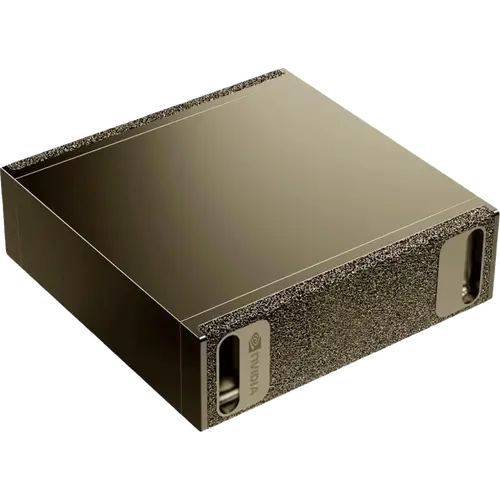
- Compact 150 x 150 x 50.5 mm chassis at 1.2kg that draws under 240W
- Two ConnectX-7 QSFP ports at up to 200 Gbps let two or four units be clustered
- Runs the NVIDIA DGX OS with CUDA, cuDNN and NVIDIA NIM preinstalled
- 10 GbE Ethernet and Wi-Fi 7 for fast model and dataset transfers
- 4TB of self-encrypting M.2 NVMe storage
- Local, private inference with no cloud and no per-token cost
- HDMI 2.1a plus up to three DisplayPort outputs over USB-C
Cons
- Built for throughput, not single-stream speed, so one chat reply trails a high-end GPU
- Price has climbed well above the maker's own figure as resellers dominate the listing
- Some buyers reported thermal-related crashes and a Wi-Fi driver failure on first boot
- Rewards Linux and CUDA comfort; it is not a beginner machine
- No Thunderbolt, no audio jack, and no built-in speakers or microphone
- The included 240W external power supply is required; a lower-rated one can throttle or fail to boot
Who is the NVIDIA DGX Spark for?
This is a purpose-built machine for local AI work, and it makes most sense to anyone whose models keep running out of video memory. Owners describe loading large mixture-of-experts and coding models locally, running private agents that never touch an external API, and reviewing sensitive or export-controlled codebases without exposing them to a cloud service. The GB10 superchip pairs a 20-core Arm CPU with an integrated Blackwell GPU and, crucially, gives them a single 128GB pool of unified LPDDR5x rather than the isolated few gigabytes of a graphics card. It is not a beginner machine: buyers consistently note that a proper setup rewards comfort with Linux, and that following NVIDIA's own playbooks gets you further than improvising.
What buyers love
Two things come up again and again: memory and calm. The 128GB pool lets people run models they previously could not run at all, and the ConnectX-7 SmartNIC turns a pair or a quartet of units into something much larger, which several owners treat as a large part of the value. Just as often praised is how the machine behaves on a desk, with buyers reporting loads well under the 240W supply and a fan quiet enough to sit beside. The 4TB of self-encrypting NVMe storage is called out by owners who compare it favourably with the 1TB that cheaper lookalike boxes ship. Buyers also value the local privacy: running an AI stack that stays on your own network, backed by CUDA and NCCL so the tooling they already use works.
What to know before you buy
The honest limitation is design intent, not raw power. Several owners found that token generation on a single stream lags a high-end consumer graphics card, and one described the Spark as a big tractor that pulls heavy loads rather than a sports car, best at running many jobs in parallel instead of answering one prompt fast. Reports of thermal-related crashes appear in the reviews, along with a first-boot Wi-Fi driver failure that forced one buyer to repair the install from a USB stick, so check the seller and test early. The price is another caveat: the listing is frequently dominated by third-party resellers well above the maker's own figure, and one buyer returned a unit after repeated shutdowns and said they would buy again once the thermal issue is settled. Finally, expect to supply a keyboard and monitor only if you want one; many owners run it headless and reach it over SSH or a mesh VPN, and the machine powers on as soon as it is plugged in, so shut it down fully before unplugging to avoid corrupting the filesystem.
Is the NVIDIA DGX Spark worth it?
It is worth it if the 128GB pool solves a problem you actually have, and poor value if it does not. Nothing else in this footprint at 150 x 150 x 50.5 mm and 1.2kg will hold a model of this size while staying quiet enough to sit next to you, and the 200 Gbps ConnectX-7 links give a real upgrade path, since two units reach models up to 405 billion parameters. Buy it for research, for agentic pipelines, for keeping sensitive data local, or as the first node of a small cluster. Do not buy it expecting the fastest possible answers from a single prompt, or as a gaming machine, because it has no audio jack, no speakers and no microphone. Judged as a compact, low-noise platform for large local models it earns its premium; judged as a general-purpose desktop it does not.
Frequently asked questions
Does the NVIDIA DGX Spark require a subscription?
No. It is a standalone computer that runs models locally, with the NVIDIA DGX OS, CUDA and the core AI software stack preinstalled and free to use. There is no mandatory cloud subscription and no per-token fee, which is the main reason buyers choose it for private work.
Can you cluster more than one DGX Spark?
Yes. Alongside its 10 GbE Ethernet port, each unit carries two QSFP ConnectX-7 ports, each up to 200 Gbps, and the official guide describes connecting up to four systems. A pair can run models up to 405 billion parameters, so several owners treat a second unit as the natural upgrade path.
What can the NVIDIA DGX Spark run?
It runs large language models and autonomous agents of up to roughly 200 billion parameters on a single unit, and larger when two are clustered. Owners report running models through Ollama, PyTorch and the NVIDIA NIM stack, and using it for inference, prototyping and fine-tuning without sending data to the cloud.
What operating system does the DGX Spark use?
It ships with the NVIDIA DGX OS, an Ubuntu Linux distribution tuned for AI workloads and preconfigured with CUDA, cuDNN and the NVIDIA developer stack. It is not a Windows machine, and buyers note that comfort with Linux makes setup and maintenance much smoother.
What ports does the NVIDIA DGX Spark have?
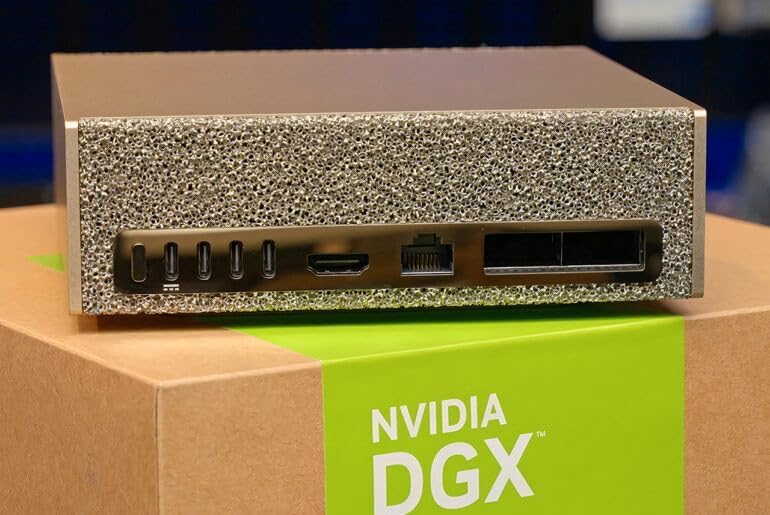
Four USB Type-C ports (one of which carries power delivery), a single HDMI 2.1a display connector, one RJ-45 10 GbE Ethernet port, and two QSFP ConnectX-7 ports. Up to three of the USB-C ports can also drive DisplayPort monitors. There is no Thunderbolt port, no audio jack and no SD card slot.
Is the NVIDIA DGX Spark good for gaming?
It is not designed for gaming. The Blackwell GPU is aimed at AI compute and the machine has no audio jack, speakers or microphone, so it is a headless-capable AI workstation rather than a general desktop. Its HDMI 2.1a and DisplayPort outputs are there to drive monitors for development.