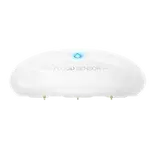


Fibaro Motion Sensor (FGBHMS-001) Review: Gorgeous Cat-Eye Design Let Down by Unreliable HomeKit Connectivity
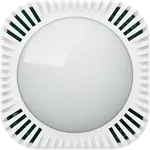
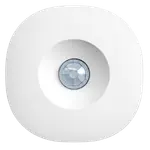
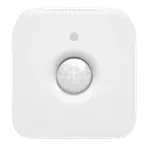
The Fibaro Motion Sensor (FGBHMS-001) is a HomeKit multi-sensor best known for its distinctive cat-eye design, and its low rating reflects a striking-but-frustrating device. On the plus side, it looks fantastic (a professional, color-changing 'eye' that lights up on detection, which you can disable), it's a compact 3-in-1 (motion, light and temperature) that fits neatly in a corner or on a shelf, and when it works it responds quickly and is easy to set up in HomeKit for notifications, alarms or lighting. The problem is reliability. The most common and serious complaint is that it constantly disconnects from HomeKit, its Bluetooth connection drops, it slips into a deep sleep it won't wake from, and owners see 'connection fault', an 'N/A' serial, or 'not reachable' errors, sometimes reporting under 10% of motion events, with the only fix being to pull the battery or toggle the phone's Bluetooth. Many contrast it unfavorably with the Philips Hue motion sensor, which 'never drops off the network,' and recommend buying that instead (often at half the price). Trigger latency can also be high (tens of seconds from motion to action, poor for entry lighting), the light (lux) sensor doesn't reliably update its value (making light-based automations unreliable), and temperature can read high with no offset. Historically the app shipped incomplete (no sensitivity/timeout controls for months), and even now the FibaroHome app is awkward (owners use Eve's app to configure scenes). Some units also stopped working after iOS updates. It's a beautiful sensor that too often doesn't stay connected.
- Owners who prioritize a striking design over reliability
- HomeKit users wanting motion, light and temperature in one unit
- Tinkerers willing to configure via the Eve app
- Anyone who can tolerate occasional dropouts
Pros
- Striking, professional cat-eye design with a configurable indicator LED
- Compact 3-in-1 (motion, light and temperature) that fits in a corner
- Quick response and easy HomeKit setup, when connected
- Programmable motion-off timeout (after firmware updates)
Cons
- Frequently disconnects from HomeKit / unreliable (deep-sleep dropouts)
- High trigger latency (poor for entry lighting)
- Unreliable light (lux) sensor; temperature reads high with no offset
- Awkward app (configure via Eve); pricey; owners recommend the Philips Hue sensor instead
Who is the Fibaro Motion Sensor for?
This is a HomeKit (Bluetooth) multi-sensor combining motion, light and temperature detection in an eye-shaped body, powered by a CR123A battery. It integrates with Apple HomeKit. It's aimed at HomeKit users who want an attractive, all-in-one sensor and are willing to work around its quirks. In practice, though, its reliability problems make it hard to recommend over alternatives, most owners suggest the Philips Hue motion sensor instead. It's not for you if you need dependable, always-connected operation, low-latency entry lighting, or a trustworthy light sensor for automations.
What buyers love
The design is the standout: owners repeatedly praise the professional, cat-eye look, complete with a color-changing LED that lights on detection (and can be turned off for stealth). It's compact and fits neatly into a corner or on a shelf, and being a 3-in-1 (motion, light and temperature) it does more than a plain motion sensor. When it's connected, response is quick, and it's straightforward to set up in HomeKit to push motion notifications, act as an alarm (triggering a HomePod), or control outdoor lights on a timer. Some owners prefer it to the Eve Motion (for its size plus temperature and light sensors) and to ecobee's sensor (for its programmable motion-off timeout and broader compatibility). For those whose units stay connected, it's a capable, good-looking sensor.
What to know before you buy
Reliability is the dealbreaker for many. The most repeated complaint is that it constantly disconnects from HomeKit: the Bluetooth link drops, the device enters a deep sleep it won't wake from, and owners get 'connection fault', 'N/A' serial numbers or 'not reachable' errors, in bad cases reporting fewer than 10% of motion events. Recovery often means pulling the battery or cycling the phone's Bluetooth. Trigger latency can also be high (tens of seconds from motion to action), making it poor for turning lights on as you enter, and the light (lux) sensor frequently fails to update its reading, so light-based automations are unreliable. Temperature can read high with no offset. Historically, the app launched incomplete (no sensitivity or timeout controls for roughly nine months), and even after fixes, the FibaroHome app is awkward, so owners configure scenes and triggers in the Eve app instead. Some units stopped working after iOS updates, support is described as unhelpful, it's pricier than rivals, and the mount grips loosely. Overwhelmingly, owners recommend the Philips Hue motion sensor as a more reliable, cheaper alternative.
Is the Fibaro Motion Sensor worth it?
For most buyers, no. It's a beautifully designed 3-in-1 HomeKit sensor, and when connected it works quickly and does the job, but the middling average rating is earned by frequent HomeKit disconnects, high latency, an unreliable light sensor, and a history of incomplete software. Owners repeatedly say the Philips Hue motion sensor is more dependable and often half the price. Buy the Fibaro only if the cat-eye aesthetic genuinely matters to you and you can tolerate dropouts and workarounds (configuring via the Eve app, occasional battery pulls); if you want a sensor that simply stays connected and reliably drives automations, choose the Hue sensor or another proven option instead.
Frequently asked questions
Is it reliable with HomeKit?
Often not. The most common complaint is that it constantly disconnects, dropping its Bluetooth link, entering a deep sleep it won't wake from, and showing 'connection fault' or 'not reachable', sometimes reporting under 10% of motion events. Recovery frequently requires pulling the battery or cycling the phone's Bluetooth. Reliability is its biggest weakness.
How does it compare to the Philips Hue motion sensor?
Owners overwhelmingly favor the Hue sensor. They report the Hue 'never drops off the network,' reads temperature and motion reliably, and often costs about half as much, while offering the same motion, light and temperature sensing. Many specifically recommend buying the Hue sensor instead of the Fibaro.
Can I turn lights on when I enter a room?
It's a poor fit for that. Trigger latency can be tens of seconds from when motion begins, so lights may come on well after you've entered. Combined with the frequent disconnects, it's unreliable for entry lighting, better-suited to notifications or alarms if you can keep it connected.
Is the light sensor useful for automations?
Not reliably. Owners report the lux value often fails to update, staying at a previous reading, so automations based on light level don't work consistently. If you need dependable light-level triggers, this sensor will likely disappoint.
How do I configure sensitivity and timeout?
After firmware updates, you can set sensitivity, timeout, tamper and the LED indicator. However, the FibaroHome app is awkward (and oddly requires Location Services to build scenes), so many owners use the Eve app to configure triggers and actions, which then appear in Apple Home. Expect some setup fiddliness.