


QNAP TS-664-8G-US Review: A Six-Bay Storage Workhorse With Room to Grow
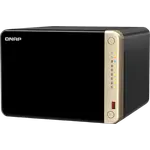
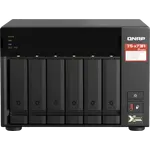
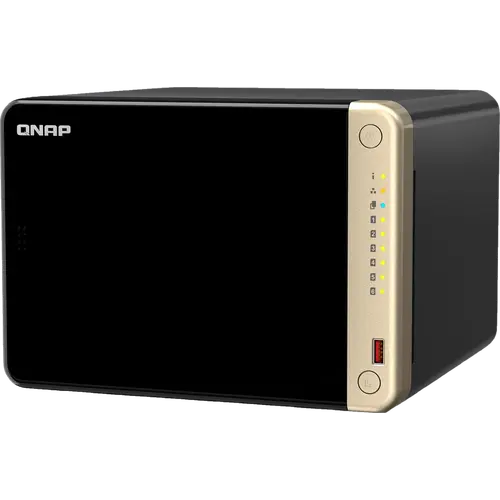
The QNAP TS-664-8G-US is a six-bay NAS for buyers who need room for a growing library and fast local transfers without moving to a rack unit. Six SATA bays, two M.2 slots, dual 2.5GbE ports and a quad-core Intel x86 chip give it the flexibility to run containers, virtual machines and QNAP's app stack, while QTS keeps day-to-day management familiar. It is happiest as a storage and backup hub; anyone who wants a heavy media transcoder or a silent appliance should weigh its entry-level Celeron and plastic drive trays first. At its mid-range price, the expansion is the point.
- Large media libraries
- Home backups
- Home lab and containers
- Small offices
Pros
- Six hot-swappable 3.5-inch SATA bays with RAID 5 and RAID 6 support
- Dual 2.5GbE ports with seven-mode port trunking
- Two M.2 PCIe slots usable as cache or as an SSD storage pool
- Quad-core Intel x86 processor with AES-NI and hardware transcoding
- Runs Docker and LXC containers, virtual machines, Plex and QVR surveillance
- Memory upgradable through two SODIMM slots, up to 16 GB
- PCIe Gen 3 slot for a 10GbE network card later
- Can be switched from QTS to QuTS hero for ZFS
Cons
- Entry-level Celeron and graphics are not a heavy transcoding or VM powerhouse
- Plastic drive trays and covers feel less solid than the price suggests
- No ECC memory and no hybrid RAID for mixing drive sizes
- No built-in 10GbE, USB-C or SD card slot
- Fan and drive noise rise under load
- Ships diskless, so drives are an extra cost
Who is the QNAP TS-664-8G-US for?
This is the desktop NAS for a household or small office that has outgrown four bays. Six 3.5-inch SATA bays support RAID 5 and RAID 6, so you can lose a drive, or two, without losing the array, and they are hot-swappable for replacing a failed disk without a shutdown. Dual 2.5GbE ports roughly double what Gigabit can move over the Cat 5e wiring most homes already have, and two M.2 2280 PCIe slots can serve as a cache in front of the hard drives or as an all-flash storage pool. The Intel Celeron N5095 is a 64-bit x86 chip, which means the full QTS app catalogue rather than the reduced set some ARM NAS run. It ships diskless, so budget for drives.
What owners praise
The recurring theme is capacity and flexibility for the money. Owners describe filling the six bays and both M.2 slots, adding a PCIe card for more solid-state storage, and using the unit as the centre of a home network for backups, media and containers. Several mention that setup was straightforward and that QTS felt familiar, especially for anyone coming from another QNAP. The 2.5GbE ports earn repeated praise from buyers who also bought a 2.5G switch, since that is what makes large transfers feel quick. Containers come up too, with one owner running Pi-hole and other network services through Container Station. Noise is a split verdict: some call it quiet, particularly with slower 5400 rpm drives, while others notice the fans and drives under load.
What to know before you buy
The Celeron is the ceiling. It handles file serving, backups, containers and light virtual machines, but owners who expected a powerful media server have been disappointed when a demanding transcode fell back to software or an unsupported audio format would not play. The hardware transcoding engine is there, yet this is an entry-level chip, not a media workstation. The chassis also draws mixed feelings: the plastic drive trays and covers do the job but feel less solid than the metal enclosures some rivals use. There is no ECC memory, no hybrid RAID for mixing drive sizes, no Btrfs, and no built-in 10GbE, USB-C or SD card slot. A PCIe Gen 3 slot accepts a 10GbE card later, and the memory is upgradable through two SODIMM slots, which is the main headroom beyond the bays.
Is the QNAP TS-664-8G-US worth it?
It is worth it if you want six bays, 2.5GbE and x86 software support in a desktop box without paying for a bigger chassis. The combination of hot-swap bays, two M.2 slots, a PCIe expansion slot and the option to switch from QTS to QuTS hero for ZFS gives it a longer useful life than a sealed appliance. Buyers who mainly want a quiet, simple file share may be happier with a smaller or more polished unit, and anyone planning serious Plex transcoding should compare the CPU first. For a growing library, a backup target and a modest home lab in one machine, the balance is strong.
Frequently asked questions
Does the QNAP TS-664-8G-US come with hard drives?
No. It ships diskless with six 3.5-inch SATA 6Gb/s bays that also take 2.5-inch SATA SSDs, plus two M.2 2280 PCIe slots. Drives are bought separately.
Can you upgrade the memory?
Yes. It arrives with 8 GB of DDR4 in a SODIMM slot and has two slots in total, with QNAP rating it for up to 16 GB as two 8 GB modules.
Does the TS-664 support ZFS?
Yes, but not by default. QTS formats internal drives as EXT4, and ZFS comes from switching the NAS to the QuTS hero operating system, which is supported from QTS 5.2.1.
Can it run Plex, Docker and Home Assistant?
Yes. Container Station runs Docker and LXC/LXD containers, Virtualization Station runs virtual machines including Linux guests such as Home Assistant, and Plex is available for the media library. Virtualization Station needs at least 4 GB of memory, which this model exceeds out of the box.
How fast is the network, and can it do 10GbE?
It has two 2.5GbE ports that can be trunked together and no built-in 10GbE. The PCIe Gen 3 slot accepts an optional 10GbE expansion card.
Which RAID levels does it support?
With six bays it supports JBOD, single disk, RAID 0, RAID 1, RAID 5, RAID 6, RAID 10 and RAID 50 through QTS.