Synology DS1823xs+ Review: A Fast Eight-Bay NAS With 10 GbE That Divides Owners Over Drive Warnings
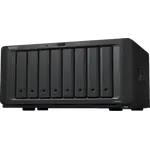
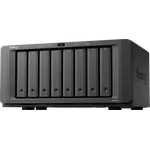
The Synology DS1823xs+ is an eight-bay desktop NAS with a Ryzen V1780B processor, ECC memory, two M.2 NVMe slots and a 10 GbE port, aimed at small offices, creative teams and home labs. Owners report fast performance, a very capable photo, backup and file-sharing platform, painless migration from older Synology boxes and solid support. The loudest complaint is about drives: with third-party drives the system shows health and compatibility warnings and some owners say it limits features such as SSD cache, which turns an otherwise excellent NAS into a source of annoyance. Others point to the modest stock memory and to features removed in recent DSM updates. It is a strong choice if you will use Synology-approved drives or can live with the warnings.
- Small offices and creative teams
- Large photo and media libraries
- 10 GbE networks
- Upgrading from an older Synology
Pros
- 10 GbE port built in, plus two gigabit ports
- Fast in daily use, according to owners
- Mature DSM software with photo AI, backup, surveillance and file sharing
- Quad-core AMD Ryzen V1780B with hardware encryption
- ECC memory expandable to 32 GB
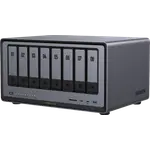
- Eight hot-swap bays, expandable to eighteen
- Two M.2 NVMe slots usable as a storage pool
- Simple migration of drives from older Synology units
Cons
- Unverified-drive warnings with third-party HDDs and SSDs, and reported limits on features such as SSD cache
- Stock 8 GB of memory is thin for virtual machines and larger arrays
- No hardware transcoding
- No Synology Hybrid RAID, ZFS, HDMI or USB-C
- Some owners found it noisy on a desk
- Recent DSM updates removed features such as thumbnail generation and H.265 support, according to owners
- 87.93 W under access
- Warranty term not published
Who is the Synology DS1823xs+ for?
It is for owners who have outgrown a four-bay box and want capacity, 10 Gigabit networking and the Synology software without moving to a rack. Buyers include people consolidating several older Synology units into one, a few coming from QNAP, and home users who bought it for backups, a family photo and video archive, surveillance and file sharing, and who expect it to last many years. It is a large desktop tower that most people place on a shelf or on the floor.
What do owners say about the DS1823xs+?
The praise is for speed and polish. Owners call it very fast, say the 10 GbE connection is a standout and describe the DSM software as comprehensive and easy to configure, with photo tools that sorted decades of pictures by people, places and events in a few days. Moving drives from an old Synology to the new one is described as automatic and quick, and one owner calls Synology support the best they have used. The same reviews raise one theme again and again: warnings. Owners using Seagate, WD and Samsung drives, including NAS-grade models, see unverified-drive messages, and some report critical warnings on SSDs and no usable SMART data in the health view. Earlier buyers say the drives and memory work well and the warning can be ignored or suppressed with a configuration edit, while a recent buyer reports the xs+ model is locked down, with third-party drives triggering constant warnings and disabling the SSD cache feature. Other complaints are the stock memory (owners advise upgrading to 16 or 32 GB), a modest CPU for virtual machines, the fan noise on a desk, the lack of a USB-C port and the removal of thumbnail generation, Video Station and H.265 support in DSM 7.2.2. One buyer received a defective unit with a corrupted partition.
What to know before you buy
Decide on drives before you decide on the NAS. Owners who use third-party drives should expect warnings and possibly missing features; owners who buy Synology-branded drives pay a premium for a quieter dashboard. The stock 8 GB of ECC memory is thin for virtual machines or a larger array, and the spec allows up to 32 GB. There is no hardware transcoding, so Plex works best when clients play files directly, and there is no Synology Hybrid RAID or ZFS, no HDMI output and no USB-C port. Power draw is 87.93 W under access and the noise rating is 23.6 dB, which one owner still found noisy on a desk. The warranty term is not published for this model.
Is the Synology DS1823xs+ worth it?
It is worth it for an owner who values the software, 10 GbE speed and eight bays enough to accept Synology's drive policy, and who plans to add memory. It is a poor fit for someone who wants to reuse cheap drives without warnings or who depends on the features removed from the latest DSM. If drive freedom matters more than the Synology ecosystem, look at other brands before committing.
Frequently asked questions
Does the Synology DS1823xs+ work with non-Synology drives?
It runs with them, but owners report unverified-drive or critical warnings in DSM and, for some, missing health data. Reviewers say the warning can be ignored or suppressed on some units, while one recent buyer reports that SSD cache is disabled with third-party drives.
Does the DS1823xs+ have 10 GbE?
Yes. It has one 10 GbE port built in alongside two gigabit ports, and one owner reports it saturating a 10G network with an SSD array.
Should I upgrade the memory?
Many owners do. It ships with 8 GB of ECC memory and accepts up to 32 GB, which owners recommend for virtual machines, large arrays and heavier use.
Does the DS1823xs+ support hardware transcoding for Plex?
No. The Ryzen V1780B has no hardware transcoding, so Plex Media Server runs but cannot convert video in hardware.
How hard is it to upgrade from an older Synology NAS?
Owners describe it as simple: move the drives to the new unit and DSM recognizes the old system and completes an automated migration, taking about ten minutes in one report.
Is the DS1823xs+ loud?
It is rated at 23.6 dB, and most owners place it on a shelf or on the floor. One owner found it a little noisy sitting on a desk.