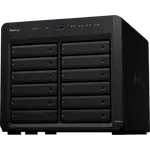
Synology DS1825+ Review: Eight Bays, Polished DSM and a Drive Policy That Finally Relaxed
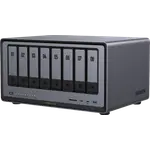
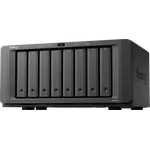
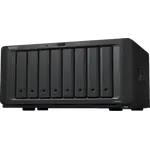
The Synology DS1825+ is an eight-bay desktop NAS for large libraries and backups: hot-swap bays expandable to eighteen, a quad-core AMD Ryzen V1500B with ECC memory up to 32 GB, two M.2 NVMe slots that can form a storage pool, and dual 2.5 GbE. Owners rate DSM as the strongest part of the package, clean and approachable, and describe smooth migrations from older Synology units. The main complaint was drive compatibility: at launch new installs only accepted drives on Synology's list, and owners say DSM 7.3 reversed that for hard drives, while one still finds the M.2 slots limited to Synology SSDs. It is a premium, polished choice rather than the cheapest hardware per bay, and it has no hardware transcoding.
- Large media and file libraries
- Families sharing files and backups
- Synology owners upgrading an older DiskStation
- Small business backup
- Docker and virtual machines
Pros
- DSM is polished and approachable, with Docker, virtual machines, Plex and surveillance apps
- Eight hot-swap bays, expandable to eighteen with an expansion unit
- Easy migration of drives from older Synology DiskStations
- Dual 2.5 GbE ports and Wake-on-LAN
- ECC DDR4 memory, upgradeable to 32 GB
- Two M.2 NVMe slots that can be used as a storage pool
- SHR, RAID 5 and RAID 6 on Btrfs with snapshots
- Three-year warranty
Cons
- Launched restricted to listed hard drives; DSM 7.3 relaxed it, but M.2 SSDs may still need to be Synology's
- No hardware transcoding
- No 10 GbE, HDMI or USB-C ports
- Pricey for its raw hardware specs
- Large and heavy at 6 kg, drawing around 60.1 W
Who is the Synology DS1825+ for?
It suits someone who has outgrown a four or five bay NAS, or who wants room for years of growth without starting over. Owners use it as a family cloud for phone photos and accounts, a film and series library, a shared file server between computers and a backup target, often reached from outside the home. Several came from an older DiskStation and chose this one to add bays rather than replace every drive with a bigger one. The eight hot-swap bays support RAID 5, RAID 6 and Synology Hybrid RAID on Btrfs with snapshots, and an expansion unit takes the total to eighteen bays.
What buyers love
DSM is the reason most owners give for buying it: a mature, polished system that even a less technical user can learn quickly, with Docker, virtual machines, Plex, surveillance, AI photo recognition, cloud sync, endpoint backup and remote access through QuickConnect, DDNS and a VPN server. Migration from older models is a recurring theme, with drives moved from a previous Synology unit and the volume picked up without issues. The two 2.5 GbE ports are described as a welcome step up from older Gigabit models, and owners with a long Synology history expect the same reliability they got from units that ran for a decade.
What to know before you buy
Drive compatibility is the topic that dominates the low ratings. When it launched, a new install would not accept hard drives missing from Synology's compatibility list, and some owners returned it over that. Owners say DSM 7.3 lifted the restriction for hard drives, and one runs WD Red Pro disks that are detected and work while DSM notes they are not on the list. Another owner says the M.2 slots still only work with Synology-branded SSDs, which makes SSD caching or an M.2 pool more expensive. One owner warns that moving a set of drives can fail to boot if the drives or M.2 SSDs go back in a different order, and recovered only after putting each SSD back in its original slot. On paper it has no hardware transcoding, no 10 GbE, no HDMI and no USB-C, it draws around 60.1 W and weighs 6 kg, and a few owners feel Synology hardware is pricey for its raw specs.
Is the Synology DS1825+ worth it?
As a complete NAS experience, owners say yes: the software, the upgrade path from older Synology units and the eight bays with room to reach eighteen add up to a machine built to last. With hard drives no longer restricted, the main objection from launch has largely gone, though M.2 SSD choice remains narrower. Buyers who compare only processor, memory and ports will find cheaper eight-bay hardware; buyers who value DSM, ECC memory and a long service life will find it a sensible upgrade.
Frequently asked questions
Can the Synology DS1825+ use non-Synology hard drives?
Owners say yes since DSM 7.3, which lifted the launch restriction on hard drives missing from Synology's compatibility list. Drives such as WD Red Pro are detected and work, with DSM noting they are not on the list. One owner reports the M.2 slots still only accept Synology SSDs.
How many drives does the DS1825+ hold?
Eight hot-swappable bays, expandable to eighteen with a Synology expansion unit, plus two M.2 NVMe slots that can serve as a storage pool.
Does the DS1825+ support hardware transcoding for Plex?
No. The AMD Ryzen V1500B has no hardware transcoding, so Plex Media Server runs, but heavy video conversion relies on the processor.
How much memory can the DS1825+ take?
It ships with 8 GB of DDR4 ECC memory and supports up to 32 GB.
What network ports does the Synology DS1825+ have?
Two 2.5 GbE ports, with Wake-on-LAN. There is no 10 GbE or SFP+ port as standard.
Can I move drives from an older Synology NAS to the DS1825+?
Owners describe migrating drives from older models such as a DS1621+ without issues. Keep the drives and any M.2 SSDs in their original order, since one owner could not boot until each SSD went back to its original slot.