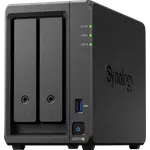
Synology DS223 Review: The Quiet Two-Bay NAS That First-Timers Set Up in Minutes
The DS223 is a two-bay NAS for households and small offices that want their own private cloud for backups, photos and file sharing without learning server administration. Owners consistently praise how quickly the drives go in and how easy the software is, even on their first NAS, and say it runs almost silently and reliably for months. The trade-offs are the modest hardware: 2 GB of memory that cannot be upgraded, a single Gigabit port and no hardware transcoding, so it is a storage and backup box rather than a media server for heavy video conversion.
- First-time NAS buyers
- Family photo and phone backup
- Living rooms and home offices
- Replacing paid cloud storage
Pros
- Tool-free drive trays and a quick, guided setup
- Easy, full-featured DSM software with phone apps
- Very quiet at a rated 14.6 dB
- Hot-swappable bays, Btrfs snapshots and Synology Hybrid RAID
- Photo library with face and object recognition
- Low 17.34 W power draw
Cons
- 2 GB of memory, not upgradeable
- Single 1 GbE port, no link aggregation
- No hardware transcoding for video
- No M.2 NVMe slots
- Only RAID 1 or SHR with two bays
- Interface can feel slow at times
Who is the Synology DS223 for?
It suits people moving from external drives or paid cloud storage to a NAS of their own. Many owners describe it as their first NAS and say the drive trays, the guided setup and the software made the jump painless. Typical uses are automatic backups of the family's phones and computers, a shared photo library, remote file access and mirrored storage for important documents. It also suits rooms where noise matters, since the enclosure is rated at 14.6 dB.
What owners love
Setup is the most common praise: owners slot in the drives without tools in a couple of minutes and have the system running shortly after, often helped by the many online tutorials. The DSM software earns credit for being powerful but simple, with clear user and permission management, scheduled backups, cloud sync and remote access from phones. Several owners highlight Synology Photos, which sorts pictures by faces, places and objects. Owners also describe it as quiet, stable and cool even after days of continuous use, with drives spinning down when idle, and one measured under 10 W at rest. Owners who mirror two drives in RAID 1 say it gives them peace of mind for documents and photos.
What to know before you buy
The hardware is entry level. Memory is 2 GB of DDR4 and cannot be expanded, networking is a single 1 GbE port with no link aggregation, and there are no M.2 slots. There is no hardware transcoding, and owners who stream video warn it is not a good fit for media servers that convert files on the fly; one is frustrated that many video formats no longer play smoothly. A few say the interface feels slow at times, that the first setup takes some networking knowledge, and that drives are wiped when they are first installed, so back up their contents first. With two bays you get mirroring or Synology Hybrid RAID, not RAID 5 or 6.
Is the Synology DS223 worth it?
For backup, file sharing and photo management, yes. Owners rate it highly and describe it as a set-and-forget box that replaced cloud subscriptions and old NAS units. Btrfs with snapshots, Synology Hybrid RAID, hot-swap bays, a VPN server and support for up to 20 cameras give it more depth than its size suggests. If you plan to transcode video, run demanding apps or need faster networking, a model with a more powerful processor and more ports will serve you better.
Frequently asked questions
Is the Synology DS223 easy to set up for a beginner?
Owners say yes. The drives slide into tool-free trays and the guided setup takes minutes, though a few note it helps to watch a tutorial first, and installing a drive erases it, so copy its data elsewhere beforehand.
Is the DS223 quiet enough for a living room or bedroom?
The enclosure is rated at 14.6 dB, and owners describe it as barely audible in normal use. The drives you install add their own noise, so quieter drives help if silence matters.
Can the DS223 transcode video for Plex?
Not in hardware. Plex Media Server installs and streams files your devices can already play, but there is no hardware transcoding, and owners who rely on video conversion recommend a more powerful model.
What RAID options does the DS223 support?
With two bays it supports mirroring (RAID 1) and Synology Hybrid RAID, on the Btrfs file system with snapshots. RAID 5 and RAID 6 need more drives.
Can I access my files from outside the house?
Yes. It offers QuickConnect remote access, DDNS and a VPN server, and owners use the phone apps to reach their files and photos away from home.