Winner
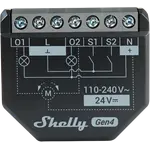

Full Smart Relays comparison in 2026
| Feature | Shelly 2PM Gen4 | Shelly i4 Gen3 | Winner |
|---|---|---|---|
| Price | $38.99 | $19.99 | Shelly i4 Gen3 |
| Safety | Overheating protection, Overvoltage protection, Overcurrent protection, Overpower protection | None | Shelly 2PM Gen4 |
| Connectivity | Bluetooth, Zigbee | Bluetooth | Shelly 2PM Gen4 |
| Integrations | Google Home, Alexa, Apple HomeKit, Samsung SmartThings, Home Assistant, Matter | Google Home, Alexa, Apple HomeKit, Home Assistant, Matter | Shelly 2PM Gen4 |
| Relay Channels | 2 | 0 | Shelly 2PM Gen4 |
| Energy Monitoring | YES | NO | Shelly 2PM Gen4 |
| Zibgee Router | YES | NO | Shelly 2PM Gen4 |
| Rating | 4.6 | 4.6 | Tie |
| Power Off Memory | NO | NO | Tie |
| Dry Contact Mode | NO | NO | Tie |
| Wet Contact Mode | NO | NO | Tie |
The Shelly 2PM Gen4 wins overall. It offers two 16A relay channels with metering, cover mode for shutters, a full protection set, Zigbee routing, Matter, HomeKit and SmartThings support and a 3-year warranty. The Shelly i4 Gen3 is cheaper but has no relay, no metering and no Zigbee.
Output versus input. The Shelly 2PM Gen4 switches two circuits and measures them, and can interlock the channels to drive a shutter motor safely. The Shelly i4 Gen3 has four inputs and no relay at all, so it only triggers scenes and automations elsewhere.
Yes. It supports Zigbee alongside Wi-Fi and Bluetooth and works as a Zigbee router to strengthen the mesh, which is useful in a Zigbee-heavy home. Switching between Wi-Fi and Zigbee mode can be fiddly, but it means the module fits either kind of setup. The Shelly i4 Gen3 has no Zigbee radio.
Overheating, overvoltage, overcurrent and overpower protection on both channels, which is a meaningful margin of safety on a 16A circuit. The Shelly i4 Gen3 lists no protections, but it also switches nothing, so the comparison only matters if you are driving an actual load.
Buy the Shelly 2PM Gen4 if you want to control two circuits or a roller shutter with obstacle detection, see the consumption of each channel, and choose between Wi-Fi and Zigbee with Matter, HomeKit, SmartThings and Home Assistant support. It needs a neutral wire and fits a standard back box.
Buy the Shelly i4 Gen3 if you want to keep your existing wall switches and use them to trigger smart scenes, or wire buttons and dry-contact sensors into Home Assistant or Alexa. It is small, cheap and quick to respond, but it cannot switch a load by itself.

Join the newsletter and get the best smart home deals and new releases in your inbox.