



Asus ROG Strix GS-BE12000 Review: Eight 2.5G Ports and Tri-Band Wi-Fi 7 in a Compact Tower
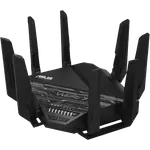
The Asus ROG Strix GS-BE12000 is a tri-band Wi-Fi 7 gaming router whose real headline is wired: one 2.5 Gbps WAN port and seven 2.5 Gbps LAN ports packed into a compact upright tower with eight internal antennas. Owners moving up from older Asus hardware describe a setup that takes minutes, coverage that holds across a whole house and no trouble carrying thirty or more devices, backed by a deep ASUSWRT interface, AiMesh, a separate IoT network and a complete VPN client and server suite. The trade-offs are that every wired link tops out at 2.5 Gbps, with no 10 Gbps port and no link aggregation, and that owners running several units in AiMesh have hit unstable 2.4 GHz radios. It is a premium buy aimed at a multi-gig, wired-heavy household that enjoys tuning its own network rather than at someone who wants to plug in a box and forget it.
- Gamers on multi-gig internet
- Wired-heavy home networks
- Device-dense smart homes
- Tinkerers who like deep settings
- Existing Asus AiMesh owners
Pros
- Eight 2.5 Gbps Ethernet ports (one WAN, seven LAN) for a genuine multi-gig wired backbone
- Tri-band Wi-Fi 7 with MLO rated up to 12 Gbps, backward compatible down to Wi-Fi 5
- AiMesh support, so other Asus routers can join as nodes instead of buying a matching kit
- Dedicated IoT network plus a guest network and WPA3, keeping smart home gear isolated
- Full VPN toolkit with client and server, OpenVPN, WireGuard, PPTP and L2TP/IPSec, plus DDNS
- USB 3 port turns a drive into Samba, FTP, Time Machine and media sharing storage
- Dual WAN with failover, including 4G and 5G USB tethering as a backup connection
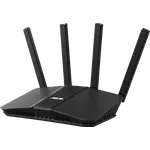
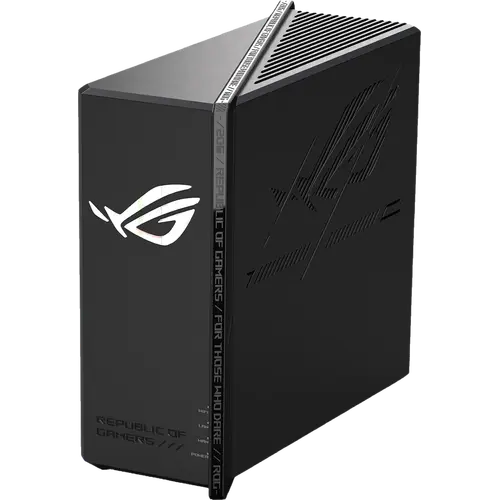
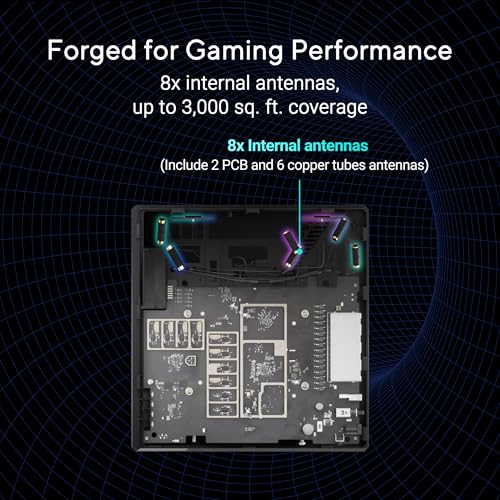
- Compact upright chassis with eight internal antennas instead of external ones
- Three-year warranty, longer than many routers in this class
Cons
- No 10 Gbps port, so every wired link is capped at 2.5 Gbps
- No LAN link aggregation to bond two ports into a single faster connection
- Not a Matter controller or a Thread border router, so it cannot run smart home accessories on its own
- No SNMP monitoring for anyone administering the network with standard tools
- Deep settings menu that takes real time to learn before the router performs at its best
- Owners running several units in AiMesh have reported unstable 2.4 GHz radios until the extra units were reconfigured as standalone access points
- Premium list price for a router whose fastest wired port is 2.5 Gbps
Who is the Asus ROG Strix GS-BE12000 for?
This is a flagship-adjacent gaming router for households that have outgrown an ISP box or an older Asus model and want their wired network to be as fast as their Wi-Fi. Eight 2.5 Gbps Ethernet ports (one WAN, seven LAN) mean a desk full of consoles, NAS boxes, switches and desktops can all be hardwired at multi-gig speeds without a separate switch, and the tri-band Wi-Fi 7 radios with Multi-Link Operation cover the wireless half. Owners describe replacing ISP-supplied and older Wi-Fi 6 hardware and immediately saturating their 2.5 Gbps links, and one runs it as the backbone of a smart home with local DNS, monitoring tools, cameras and dozens of connected gadgets. It suits someone comfortable in a detailed web interface and command line; a buyer who never wants to open the settings page will not get their money's worth.
What buyers love
The most repeated praise is how quickly it comes up: several owners had both networks configured in minutes, whether through the web interface or the ASUS Router mobile app, and one calls the resulting box a mini home server for the sheer number of options it exposes. The port bank is the other favourite, with owners noting the two LAN ports that prioritize gaming traffic automatically and how much cable clutter disappears when seven multi-gig ports are built in. Stability comes up again and again: thirty-plus devices online without random drops, smart home services and monitoring tools that stopped misbehaving after the upgrade, and coverage that reaches the far corners of a house and out into a back garden. Owners also like being able to carve the network into purpose-built SSIDs, including a dedicated IoT network for smart home gear, and the compact upright design that hides its eight antennas instead of bristling with external ones.
What to know before you buy
The ceiling is 2.5 Gbps on every port: there is no 10 Gbps WAN or LAN, and no link aggregation to bond two ports into one faster link, which one owner explicitly wishes for. Configuration depth cuts both ways, and one owner outside the enthusiast bracket notes plainly that it takes advanced knowledge before the router performs the way it should. The most substantial complaint comes from an owner who put three of these units into an AiMesh network over Ethernet backhaul and watched the 2.4 GHz radios drop repeatedly, suspecting AiMesh's shared-channel behaviour; the fix was to run the extra units as standalone access points with manually chosen channels, at which point the 2.4 GHz networks stabilized. Another owner in an AiMesh setup simply reported a weak signal and was not won over. It is also worth knowing what this router is not: it carries no Matter controller and no Thread border router, so it will not commission smart home accessories on its own, and it offers no SNMP for anyone monitoring their network with standard tools.
Is the Asus ROG Strix GS-BE12000 worth it?
For a household with multi-gig internet and a lot of things to plug in, this is one of the more sensible ways to spend money on networking: seven 2.5 Gbps LAN ports is a genuine switch replacement, and the Wi-Fi 7 radios, AiMesh, WPA3, the IoT and guest networks, the full VPN client and server toolkit and USB storage sharing all arrive without a subscription attached. The list price is premium, and a couple of owners waited for a discount rather than pay it, so the value call improves considerably when it is on sale. Buyers who need a 10 Gbps port, or who want the simplest possible plug-and-play mesh, should look elsewhere; buyers who want a fast, deeply configurable network in a box that fits on a shelf are the ones who come away happiest. The three-year warranty is a reassuring backstop either way.
Frequently asked questions
Does the Asus ROG Strix GS-BE12000 support Wi-Fi 7?
Yes. It is a tri-band Wi-Fi 7 router rated up to 12 Gbps in total, with Multi-Link Operation so compatible clients can use more than one band at once, and it stays backward compatible with Wi-Fi 6E, Wi-Fi 6 and Wi-Fi 5 devices.
How many Ethernet ports does it have, and how fast are they?
Eight in total: one 2.5 Gbps WAN port and seven 2.5 Gbps LAN ports. There is no 10 Gbps or SFP port, and no link aggregation, so 2.5 Gbps is the ceiling on any single wired connection.
Can I use my other Asus routers as mesh nodes with it?
Yes, through AiMesh. It can act as the primary AiMesh router or as a node in an existing AiMesh network, and it also runs as an access point, a repeater or a media bridge. AiMesh only pairs with other Asus AiMesh routers, not with third-party mesh systems.
Does it work as a smart home hub?
No. It has no built-in Matter controller and no Thread border router, so it will not commission or control those accessories directly. What it does offer is a dedicated IoT network SSID that keeps Wi-Fi smart home devices on their own segment, separate from laptops and phones.
Does it include VPN, and does it need a subscription?
It includes both a VPN client and a VPN server at no extra cost, covering OpenVPN, WireGuard, PPTP and L2TP/IPSec, along with DDNS so you can reach your home network from outside as your public IP changes. No subscription is required for those features.
Can I plug a hard drive into it?
Yes. There is one USB 3 port, and the router can share an attached drive over Samba and FTP, act as a media server for streaming to devices on the network, and serve as a Time Machine backup target for Macs.