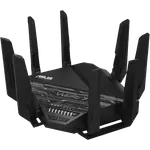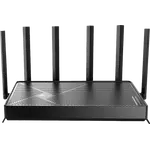


Asus ZenWiFi BD5 Review: An Affordable Wi-Fi 7 Mesh Node With a Few AiMesh Growing Pains
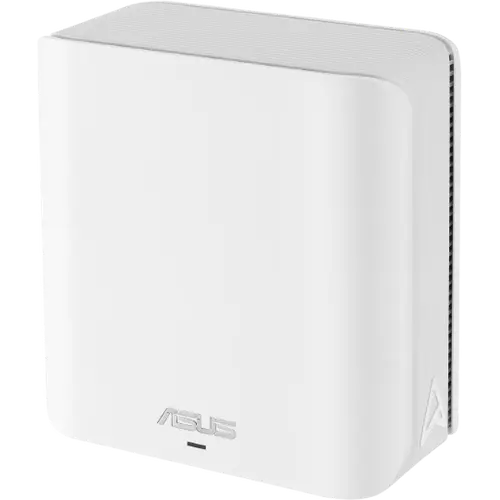
The Asus ZenWiFi BD5 is a budget-friendly entry into Wi-Fi 7, built to slot into an existing AiMesh network or start a small one, with a full VPN, firewall and parental-control suite included at no extra cost. Most owners say it noticeably outperforms an older Wi-Fi 6 router and pairs into ASUS's AiMesh system in minutes, especially with a wired backhaul. Its dual-band radio (no 6 GHz), just two Ethernet ports, and a handful of AiMesh pairing or stability complaints keep it a step below pricier tri-band mesh systems. For a single moderately sized home, or as an extra node bolted onto an existing ASUS mesh, it is a strong value pick backed by a solid warranty.
- AiMesh households expanding coverage
- Wi-Fi 7 upgraders on a budget
- No-subscription security seekers
- Small to mid-size homes
Pros
- Straightforward AiMesh setup, drops into an existing ASUS mesh as a node in minutes
- Wi-Fi 7 speed and stability that feels like a clear step up from Wi-Fi 6
- Dual 2.5 Gbps ports for multi-gig internet or a fast NAS
- Built-in VPN, firewall and parental controls with no subscription required
- Separate IoT SSID keeps smart-home devices on their own network
Cons
- Dual-band only, no 6 GHz radio for tri-band-level backhaul headroom
- Just two Ethernet ports (plus WAN), so a switch is needed for more wired devices
- A few buyers reported AiMesh pairing or mesh-stability hiccups
- No USB ports, so no local storage or media sharing, and no built-in Thread/Matter hub
Who is the Asus ZenWiFi BD5 for?
The BD5 fits two kinds of buyers well. The first already owns ASUS networking gear and wants an affordable AiMesh node to fill a dead zone or add a floor of coverage; several owners describe adding it to an existing ZenWiFi or ROG router with minimal fuss. The second is a household replacing an aging Wi-Fi 6 router and wanting a taste of Wi-Fi 7 speed and stability without paying tri-band prices. Because it ships as a single unit with a dual-band radio, buyers who need whole-home coverage from day one, or who want the extra backhaul headroom of a dedicated third radio, are better served by a multi-pack or a tri-band ZenWiFi model.
What buyers love
The most consistent praise is how easily the BD5 joins an AiMesh network: reviewers describe adding it as a node in minutes through the ASUS app, with the mesh optimizing itself automatically once connected. Several owners moving up from Wi-Fi 6 report noticeably better stability and lower latency, especially when using a wired Ethernet backhaul between nodes. The dual 2.5 Gbps ports stand out for anyone with multi-gig internet or a fast NAS, and buyers repeatedly call out that firewall protection, VPN client and server modes, and parental controls (Wi-Fi pause schedules, instant pause, content blocking) all come built in with no subscription required. A dedicated IoT network SSID also gets mentioned as a clean way to keep smart-home devices separated from primary devices.
What to know before you buy
The BD5 is dual-band only, with no 6 GHz radio, so it skips the extra clean spectrum and backhaul flexibility that tri-band mesh systems offer in more complex floor plans. Physical connectivity is limited too: one 2.5 Gbps WAN port and two 2.5 Gbps LAN ports, so a separate switch is needed for more than a couple of wired devices, and there are no USB ports for local storage or media sharing. It also does not include a built-in Thread border router or Matter controller, so it will not double as a smart-home hub. A few reviewers ran into real friction: one buyer could not get the BD5 to pair reliably as an AiMesh node with a different-generation ASUS router despite working with ASUS support, and another running a three-unit mesh reported having to periodically restart or reset a node. These aren't the majority experience, but they're worth knowing about if you're pairing across router generations.
Is the Asus ZenWiFi BD5 worth it?
For the price, the BD5 packs in Wi-Fi 7 speeds, a genuinely useful security and parental-control suite with no subscription, and the AiMesh compatibility that makes it easy to grow a network node by node. The trade-offs, dual-band only, a light port count, and occasional AiMesh pairing hiccups, are the kind of compromises expected at this price tier rather than dealbreakers for most buyers. Backed by a 3-year warranty, it is a sensible pick for a single home or as a budget way to extend an existing ASUS mesh, while larger or more demanding homes should look toward a tri-band ZenWiFi model instead.
Frequently asked questions
Does the Asus ZenWiFi BD5 require a subscription for security or parental controls?
No. Firewall protection, VPN client and server support, and parental controls such as Wi-Fi pause schedules, instant pause and content blocking are all built in without a recurring fee.
Can the ZenWiFi BD5 be added to an existing AiMesh network?
Yes, it supports Asus's AiMesh standard and most owners report it joins an existing AiMesh setup quickly, though a small number of buyers had trouble pairing it as a node with certain other Asus router models.
Does the ZenWiFi BD5 support Wi-Fi 6E or the 6 GHz band?
No. It is a dual-band Wi-Fi 7 router covering 2.4 GHz and 5 GHz only, with no 6 GHz radio, so it does not include Wi-Fi 6E's dedicated clean-spectrum band.
How many Ethernet ports does the ZenWiFi BD5 have?
It has one 2.5 Gbps WAN port and two 2.5 Gbps LAN ports, so a wired switch is needed to connect more than a couple of wired devices.
Does the ZenWiFi BD5 support VPN connections?
Yes, it includes both VPN client and server modes with OpenVPN, PPTP, L2TP/IPSec and WireGuard support, plus DDNS for remote access.