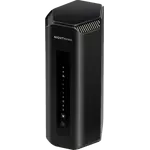


eero Pro 7 Review: Multi-Gig Wi-Fi 7 Mesh That Sets Itself Up
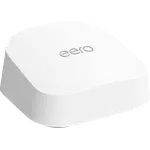
The eero Pro 7 is the mesh router to buy when you have a multi-gig line, a house full of devices and no interest in tuning a network. It pairs tri-band Wi-Fi 7 with MLO, a BE10800 rating and two auto-sensing 5 GbE ports, and it doubles as a Thread border router and Matter controller, so smart home gear joins without a separate hub. The trade-off is control: there is no web interface, no USB port and no VPN server, and several of the features people expect (content filtering, dynamic DNS, failover to a backup connection) sit behind a paid subscription. If you want plug-and-play speed it is excellent value at the premium tier; if you want to hand-tune DHCP ranges and run a network drive, look elsewhere.
- Multi-gig internet plans
- Large multi-device homes
- Set-and-forget buyers
- Thread and Matter smart homes
Pros
- Setup takes minutes from the phone app, with no networking knowledge needed
- Tri-band Wi-Fi 7 with MLO, rated BE10800, and up to 3.9 Gbps wireless
- Two auto-sensing 5 GbE ports for internet plans up to 5 Gbps
- Doubles as a Thread border router and a Matter controller, no extra hub
- Joins an existing eero mesh alongside every earlier generation
- WPA3 encryption, a built-in firewall and a three-year warranty
- Rated for more than 200 connected devices
Cons
- Content filtering, dynamic DNS, the IoT network and backup failover all need a paid subscription
- No web interface and no command line, so advanced tuning is limited to what the app exposes
- No USB data port, so no network drive, Samba shares or Time Machine backups
- One unit covers noticeably less than advertised through thick walls or between floors
- No VPN client or server, and no link aggregation
- Premium price for a single node, and coverage usually wants a second one
Who is the eero Pro 7 for?
This is a router for a home whose internet plan has outgrown its Wi-Fi. Tri-band Wi-Fi 7 with Multi-Link Operation lets a compatible device use several bands at once, the BE10800 rating puts it near the top of the consumer range, and eero rates a single unit for more than 200 connected devices. Two auto-sensing 5 GbE ports mean the wired side is not the bottleneck on a plan up to 5 Gbps, which is unusual at this size. It also runs the smart home side of the house: it acts as a Thread border router and as a Matter controller, so sensors, locks and bulbs commission straight into it. Owners of earlier eero hardware are a natural audience too, since a Pro 7 drops into an existing eero mesh rather than replacing it.
What buyers love
Setup is the single most repeated compliment. Buyers describe getting a unit or two running in about ten minutes from the phone app, with no networking knowledge required, and several who replaced older mesh kits from other brands say the eero process was noticeably simpler. The speed gains are the other theme: owners on multi-gigabit lines report pulling well over a gigabit wirelessly in rooms where their previous system struggled, and one who moved up from the previous 6E generation measured a few hundred megabits of improvement. Reliability lands next. People running roughly a hundred devices across three floors describe the network as rock solid where their old one needed weekly reboots, and mixing a Pro 7 into an existing eero mesh comes up again and again as something that simply works. Regular firmware updates and the discreet, quiet casing round out the praise.
What to know before you buy
The paywall is the most common complaint, and it is real: content filtering, site blocking, dynamic DNS, a dedicated IoT network and automatic failover to a backup hotspot are all subscription features rather than part of the box. Profiles, scheduled pauses and instant pause are free, but several owners bought expecting the rest and were annoyed to find a monthly cost behind it. The second limitation is control. There is no web interface and no command line, so every setting lives in the app, and buyers who wanted to pick a specific DHCP range, exclude addresses or open an advanced admin mode ran into a wall. There is also no USB data port, which rules out a network drive, Samba shares or Time Machine backups, and more than one owner asked for it by name. Finally, treat the coverage claim as a best case: through thick walls or across floors, owners consistently found one unit covers less than the quoted area and a second node is needed. A handful report occasional random disconnections.
Is the eero Pro 7 worth it?
At the premium tier, yes, provided you are buying it for what it is good at. The hardware is genuinely high end (tri-band Wi-Fi 7, MLO, 5 GbE on both ports, WPA3, a built-in firewall) and it comes with a three-year warranty, which is longer than most of its rivals offer. What you are paying for on top of that is the software doing the thinking: band steering, channel selection and mesh routing happen without you, and the reward is a network that stays out of the way. What you are giving up is the tinkering, plus the recurring cost if you want the filtering and failover extras. Buyers who want a faster network and never want to think about it call it well worth the money; buyers who wanted a configurable router at this price are the ones who send it back.
Frequently asked questions
Does the eero Pro 7 need a subscription?
No, the router works fully without one. Wi-Fi, the mesh, profiles, scheduled pauses, instant pause and the built-in firewall are all free. A paid subscription is only required for content filtering and site blocking, dynamic DNS, a separate IoT network and automatic failover to a backup hotspot.
Can the eero Pro 7 act as a smart home hub?
Yes. It is a Thread border router and a Matter controller, so Thread and Matter accessories can be commissioned into it directly instead of needing a separate bridge.
Does the eero Pro 7 work with older eero units?
Yes. It is compatible with every previous eero generation and can join an existing eero network as a gateway or as an extender, though eero notes that mixing older hardware in can hold the whole network back.
How fast is the eero Pro 7?
It carries a BE10800 tri-band rating, which works out to roughly 10.8 Gbps aggregated across its 2.4 GHz, 5 GHz and 6 GHz radios, and eero quotes up to 3.9 Gbps to a single wireless device. Its two auto-sensing 5 GbE ports support wired internet plans up to 5 Gbps.
Can you manage the eero Pro 7 from a browser?
No. There is no web interface and no command line access. Setup and every network setting are handled through the eero app on Android or iOS.
Can you plug a hard drive into the eero Pro 7?
No. The only USB connector is the USB-C power inlet, so there is no USB data port and no support for network file sharing, Samba or Time Machine backups.