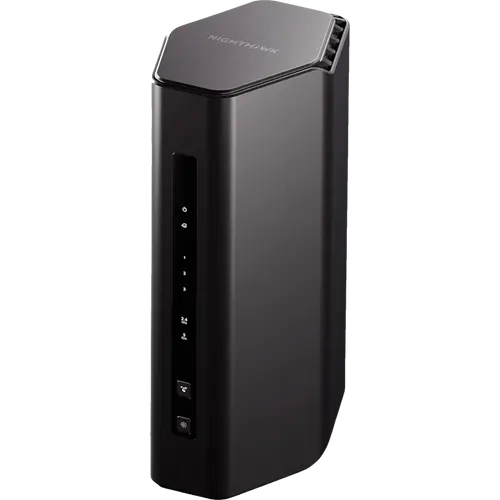



NETGEAR Nighthawk RS140 Review: A Budget Wi-Fi 7 Router With a 2.5G Internet Port
The NETGEAR Nighthawk RS140 is a compact dual-band Wi-Fi 7 router for apartments and mid-size homes that want one modern box to replace an ISP router or an older Wi-Fi 5 model. It pairs a 2.5 Gbps internet port with three Gigabit LAN ports, WPA3, a dedicated IoT network, guest Wi-Fi, parental controls and a VPN server, and NETGEAR rates it for up to 80 devices and 2,250 square feet of coverage. What it does not do is the premium end of Wi-Fi 7: there is no 6 GHz band, no MLO and no mesh expansion, so it suits budget buyers and multi-gig internet plans rather than large or heavily loaded networks.
- Apartments and mid-size homes
- Replacing an ISP router
- Multi-gig internet plans
- Budget Wi-Fi 7 buyers
- Smart homes with many devices
Pros
- Dual-band Wi-Fi 7 (BE5000) rated up to 5 Gbps combined
- 2.5 Gbps internet port for multi-gig plans
- Three Gigabit LAN ports
- Separate IoT and guest networks
- WPA3 encryption and a built-in firewall
- VPN server and Dynamic DNS for remote access
- Parental controls with schedules, instant pause and content blocking
- Access point mode, speed tests and configuration backup
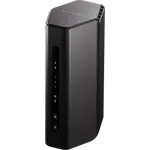
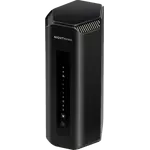
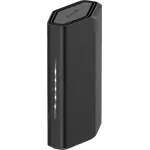
- Compact body with three internal antennas
Cons
- No 6 GHz band
- No MLO (multi-link operation)
- No mesh support for adding satellites
- No multi-gig LAN ports
- No USB port, so no network storage or media sharing
- Not a Thread border router or a Matter controller
- No multi-WAN, failover or cellular backup
Who is the NETGEAR Nighthawk RS140 for?
It fits a household that wants a single, current router and does not plan to grow into a mesh system. At 249 x 150 x 101.6 mm and about 697 g, with three internal antennas and nothing sticking out, it sits on a shelf without drawing attention, and its rating of up to 80 connected devices covers a typical mix of phones, laptops, TVs, consoles and smart home gear. The 2.5 Gbps internet port matters most for anyone on a cable or fiber plan faster than 1 Gbps, because the router will not be the bottleneck at the front door, and the three Gigabit LAN ports handle wired devices such as a desktop, a console or a NAS.
What the Nighthawk RS140 offers
The wireless side is dual-band Wi-Fi 7 (BE5000), one 2.4 GHz radio rated up to 0.7 Gbps and one 5 GHz radio rated up to 4.3 Gbps for a combined maximum of 5 Gbps, and it stays compatible with Wi-Fi 6 and Wi-Fi 5 devices. A quad-core 2.0 GHz processor with MU-MIMO and OFDMA shares the airtime between devices, and NETGEAR quotes coverage of up to 2,250 square feet. Security starts with WPA3 encryption and a built-in firewall, and the router can run a separate IoT network that keeps cameras, plugs and other smart home devices apart from the laptops and phones that hold personal data, next to a guest network for visitors. Parental controls cover scheduled Wi-Fi pauses, instant pauses and content blocking. For remote access it has a VPN server and Dynamic DNS. Management runs through the web interface or the Nighthawk app for iOS and Android, with built-in speed tests, and access point mode lets it work behind another router.
What to know before you buy
The trade-offs come from its position as a Wi-Fi 7 entry model. There is no 6 GHz band, so it has none of the wide, uncongested channels that tri-band Wi-Fi 7 routers use, and it does not support MLO, the Wi-Fi 7 feature that lets a device use more than one band at once. It supports no mesh standard, so coverage cannot be extended with matching satellites, and the fast port is reserved for the internet connection: all three LAN ports are Gigabit. There is no USB port, so no network storage or media sharing, and it is not a Thread border router or a Matter controller. There is no multi-WAN, failover or cellular backup, and the enhanced NETGEAR Armor security is a paid subscription after a trial period.
Is the NETGEAR Nighthawk RS140 worth it?
As an affordable step onto Wi-Fi 7 it makes sense: a 2.5 Gbps WAN port, WPA3, an IoT network, parental controls and a VPN server cover what most apartments and mid-size homes need from one router. Buyers with a large or multi-storey home, many simultaneous heavy users, or Wi-Fi 7 laptops and phones that could use 6 GHz and MLO will get more from a tri-band model or a mesh system, and anyone who wants multi-gig wired speeds between devices needs a router with 2.5 Gbps LAN ports.
Frequently asked questions
Does the NETGEAR Nighthawk RS140 have a 6 GHz band?
No. It is a dual-band Wi-Fi 7 router with one 2.4 GHz and one 5 GHz radio. It also does not support MLO, the Wi-Fi 7 feature that combines bands for a single device.
How fast is the Nighthawk RS140?
It is rated at up to 5 Gbps of combined wireless speed (BE5000) across its two bands, up to 0.7 Gbps on 2.4 GHz and up to 4.3 Gbps on 5 GHz. Its internet port runs at 2.5 Gbps, so it can pass through internet plans faster than 1 Gbps.
Can I add mesh satellites to the RS140?
No. It supports no mesh standard, so it works as a single router. It can, however, run in access point mode behind another router.
What ports does the Nighthawk RS140 have?
One 2.5 Gbps WAN port for the internet connection and three Gigabit Ethernet LAN ports. There is no USB port.
Does it have a separate network for smart home devices?
Yes. It can run a dedicated IoT network alongside the main and guest networks, which keeps smart home devices apart from computers and phones. It is not a Thread border router or a Matter controller.
How many devices can the RS140 handle?
NETGEAR rates it for up to 80 connected devices, with coverage of up to 2,250 square feet.