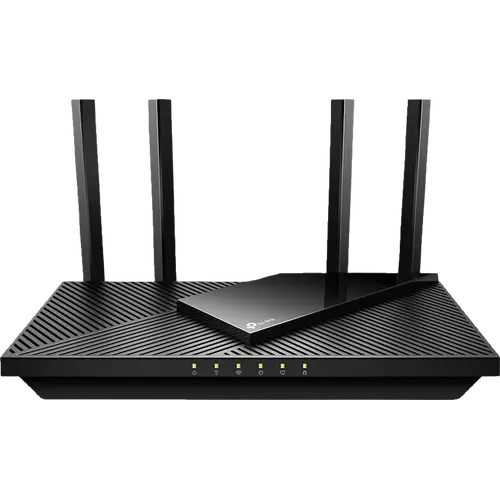


TP-Link Archer AX21 Review: The Budget Wi-Fi 6 Router That Fixes a Weak ISP Gateway
The Archer AX21 is the router people buy to replace a weak ISP gateway, and owners say it does exactly that: setup through the Tether app takes minutes, coverage reaches rooms and floors the old router missed, and it keeps twenty or more devices balanced across its two bands. On paper it adds WPA3, guest and IoT networks, parental controls, QoS, EasyMesh and a VPN client and server, which is a lot for its price tier. The trade-offs are generational: no 6 GHz band, Gigabit ports only and no USB port. For an apartment or a typical house on a sub-gigabit plan it is one of the easiest value upgrades to Wi-Fi 6.
- Budget Wi-Fi 6 upgrades
- Replacing an ISP gateway
- Home offices on a budget
- Apartments and small homes
Pros
- Quick setup from the Tether app or web interface
- Much better coverage than a typical ISP gateway
- Handles many devices across 2.4 and 5 GHz
- WPA3, guest network and a separate IoT network
- VPN client and server, including WireGuard
- EasyMesh and OneMesh support, plus access point mode
- Two-year warranty
Cons
- No 6 GHz band, Wi-Fi 6E, Wi-Fi 7 or MLO
- Gigabit ports only, with no link aggregation
- No USB port for network storage
- Tether app is more limited than some rivals
- Not a Matter controller or Thread border router
Who is the TP-Link Archer AX21 for?
It suits households whose internet plan is fine but whose Wi-Fi is not. Several owners bought it because the provider's router or its repeaters could not reach every room or cope with the number of devices at home, and describe finally getting signal across the whole house without paying for a faster plan. It also fits a home office on a budget, since QoS and device priority keep video calls smooth when everyone else is online. It is not aimed at multi-gig fiber plans, Wi-Fi 7 homes or anyone who wants to share a USB drive.
What buyers love
Ease of setup comes up again and again: owners configure it from the TP-Link Tether app or the web interface in minutes, with no help needed. Coverage is the other big theme, with buyers reporting internet in every room, strong speeds through a floor and far better range than the router it replaced. People running around twenty devices, from TVs and printers to consoles, say it balances them well across 2.4 and 5 GHz, and one owner started gaming over Wi-Fi instead of cable. The feature set also impresses at this price, with QoS, VPN and mesh support singled out, and buyers repeatedly call it the best Wi-Fi 6 router they found on a limited budget.
What to know before you buy
The complaints are minor and mostly about software. One owner finds the Tether app limited compared with rival brands' apps, and another reports trouble with its Alexa skill. The bundled Ethernet cable is basic, so a better one is worth buying. The rest are spec limits: it is dual-band only, with no 6 GHz band, Wi-Fi 6E, Wi-Fi 7 or MLO; all five ports are Gigabit, so a faster-than-gigabit plan will be capped; there is no link aggregation; and there is no USB port, so no FTP, Samba, media sharing or Time Machine backups. It is not a Matter controller or a Thread border router, it has no built-in speed test and the VPN server does not do L2TP/IPSec.
What the TP-Link Archer AX21 offers
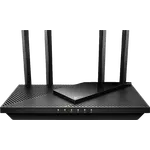
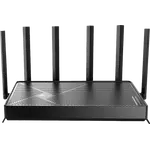
It is an AX1800 dual-band router with 574 Mbps on 2.4 GHz and 1201 Mbps on 5 GHz, four external antennas, one Gigabit WAN port and four Gigabit LAN ports. Security covers WPA3 and a firewall, with a guest network and a separate IoT network that keeps smart lights and cameras apart from phones and laptops. Parental controls combine content blocking, schedules and an instant internet pause per profile. The VPN section works both ways, with OpenVPN and PPTP servers and a VPN client that includes WireGuard, plus DDNS. It joins EasyMesh and TP-Link OneMesh networks, can run in access point mode behind another router, and backs up its configuration to a file. The warranty is two years.
Is the TP-Link Archer AX21 worth it?
Yes, for its intended home. Its average rating is high, and owners consistently describe it as easy, stable and far better than the gateway it replaced, which is exactly the job it is priced for. If your plan is faster than gigabit, you have 6 GHz clients to feed or you want network storage, step up to a tri-band or multi-gig model; otherwise it is hard to get more Wi-Fi 6 for less.
Frequently asked questions
Is the TP-Link Archer AX21 Wi-Fi 6E or Wi-Fi 7?
Neither. It is a dual-band Wi-Fi 6 router rated AX1800, with 574 Mbps on 2.4 GHz and 1201 Mbps on 5 GHz and no 6 GHz band.
What ports does the Archer AX21 have?
One Gigabit WAN port and four Gigabit LAN ports. There is no multi-gig port, no link aggregation and no USB port.
Does the Archer AX21 support VPN?
Yes. It runs OpenVPN and PPTP VPN servers and has a VPN client that includes WireGuard. L2TP/IPSec is not supported.
Can the Archer AX21 be used as a mesh node or access point?
Yes. It supports EasyMesh and TP-Link OneMesh for adding extenders or a second unit, and it has an access point mode for running behind an existing router.
Does the Archer AX21 have a separate network for smart home devices?
Yes. Alongside a guest network it offers a dedicated IoT network, which keeps smart lights, plugs and cameras on their own wireless network. It is not a Matter controller or a Thread border router.
How is the Archer AX21 managed?
Through a web interface or the TP-Link Tether app for Android and iOS. There is no command line or SNMP access.