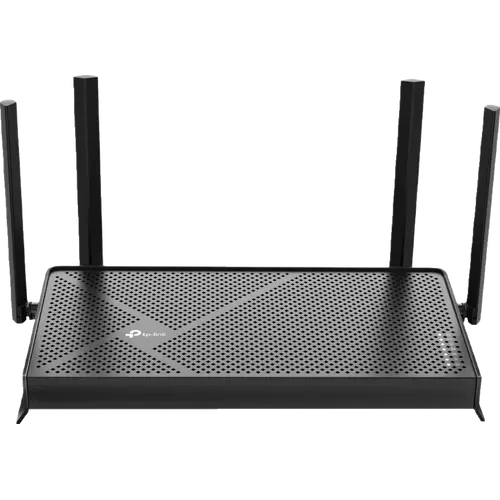


TP-Link Archer BE230 Review: The Cheapest Route to Wi-Fi 7 and a 2.5 Gbps Port
The Archer BE230 exists to answer one question: what is the least you can spend and still replace an ISP gateway with a proper router? It is dual-band, so there is no 6 GHz radio and no Wi-Fi 6E, but it pairs a 2.5 Gbps WAN port with a 2.5 Gbps LAN port, which is what actually stops a gigabit plan being throttled at the front door. Owners upgrading from an ISP box or an older Archer describe the jump in blunt terms, going from double-digit megabits to nearly saturating their plan, and setup through the Tether app is repeatedly described as taking minutes. The catch is the ceiling: this is an entry-level radio, so a busy smart home with dozens of always-on devices, or a household chasing headline Wi-Fi 7 numbers, will feel the limits.
- Replacing an ISP router
- Gigabit plans on a budget
- Apartments and medium homes
- EasyMesh expansion
- Home VPN and USB sharing
Pros
- One 2.5 Gbps WAN port and one 2.5 Gbps LAN port, so a multi-gig plan is not capped at the router
- Dual-band Wi-Fi 7 with Multi-Link Operation, rated 2882 Mbps on 5 GHz and 688 Mbps on 2.4 GHz
- Owners replacing an ISP gateway routinely report getting close to their full plan speed
- Setup through the Tether app takes minutes, with a surprisingly deep web interface behind it
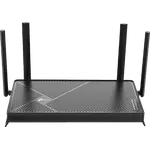
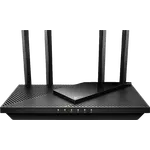
- Four external antennas with Beamforming, and strong coverage reports in multi-floor and brick homes
- EasyMesh compatible, so older TP-Link routers and extenders can join it later
- Full VPN suite as server and client: OpenVPN, WireGuard, PPTP and L2TP, plus DDNS
- Separate guest network and a dedicated IoT network, with WPA3 encryption
- USB 3.0 port with Samba, FTP and media sharing
- HomeShield parental controls with content blocking, schedules and instant pause
- Access point mode for running behind an existing ISP router
- Configuration backup and restore, and a 2-year warranty
Cons
- Dual-band only, with no 6 GHz band and no Wi-Fi 6E, which several owners feel undercuts the Wi-Fi 7 label
- A minority report firmware trouble, including radios stopping after an update and 2.4 GHz dropping out
- Struggles in a device-dense smart home, with one owner reporting problems at around thirty devices
- In an EasyMesh setup the guest network does not reach the satellite units
- No link aggregation on the LAN ports, and three of the four are plain gigabit
- No 10 Gbps or SFP ports
- No Matter controller or Thread border router role for smart home devices
- No built-in speed test and no alert when a new device joins
- No third-party firmware support, so DD-WRT is not an option
- Advanced HomeShield security features need a paid subscription
Who is the TP-Link Archer BE230 for?
This is the entry rung of TP-Link's Wi-Fi 7 range, rated BE3600 across two bands: 2882 Mbps on 5 GHz and 688 Mbps on 2.4 GHz, with Multi-Link Operation so a Wi-Fi 7 client can use both at the same time. It still serves Wi-Fi 5 and Wi-Fi 6 devices normally, which matters because most of what is on a home network today is not Wi-Fi 7 yet. What separates it from cheaper routers is the wired side: one 2.5 Gbps WAN port and one 2.5 Gbps LAN port alongside three gigabit LAN ports, plus a USB 3.0 port for a drive. Four external antennas with Beamforming handle the coverage. It suits an apartment or a medium house on a fast connection where the provider's own box has become the bottleneck, and it suits anyone who wants a second unit to extend an existing TP-Link network. Households that want 6 GHz spectrum, several multi-gig LAN ports or 10 Gbps wired networking are shopping a tier or two up.
What buyers love
The dominant theme is the size of the upgrade relative to what it costs. Owners replacing an ISP gateway or a Wi-Fi 5 era Archer report going from tens or low hundreds of megabits to figures close to the ceiling of their plan, with one describing the moment they realised the connection had been capable of gigabit speeds all along. Setup is the second theme and it is nearly unanimous across regions: the Tether app walkthrough has people online in about five minutes, and more than one owner joked that mounting the unit to the wall took longer than configuring it. Coverage surprises people in both directions, but the positive reports are the louder ones, covering three-storey houses, a 140 square metre home and a Victorian property with solid brick walls where the provider's own mesh kit had failed. The 2.5 Gbps ports get singled out by owners wiring a NAS or a cable modem, and EasyMesh earns its own following: it pairs happily with older TP-Link routers and extenders, and at least one owner reports it linking with a different manufacturer's extender. Power users go further than the price suggests they should, praising a web interface with far more settings than expected, and several build a personal VPN tunnel with the built-in WireGuard server plus DDNS to reach a USB drive from outside the house. Parental controls and per-device access lists come up regularly as the reason the router stayed.
What to know before you buy
The most repeated criticism is not a fault, it is a labelling grievance: this is a dual-band router, so there is no 6 GHz band, and several technically minded owners argue it therefore behaves much like a good Wi-Fi 6 router rather than delivering what the Wi-Fi 7 badge implies. If you already run a capable Wi-Fi 6 router, that is a fair warning. The second theme is firmware. A minority report real trouble, including radios shutting down half an hour after an update with no way to roll back, and 2.4 GHz disappearing entirely on a unit and again on its replacement. Another owner found it unstable as a standalone router with daily drop-outs, and stable only once it was demoted to an access point behind a separate gateway. Support gets poor marks from the people who needed it. Device count is the other real limit: an owner running around thirty devices, mostly smart switches and bulbs, describes web pages hanging and cameras loading slowly, so a dense smart home is not this router's comfort zone. Two smaller gotchas are worth knowing up front. In an EasyMesh setup the guest network does not extend to the satellites, and there is no third-party firmware path, so DD-WRT and friends are out. On paper the spec sheet is also missing a few conveniences its own family sometimes has: no link aggregation, no built-in speed test, and no alert when a new device joins the network.
Is the TP-Link Archer BE230 worth it?
For a normal home on a gigabit or slower connection, this is one of the easiest value calls in the category. The two things that change day-to-day performance are both here, a 2.5 Gbps WAN port so the plan is not capped at the router and a fast 5 GHz band with MLO, and around them sits software that routers costing considerably more often gate behind a subscription or omit: guest and IoT networks, WPA3, QoS, an SPI firewall, HomeShield parental controls with content filtering and scheduling, a VPN server and client covering OpenVPN, WireGuard, PPTP and L2TP, DDNS, USB 3.0 sharing with Samba, FTP and media streaming, access point mode, configuration backup and restore, and a 2-year warranty. What it does not stretch to is spectrum and headroom: no 6 GHz, three of the four LAN ports are plain gigabit, and there is no Matter controller or Thread border router role for smart home gear. Buy it as an honest, well-equipped core for a medium home, treat EasyMesh as the answer if the building fights you, and step up a tier if the household is dense with devices or you want the full Wi-Fi 7 story.
Frequently asked questions
Is the TP-Link Archer BE230 a real Wi-Fi 7 router?
Yes, it runs 802.11be with Multi-Link Operation and 4K-QAM, but only across two bands. It is rated BE3600 in total, 2882 Mbps on 5 GHz and 688 Mbps on 2.4 GHz, and it has no 6 GHz radio, so it does not support Wi-Fi 6E. That missing band is the reason some owners argue it performs more like a strong Wi-Fi 6 router than a flagship Wi-Fi 7 one.
How fast are the Ethernet ports on the Archer BE230?
There are five: one 2.5 Gbps WAN port, one 2.5 Gbps LAN port and three 1 Gbps LAN ports. There is no link aggregation and no 10 Gbps or SFP option, so 2.5 Gbps is the wired ceiling, on the internet port and on one LAN port.
Will one Archer BE230 cover a whole house?
Its four external antennas with Beamforming cover apartments and medium homes well, and owners report success in three-storey and solid-brick properties. Larger or more awkward buildings are better served by adding a second unit: the router is EasyMesh compatible, so an existing TP-Link router or range extender can be paired with it under one network name.
Does the Archer BE230 support a VPN?
Yes, in both directions. It works as a VPN server and as a VPN client, and supports OpenVPN, WireGuard, PPTP and L2TP/IPSec. It also includes DDNS, which is what lets you reach the server from outside your home, and several owners use exactly that combination to get at a drive plugged into the USB 3.0 port while travelling.
Can it be used as an access point or in a mesh?
Both. It has a dedicated access point mode for running behind an ISP gateway that cannot be put into bridge mode, and it is EasyMesh compatible for whole-home coverage under a single network name. One limitation to plan for: in a mesh, the guest network runs on the main unit only and does not extend to the satellites.
Does it work as a Matter hub or a Thread border router?
No. The Archer BE230 has no Matter controller role and no Thread border router, so devices on those protocols still need their own hub. What it does offer is a dedicated IoT network, which keeps smart home gear on its own SSID away from your phones and computers.